Is This Link Safe?
To check whether a link is safe, read the registered domain immediately to the left of the first single slash. If it is not the company's real domain, the link is not theirs, no matter what the rest of the address says. Paste the URL into 1Lookup's free link checker and it examines the domain, TLD, subdomains and path for phishing patterns without opening the page.
Example resultThis is a real lookup we captured on 2026-08-23 for https://en.wikipedia.org/wiki/URL. Run any lookup above and it is replaced with yours.
This is a legitimate Wikipedia link
This URL points to the official Wikipedia article on URLs. The registered domain is wikipedia.org, a well-known trusted site with no lookalike indicators.
What we found
- Registered domain is wikipedia.org, the authentic Wikipedia domain
- Uses standard .org TLD, appropriate for a non-profit encyclopedia
- Contains no credential-harvesting paths, suspicious subdomains, or URL shorteners
- Links to a public reference article, not a login or payment page
- No punycode, IP addresses, or randomized parameter strings detected
Confidence: 95%
This is an automated assessment of the content you pasted, not a guarantee. When money or credentials are involved, contact the organisation directly using a number or address you already trust.
This tool provides an automated assessment of the web address you submit. It analyses the address only: it does not open the link, follow redirects, scan for malware, or query external blocklists such as Google Safe Browsing. It cannot detect a malicious page hosted on an otherwise legitimate domain, and it is not a substitute for antivirus or endpoint protection. A low-risk result means the address shows no clear phishing indicators, not that the destination is verified as safe. When credentials or payments are involved, navigate to the organisation's site yourself rather than following any link.
Need this at scale? IP Lookup API
Resolve and score the infrastructure behind any host: geolocation, VPN/proxy and fraud signals.
Check a Link Before You Click It
A link is the delivery mechanism for most phishing, and the address is usually the only warning you get. The problem is that URLs are built to be misread. Brand names get placed in subdomains, in folder names, and in parameters, all of which look reassuring and none of which mean the link belongs to that brand.
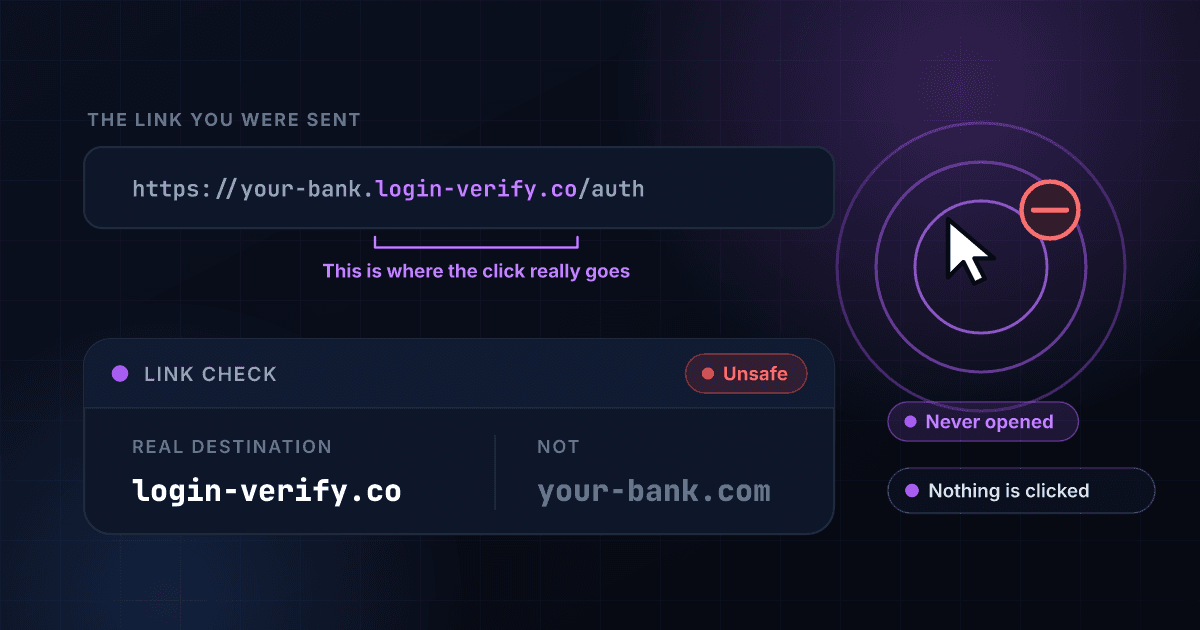
There is one rule that resolves nearly all of it. Read backwards from the first single slash: the two parts immediately before it are the real domain. In paypal.com.secure-login.xyz/verify, the real domain is secure-login.xyz and it has nothing to do with PayPal. This checker applies that reading for you, along with checks for cheap or unusual top-level domains, raw IP addresses, punycode characters that imitate Latin letters, URL shorteners that hide the destination, open-redirect parameters, and login or payment paths sitting on an unrelated domain.
We never open the link. The analysis is of the address only, which makes it instant and completely safe to run, and also means it cannot tell you what is on the page. A clean-looking address on a compromised legitimate site will still come back low risk, which is why the result always tells you what it could and could not establish.
When the link resolves to a working site
Reading the domain tells you who the address belongs to, not whether the page behind it is a real shop, a copy of one, or a form built to collect card details. For the site itself, including its contact details and policies, use the website legitimacy checker.
How to read a link before you click it
The trick in almost every fake link is the same: the brand name is there, but it is not in the part that decides where you land. Here is where to look.
https://your-bank.com. (red flag 1)secure-login-verify.icu (red flag 2)/auth?ref=email (red flag 3)
Red flag 1: The brand name, in a part that means nothing
Anything before the final two labels is chosen freely by whoever owns the site. Putting your-bank.com there costs nothing.
Red flag 2: The bit that actually decides where you go
Read backwards from the first single slash: the last two labels are the real site. Here that is secure-login-verify.icu, and nothing else.
Red flag 3: A tag that tells them the bait worked
Not dangerous on its own, but it means the link was built for a campaign and tracks which message you came from.
The example above is invented for illustration. It names no real company, and the address in it is not a live site.
How the Link Checker Works
Copy the link without clicking
Long-press on mobile and choose Copy Link, or right-click on desktop and choose Copy Link Address. On a link with visible text, copy the address rather than the words shown.
We read the address apart
The checker separates the registered domain from subdomains and path, then weighs brand lookalikes, the TLD, IP hosts, punycode, shorteners, redirect parameters and credential-harvesting paths.
Get the verdict before you click
You get a risk level, a confidence score and the specific findings, plus a clear statement of what the address alone cannot tell you about the page behind it.
Finds the real domain for you
The single most useful skill in spotting phishing, applied automatically. Brand names in subdomains, folders and parameters are identified as decoration rather than ownership.
Flags shorteners and redirects
A shortened link hides its destination by design, and an open-redirect parameter lets an attacker borrow a trusted domain to send you somewhere else. Both are called out.
Catches punycode and character tricks
Addresses using non-Latin characters that render as ordinary letters are a long-standing way to register a domain that looks exactly like a famous one.
Never opens the link
No request is made to the destination by you or by us. Nothing is downloaded, no tracking pixel fires, and no one-time phishing link gets burned before you have decided.

Who uses this tool
A link in a text or email
The most common way phishing arrives. Copy the address instead of tapping it and you turn a one-second mistake into a decision you actually get to make.
A shortened link
Shortened links in messages from people you do not know are worth treating as unknown by default, because the destination is deliberately hidden until you arrive.
A QR code you scanned
Scanning usually shows the address before opening it. Paste that address here. Quishing, where stickers are placed over real codes on parking meters and menus, is now common.
A link a family member forwarded
Forwarded links spread scams through groups fast. Checking one takes a few seconds and gives you something concrete to send back to the group.
Frequently asked questions
Can it check bit.ly and other shortened links?
Yes, paste the short link exactly as you received it. Shorteners are the standard disguise for malicious destinations, which is why an unexpected bit.ly, tinyurl or t.co link deserves checking before clicking. The analysis reasons about where the link leads and how it is being presented; when the verdict is uncertain, treat the link as unsafe until whoever sent it confirms it through another channel.
How do I copy a link without clicking it?
On iPhone or Android, press and hold the link and choose Copy Link. On a computer, right-click and choose Copy Link Address. In an email client, hovering over a link shows the true destination in the status bar.
Does a padlock or HTTPS mean the link is safe?
No. HTTPS only means the connection is encrypted. Phishing sites get certificates free and in minutes, so almost all of them show a padlock. It says nothing about who is on the other end.
Can you tell me what is on the page?
No. We deliberately do not load it. The check reads the address, which is enough to catch most phishing but cannot detect a legitimate site that has been compromised, or a page that changes based on who visits.
What happens if I already clicked?
Just opening a page rarely does damage on an updated device. What matters is what came next. Entered a password, change it and turn on two-factor authentication. Entered card details, call your bank. Downloaded or installed anything, remove it and run a scan.
Are all shortened links dangerous?
No, they are used legitimately all the time. They are simply opaque, so they deserve more caution from an unknown sender. Many shorteners let you preview a destination by adding a character to the URL.
How many links can I check for free?
Five a day on this tool, fifteen a day across all our free tools, from one IP with a short pause between checks. A free account raises that to 1,000 lookups over a seven-day trial.
Related Link Safety Searches
More free tools
Scam Checker
Paste any message and get an instant read on whether it's a scam.
Scam Text Checker
Check a suspicious SMS for the signs of a smishing scam.
Phishing Email Checker
Paste a suspicious email and see whether it's phishing.
Website Legit Checker
Check whether a site is a real business or a scam storefront.