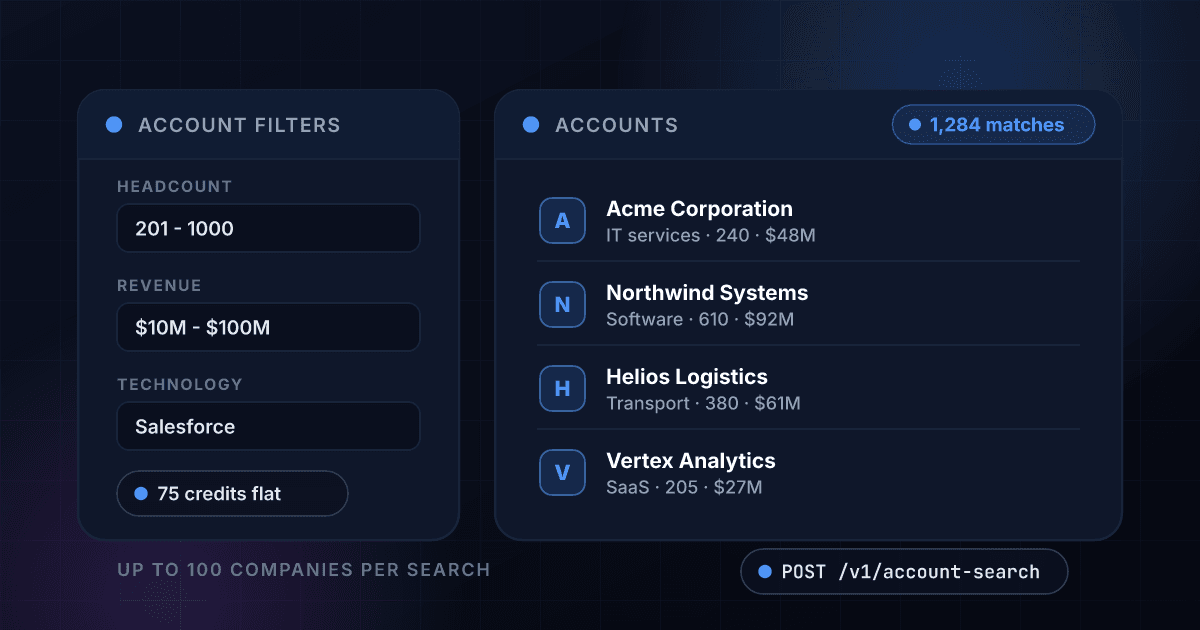
What Target Account Search gives you
Under 1 credit per company
The price is flat per search, and every search returns up to 100 companies. Ask for the full page every time and the unit cost collapses.
- 75 credits flat
- Up to 100 companies
- ~$0.0026 per company
- No per-result billing
Filters that mirror your ICP
Headcount bands, revenue floor and ceiling, HQ location, technology in use and keywords — combined into one query.
- Headcount ranges
- Revenue min/max
- HQ location
- Technology filters
Clean identifiers on every row
Each match returns the company name, domain and location: enough to dedupe, route and prioritise the list. Full firmographics are one Company Firmographics call (75 credits) away for the accounts that make the cut.
- Company name
- Domain
- Location
- Ready to enrich
Straight to CSV
Export the page in one click with every column intact, ready for your CRM or a rep's territory sheet.
- One-click CSV
- All columns included
- CRM ready
- No reformatting
Enrich anything that qualifies
Rows carry a domain, so any account worth a closer look drops straight into Company Firmographics for the full 50+ field profile.
- Domain on every row
- Feeds Firmographics
- Feeds Prospect Search
- One workflow
No platform subscription
Build account lists without an annual contract or per-seat licence. Credits are shared with every other product and roll over for up to 3 months.
- No seats
- No annual plan
- Credits roll over
- One API key
One endpoint. A set of filters in, structured data out.
Same authentication, same credit balance, and the same response envelope as every other 1Lookup product. If you have already integrated one endpoint, this one is a URL change.
curl -X POST https://app.1lookup.io/api/v1/account-search \
  -H "Authorization: Bearer $API_KEY" \
  -H "Content-Type: application/json" \
  -d '{
        "keywords": "logistics software",
        "locations": ["United States"],
        "employee_ranges": ["201,500"]
}'{
"classification": {
"found": true,
"result_count": 100,
"total_entries": 1284
},
"insights": {
"account_search_result": {
"rows": [{
"company_name": "Acme Corporation",
"domain": "acme.com",
"city": "Chicago",
"country": "United States"
}],
"enrich_product": "company_firmographics"
}
}
}Every field you get back
No hidden tiers. Every field below is returned on a successful lookup at the price shown above.
Identity
- company_name
- domain
- website
Location
- city
- state
- country
Search meta
- result_count
- total_entries
Next step
- enrich_product
Who uses Target Account Search
ABM teams building a target list
Define the account profile once — headcount band, revenue floor, region, tech in use — and pull the matching companies as a CSV your team can work immediately.
Sales leaders planning territories
Size how many companies actually exist in a segment before assigning quota to it, rather than guessing from a market report.
Competitive displacement plays
Filter for companies running a competitor's technology and hand sales a list where the pitch writes itself.
Agencies scoping a campaign
Show a prospective client the real size of their addressable market during the pitch, with named accounts rather than a TAM estimate.
Frequently asked questions
What does Target Account Search do?
It queries a company database by headcount, revenue, HQ location, technology in use and keywords, and returns up to 100 matching companies, each identified by name, domain and location. It is how you build an account list without exporting one from a seat-licensed platform. For the full profile on any account, pass its domain to Company Firmographics (75 credits, only charged on a match).
How is it priced?
75 credits per search, and each search returns up to 100 companies. At a full page that works out to under 1 credit per company — roughly $0.0026 each on the Growth plan.
Am I charged if a search returns nothing?
Yes, and we would rather say so plainly. Unlike our enrichment products, the upstream bills per query rather than per result, so an empty search still costs 75 credits. Narrow your filters before running broad exploratory queries.
What can I filter on?
Keywords, HQ location, employee headcount ranges, revenue minimum and maximum, technologies the company uses, and specific domains. Filters combine into a single query.
How is this different from Company Firmographics?
Firmographics answers 'tell me everything about this one company I already know'. Account Search answers 'which companies match my criteria'. Most teams use Search to build the list and Firmographics to go deep on the accounts that make the cut.
Can I export the account list?
Yes, the full result page exports to CSV in one click with every column included, ready to import into your CRM or hand to a rep.