This website traffic checker shows monthly visits, trend and sources for any domain
Send a domain and get back its monthly visits, the three-month trend, global and country rank, bounce rate, traffic sources including AI chatbots, top countries and top search keywords. 3 credits per site that has data.
3
Credits per site with data
$14.85 per 1,000 on Starter
0
Credits when a site has no data
no data, no charge
10
Countries and keywords per site
each with its share
7 days
Repeat checks are free
served from cache
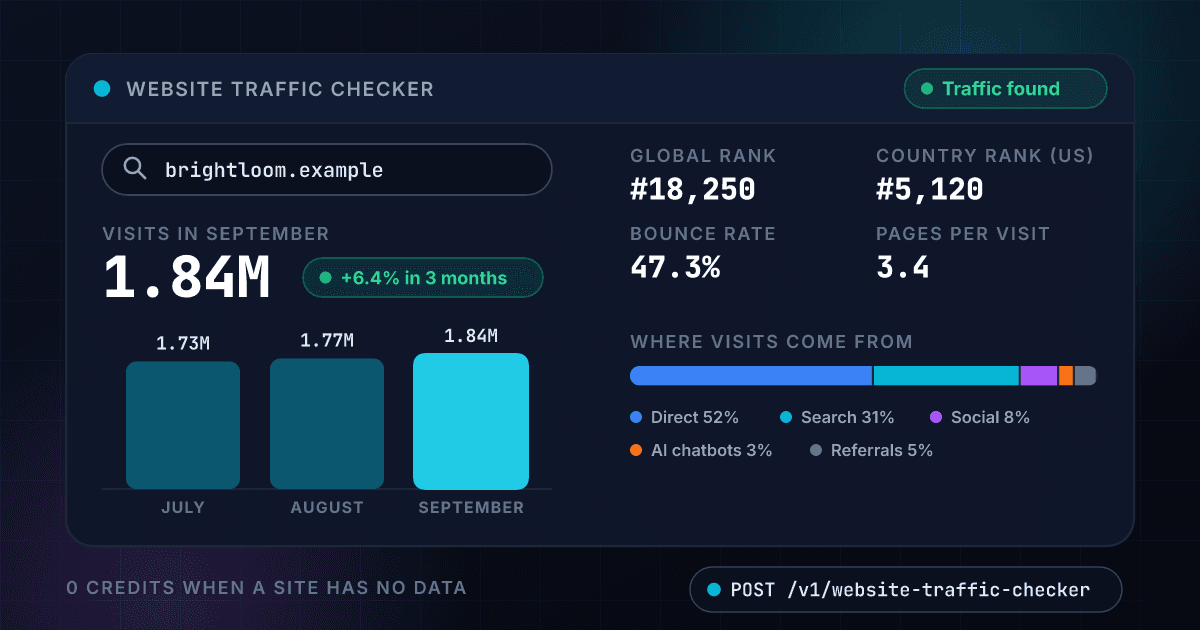
A domain comes back as a traffic report with visits, trend, sources, countries and keywords
Each number is a field your code receives, here for an invented online lighting store. The same fields come back as JSON in the API response below.
Visits in September 2026
1.84M
+6.4% in 3 months- 1.73M
- 1.77M
- 1.84M
- July
- August
- September
- Global rank
- #18,250
- Rank in United States
- #5,120
- Bounce rate
- 47.3%
- Pages per visit
- 3.4
- Visit length
- 2m 48s
- Top source
- Direct
Where the visits come from
- Direct52.1%
- Search31.4%
- Social8.2%
- Referrals4.9%
- AI chatbots3.4%
Which countries send them
- United States41.6%
- United Kingdom9.3%
- Canada6.8%
- Germany5.1%
- Australia4.7%
Which searches bring them
- pendant lights6.2%49,500 searches a month, $0.84 a click
- floor lamps4.8%74,000 searches a month, $0.92 a click
- brightloom lamps3.9%2,900 searches a month, $0.31 a click
- smart light bulbs2.7%60,500 searches a month, $0.68 a click
6 more keywords, 4 more countries and the 3-month history in the same response, 3 credits for all of it
Every site comes back as one record with its visits, its trend and where the traffic comes from
A domain written any way returns the same site's traffic
Paste a bare domain, a www address or a full page link. Each one is reduced to the site's own domain, so one site is always one answer.
- Bare domain, www or full link
- One site, one cached answer
- A bad value is refused before any charge
Monthly visits come with the three-month trend
You get the latest month's visits, the visits of the two months before it and the change between them, labeled up, down or flat.
- Visits in the latest full month
- Change over three months
- A plain up, down or flat label
Ranks, bounce rate and visit length show how engaged the visitors are
The global rank, the rank in the biggest country, the bounce rate, the pages per visit and how long a visit lasts come back as plain numbers.
- Global and country rank
- Bounce rate and pages per visit
- Average visit length in seconds
Traffic sources split the visits into search, social, referrals and AI chatbots
Every source comes back with its share of the site's visits, so you can see whether a site lives on search or on direct visits, and how many arrive from a chatbot.
- Direct, search, social and referrals
- AI chatbots as their own source
- Each source as a share of the visits
Countries and search keywords show where visitors live and what they typed
Up to 10 countries and 10 keywords come back with their share of the traffic. Each keyword also carries its monthly searches and its cost per click.
- Up to 10 countries with their shares
- Up to 10 keywords with their shares
- Monthly searches and cost per click
A site with no traffic data costs nothing
You are charged 3 credits only when data comes back. A site with no data, an error and a timeout all cost 0 credits, and a repeat check within 7 days is free.
- No data, no charge
- Errors are never billed
- Repeat checks within 7 days are free
A domain goes in and a full traffic report comes out
You send a domain and nothing else
POST the domain in any spelling: a bare domain, a www address or a full page link. It is cleaned to the site's own domain before anything is charged.
$ POST /api/v1/website-traffic-checker
"domain": "brightloom.example"
We read the site's traffic and keep the numbers that matter
The visits, the trend, the ranks, the sources, the countries and the keywords are put into one record. A site with no data is not billed.
Domain checked and cleaned
Monthly visits read
Trend and ranks calculated
Sources, countries and keywords attached
You get the report back as one JSON record
Visits, three-month trend, ranks, bounce rate, traffic sources, countries and keywords, with the headline numbers on top.
monthly visits1,840,000
trendup 6.4%
top sourceDirect
One endpoint turns a domain into a traffic report and works like every other 1Lookup call
Same authentication, same credit balance, and the same response envelope as every other 1Lookup product. If you have already integrated one endpoint, this one is a URL change.
curl -X POST https://app.1lookup.io/api/v1/website-traffic-checker \
  -H "Authorization: Bearer $API_KEY" \
  -H "Content-Type: application/json" \
  -d '{ "domain": "brightloom.example" }'

# a bare domain, a www address or a full page link all check the same site
# -d '{ "domain": "https://www.brightloom.example/pricing" }'{
"success": true,
"data": {
"classification": {
"matched": true,
"domain": "brightloom.example",
"monthly_visits": 1840000,
"month": "2026-09",
"visits_change_pct": 6.4,
"trend": "up",
"global_rank": 18250,
"country_name": "United States",
"country_rank": 5120,
"bounce_rate_pct": 47.3,
"pages_per_visit": 3.4,
"avg_visit_seconds": 168,
"top_traffic_source": "Direct",
"top_traffic_source_share_pct": 52.1
},
"insights": {
"website_traffic_result": {
"history": [
{ "month": "2026-07", "visits": 1730000 },
{ "month": "2026-08", "visits": 1770000 },
{ "month": "2026-09", "visits": 1840000 }
],
"traffic_sources": [
{ "source": "Direct", "share_pct": 52.1 },
{ "source": "Search", "share_pct": 31.4 },
{ "source": "Social", "share_pct": 8.2 },
{ "source": "Referrals", "share_pct": 4.9 },
{ "source": "AI chatbots", "share_pct": 3.4 }
],
"top_countries": [
{ "code": "US", "name": "United States", "share_pct": 41.6 },
{ "code": "GB", "name": "United Kingdom", "share_pct": 9.3 }
],
"top_keywords": [
{ "keyword": "pendant lights", "share_pct": 6.2, "monthly_searches": 49500, "cpc_usd": 0.84 }
]
}
},
"metadata": { "credits_used": 3, "cache_hit": false }
}
}A column of domains goes in and one summary row per site comes out
Upload a CSV with a domain column and download a result file with the visits, the trend, the bounce rate and the top source for every site.
- 1domain
- 2brightloom.example
- 3lumenhaus.example
- 4copperwick.example
| domain | Monthly Visits | Trend | Top Traffic Source | Credits Used |
|---|---|---|---|---|
| brightloom.example | 1840000 | up | Direct | 3 |
| lumenhaus.example | 2410000 | up | Search | 3 |
| copperwick.example | 860000 | down | Direct | 3 |
Sixteen more columns in the file, among them Status, Global Rank, Bounce Rate (%), Pages Per Visit, Top Country and Top Keyword.
One row in, one row out
Every site becomes one row, so a list of 500 sites is a spreadsheet of 500 rows you can sort by visits.
The full report is in the JSON export
The CSV carries the headline numbers and the top source, country and keyword. The month-by-month history and every source, country and keyword are in the JSON file for the same job.
A site with no data costs 0 credits
The price stays at 3 credits per site that has data, however long the list is.
Every report comes back with the same fields at one flat price
A number the site has no data for comes back as null, never as a guess, and every field costs the same 3 credits.
It sizes the site's traffic
- monthly_visits
- month
- visits_change_pct
- trend
- history[].month
- history[].visits
It ranks the site
- global_rank
- country_name
- country_rank
- category
It measures how visitors behave
- bounce_rate_pct
- pages_per_visit
- avg_visit_seconds
It splits the visits by source
- traffic_sources[].source
- traffic_sources[].share_pct
- top_traffic_source
- top_traffic_source_share_pct
It lists the countries visitors come from
- top_countries[].code
- top_countries[].name
- top_countries[].share_pct
- top_country
- top_country_share_pct
It lists the searches that bring them
- top_keywords[].keyword
- top_keywords[].share_pct
- top_keywords[].monthly_searches
- top_keywords[].cpc_usd
- top_keyword
Sales, SEO, investor and partnership teams check a site's traffic before they act on it
Sales teams check a prospect's site before the first call
Look up the domain of every account on a list and sort by monthly visits. The accounts with growing traffic and a lot of search visits are the ones with a reason to buy what you sell, and the numbers give you something specific to say.
SEO and marketing teams size up a competitor in seconds
Check the three sites you compete with and read their visits, trend and sources side by side. A competitor whose search share is climbing, or whose AI chatbot share is growing, shows you where to look next.
Investors and acquirers test a seller's traffic claims
Run the domain a seller is pitching and compare the visits, the trend and the countries with what the deck says. A claim that is far from the report is worth a question before the next meeting.
Publishers and partnership teams screen a site before they say yes
Before approving an affiliate, a sponsor or a guest post, check the site's visits, bounce rate and top countries. A bulk file of 500 applicants becomes 500 rows you can sort in a spreadsheet.
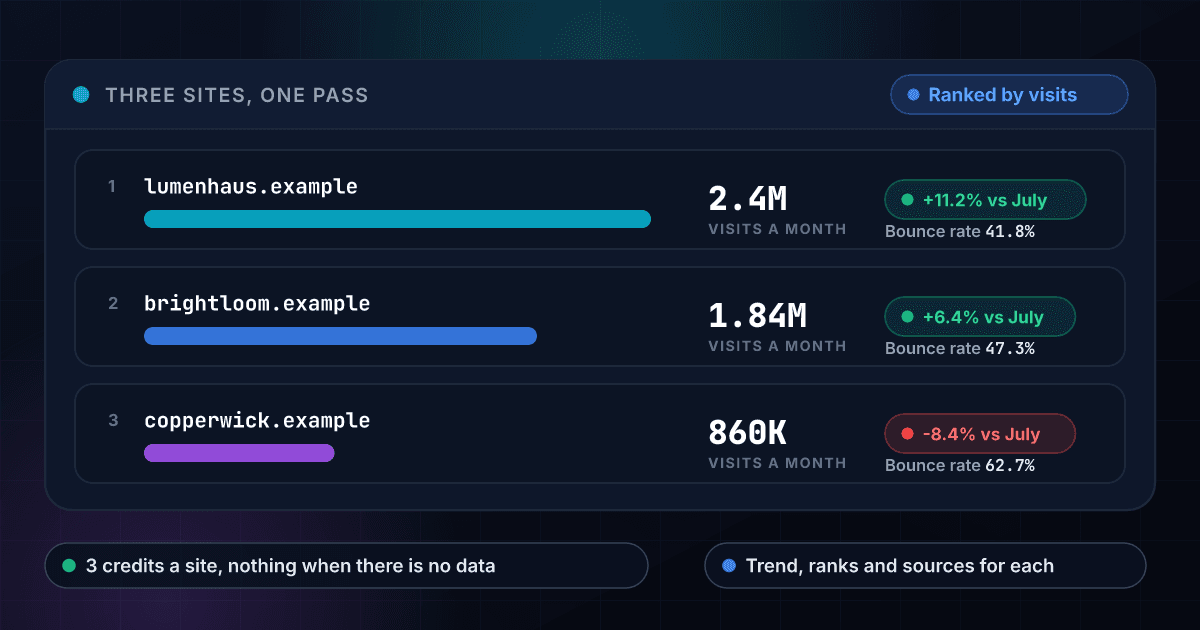
Three competitors checked in one pass show which one is growing and which one is shrinking
Each site returns its visits, its three-month trend and its bounce rate, so ranking them takes one sort on the visits column.
These are the questions people ask before they check their first site
What does the Website Traffic Checker return?
Send a domain and it returns the site's visits in the latest full month, the visits of the two months before it, the change over those three months with a trend of up, down or flat, the global rank and the rank in its biggest country, the bounce rate, pages per visit and visit length. It also returns where the visits come from (direct, search, social, referrals and AI chatbots, each as a share), the top countries and the top search keywords.
Is this a website traffic estimator?
Yes. You send a request with your 1Lookup API key and get a traffic report for any domain back as JSON, so you can check a competitor, a prospect or a partner without logging in to anything. Every figure is a monthly estimate for the whole domain.
What are the numbers good for?
Comparing sites and spotting direction. They tell you which of three sites is the biggest, which one is growing and where its visitors come from, which is what a sales, SEO or investment decision needs.
Does it show traffic from AI chatbots?
Yes. AI chatbots appear in the traffic sources beside direct, search, social and referrals, each with its share of the site's visits, so you can see how many people arrive from a chatbot answer.
How much does a traffic check cost?
3 credits per site that has traffic data, which is $14.85 per 1,000 sites on the Starter plan and $10.56 on Growth. You are charged only when data comes back. A site with no data, an error and a timeout cost 0 credits, in the API, the dashboard and bulk jobs.
What happens when a site has no traffic data?
You get a result with matched set to false and you are charged 0 credits. Very small and brand-new sites often have no data yet. Check the domain again later or try another site.
Can I check a single page?
The report is for the whole domain. A bare domain, a www address and a full page link all check the same site, so you can paste whatever you copied.
How fresh is the data and how long does a check take?
The figures are for the latest full month. A fresh check usually takes 5 to 15 seconds, so set your client timeout to 120 seconds and a slow one still returns its data. The same domain checked again within 7 days is served from cache and is free.
Can I check a list of sites at once?
Yes. Upload a CSV with a domain column and you get one summary row per site: monthly visits, the change, the trend, the ranks, the bounce rate, the top traffic source, the top country and the top keyword. The month-by-month history and every source, country and keyword are in the JSON export. Each site with data costs 3 credits and every site without data is free.
How is it different from Audience Intelligence and Domain Authority?
The Website Traffic Checker is the quick read of how big a site is and where its visits come from, at 3 credits. Audience Intelligence goes deeper at 86 credits, with the age, sex and income of the visitors. Domain Authority, at 10 credits, scores the strength of the site's backlinks and estimates its organic traffic. Teams often run the traffic check first and the others on the sites that matter.
Traffic is one signal, and these products add the rest of the picture
Here is how checking a site's traffic with 1Lookup compares with the SEO suites that estimate it
Each page sets a rival's plans and prices beside ours and says where the rival does the job better. Every figure carries its source and the date it was checked.