This Twitter reply scraper returns up to 20 replies and who wrote them
Send the link to an X (Twitter) post and get back up to 20 replies, each with the replier's handle, name, followers and bio. It finds the people who answered a post and tells you who they are. 15 credits per post that returns replies.
15
Credits per post that returns replies
about $0.07 on Starter
0
Credits when a post has no replies
no replies, no charge
20
Replies per post
replies inside the thread included
4
Facts about each replier
handle, name, followers and bio
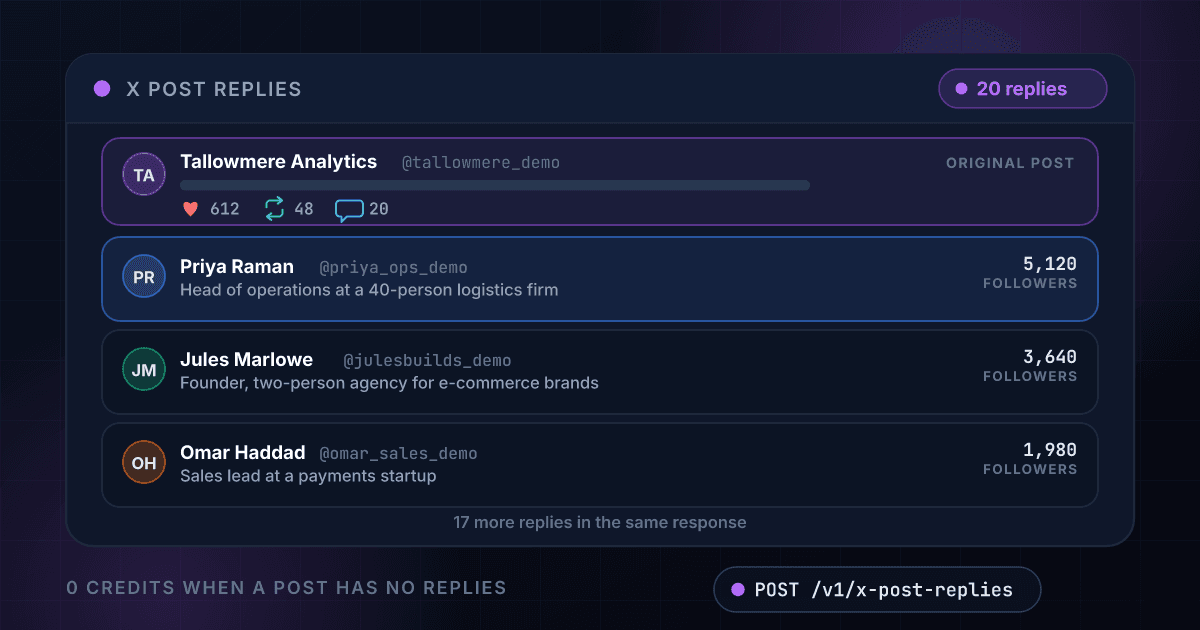
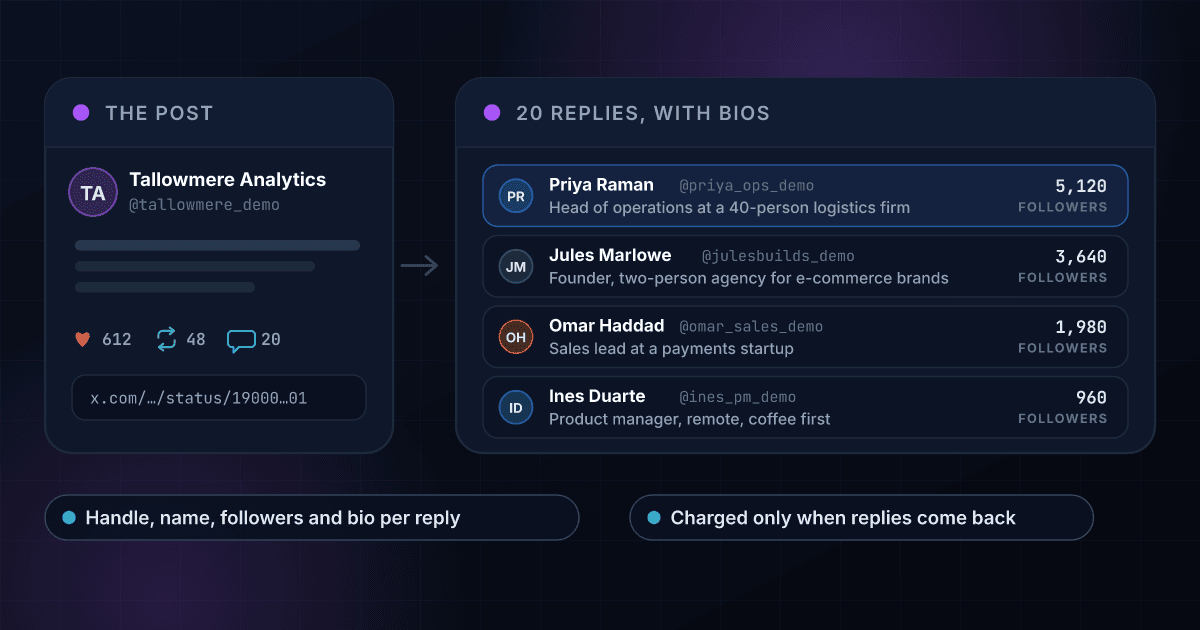
A post link comes back as the people who replied, each with a bio and a following
Each row is one reply with the numbers your code receives, and the replier with the largest following is named in the summary. The same fields come back as JSON in the API response below.
Tallowmere Analytics
@tallowmere_demo
We are opening 20 beta seats for our new reporting tool. Reply if you want one and tell us what you would report on first.
- 612
- 48
- 20
- 74K
- Replies returned
- 20
- Different people
- 17
- Biggest replier
- @callum_cfo_demo
- Their followers
- 8,410
Priya Raman
@priya_ops_demo
5,120 followers
Head of operations at a 40-person logistics firm
Yes please. I would report on churn by plan first.
- 14
Jules Marlowe
@julesbuilds_demo
3,640 followers
Founder, two-person agency for e-commerce brands
Count me in. Our dashboards are a mess and I want the weekly view.
- 9
Omar Haddad
@omar_sales_demo
1,980 followers
Sales lead at a payments startup
Would love a seat. Pipeline by source is the first thing I would report on.
- 6
Ines Duarte
@ines_pm_demo
960 followers
Product manager, remote, coffee first
Interested. Does it connect to a spreadsheet or only to a database?
- 3
Callum Reyes
@callum_cfo_demo
8,410 followers
Fractional CFO for seed-stage software companies.
Reporting on cash runway by customer segment. I would pay for that.
- 41
Amara Nwosu
@amara_growth_demo
2,270 followers
Growth lead at a developer tools company.
Please add me. Activation by channel is what I check every Monday.
- 11
14 more replies in the same response, 15 credits for all 20
A post comes back as its replies, and every reply comes with the person who wrote it
One post link returns up to 20 replies
Paste the link to any public post and get the people who answered it, without scrolling the thread or logging in to X.
- The text and time of each reply
- A link to every reply
- Replies inside the thread included
Every replier arrives with a bio
The replier's handle, name, followers, following, bio and location sit in the same record as their reply, so you know who wrote it.
- Bio and location
- Followers and following
- Verified flag
The biggest replier is named for you
The result says how many different people replied and which of them has the largest following, with their bio, so the account worth a message comes first.
- Count of different repliers
- The replier with the largest following
- Their followers and bio
Replies to replies are marked
A reply written to another replier carries in_reply_to, so a conversation inside the thread is easy to tell from an answer to the post.
- in_reply_to on every reply
- is_reply, is_quote and is_repost flags
- Quotes and reposts counted
Likes and reposts show which replies mattered
Each reply carries its likes, reposts, replies and quotes as plain numbers, so the answers other people agreed with are easy to find.
- Likes, reposts, replies and quotes
- Views where X shows them
- The most-liked reply in the summary
A post with no replies costs nothing
You are charged 15 credits only when replies come back. A post with no replies, a link to a reply, an error and a timeout all cost 0 credits.
- No replies, no charge
- Errors are never billed
- Repeat lookups within 15 minutes are free
A post link goes in and the people who replied come out
You send the link to the post and nothing else
POST the link to the original post. A link to a reply returns nothing and costs nothing, and a link to an account is refused before anything is charged.
$ POST /api/v1/x-post-replies
"post_url": "x.com/handle/status/..."
> the original post
We read the thread on X (Twitter) live and keep up to 20 replies
The thread is read when you ask, and each reply is joined to its author's profile. A post with no replies is not billed.
Post link checked
Thread read on X (Twitter) live
Each replier's profile attached
Biggest replier worked out
You get every reply and its author back as one JSON record
For each reply the text, time, likes and link, and for each replier the handle, name, followers, bio and location.
replies20
different people17
biggest@callum_cfo_demo
One endpoint reads a thread and works like every other 1Lookup call
Same authentication, same credit balance, and the same response envelope as every other 1Lookup product. If you have already integrated one endpoint, this one is a URL change.
curl -X POST https://app.1lookup.io/api/v1/x-post-replies \
  -H "Authorization: Bearer $API_KEY" \
  -H "Content-Type: application/json" \
-d '{ "post_url": "https://x.com/tallowmere_demo/status/1900000000000000301" }'{
"success": true,
"data": {
"classification": {
"matched": true,
"post_id": "1900000000000000301",
"result_count": 20,
"unique_repliers": 17,
"biggest_replier": "callum_cfo_demo",
"biggest_replier_followers": 8410,
"biggest_replier_bio": "Fractional CFO for seed-stage software companies."
},
"insights": {
"x_post_replies_result": {
"posts": [
{
"url": "https://x.com/priya_ops_demo/status/1900000000000000302",
"text": "Yes please. I would report on churn by plan first.",
"posted_at": "2026-10-20T12:03:11.000Z",
"likes": 14,
"reposts": 0,
"is_reply": true,
"in_reply_to": "tallowmere_demo",
"author": {
"handle": "priya_ops_demo",
"name": "Priya Raman",
"followers": 5120,
"bio": "Head of operations at a 40-person logistics firm",
"verified": false
}
}
]
}
},
"metadata": { "credits_used": 15, "cache_hit": false }
}
}A column of post links goes in and one row per post comes out, with the biggest replier named
Upload a CSV with a post_url column and download a result file with how many people replied, who has the largest following and their bio, and the most-liked reply.
- 1post_url
- 2x.com/tallowmere_demo/status/190000...301
- 3x.com/growthloop_demo/status/190000...412
- 4x.com/coldoutbound_demo/status/190000...518
| post_url | Status | Replies Returned | Biggest Replier | Credits Used |
|---|---|---|---|---|
| x.com/tallowmere_demo/...301 | Success | 20 | callum_cfo_demo | 15 |
| x.com/growthloop_demo/...412 | Success | 11 | dara_ml_demo | 15 |
| x.com/coldoutbound_demo/...518 | Success | 20 | noor_revops_demo | 15 |
Ten more columns in the file, among them Unique Repliers, Their Followers, Their Bio and Reply URLs.
The biggest replier and their bio are in every row
The account most worth a message is named in the file, so a list of threads becomes a short list of people.
Every reply is in the JSON export
The CSV carries the summary, the replier handles and the reply links. Each reply in full, with its author, is in the JSON file for the same job.
A post with no replies costs 0 credits
The price stays at 15 credits per post that returns replies, however long the list is.
Every post comes back with the same fields at one flat price
A count X does not show for a reply comes back as null, never as a guess, and every field costs the same 15 credits.
It summarizes who replied
- post_id
- result_count
- unique_repliers
- biggest_replier
- biggest_replier_followers
- biggest_replier_bio
It returns each reply's text and time
- id
- url
- text
- posted_at
- language
It describes who wrote each reply
- author.handle
- author.name
- author.url
- author.followers
- author.following
- author.bio
- author.location
- author.verified
It counts the engagement on each reply
- likes
- reposts
- replies
- quotes
- bookmarks
- views
It shows how each reply fits in the thread
- is_reply
- is_quote
- is_repost
- in_reply_to
It points back to the most-liked reply
- top_post_author
- top_post_likes
- top_post_url
Sales, founder, brand and research teams read the replies instead of scrolling the thread
Sales teams find leads among the people replying to a competitor's post
When a rival announces a product, the replies hold people with an opinion about it. Each replier arrives with a bio that names their role and company, so the ones worth a message stand out.
Founders and marketers read the answers to their own launch posts
A launch post that gets 200 replies is a list of interested people. Pull the replies, sort by followers and answer the ones who match your buyer first.
Brand and support teams see how a post was received
Read the replies to an announcement or an outage post and see what people said, who said it and which reply other people liked. The most-liked reply is in the summary.
Researchers and journalists collect public responses to a statement
Save the replies to a public post as JSON with their authors, times and links. A CSV of post links returns one summary row per post for a first pass across many threads.
One post link becomes 20 replies, and the bios turn them into a shortlist of people to write to
Each reply keeps its replier's bio and following, so the people with a role and an audience that fit can be picked out in seconds.
These are the questions people ask before they read their first thread
What does the X Post Replies API return?
Send a link to a post and it returns up to 20 replies to it from X (Twitter). Each reply carries its text, time, likes, reposts and a link, and the replier's handle, name, follower count, following count, bio, location and verified flag. The result also counts how many different people replied and names the replier with the largest following.
Is this a Twitter reply scraper, and do I need an X account?
It does the job of a reply scraper without the scraper. You send a request with your 1Lookup API key and the replies come back as JSON. You do not need an X account, an X developer application or a proxy, and there is no script to keep running.
Which link do I send?
The link to the original post, such as x.com/handle/status/123. A link to a reply returns nothing and costs nothing, because it is a reply and not the post that started the thread. A link to an account is refused before anything is charged.
How many replies do I get, and are the replies to replies included?
Up to 20 per post, with no pagination. Replies inside the thread are included and marked with in_reply_to, so you can tell a reply to the original post from a reply to another replier. A post with 12 replies returns 12.
Why does a reply come with the replier's bio?
Because the bio is what lets you decide who is worth a message. A reply that says 'we have this problem' is a lead only when the bio says who they are, so each replier arrives with followers, bio, location and verified flag in the same record.
How much does it cost?
15 credits per post that returns replies, about $0.07 on the Starter plan and $0.05 on Growth, so 100 posts cost about $7 and $5. You are charged only when replies come back. A post with no replies, a link to a reply, an error and a timeout cost 0 credits.
How fresh are the replies?
They are live. The thread is read on X when you ask. The same post from your organization within 15 minutes is served from cache and is free, and after 15 minutes it is read again.
How long does a lookup take?
Usually 10 to 40 seconds, because the thread is read live. Set your client timeout to at least 60 seconds so a slow lookup still returns its replies.
Can I check a list of posts at once?
Yes. Upload a CSV with a post_url column and you get one row per post: how many replies came back, how many different people wrote them, the replier with the largest following with their bio, and the most-liked reply with its link. The replier handles and reply links are in the file, and every reply in full is in the JSON export. Each post that returns replies costs 15 credits and every empty one is free.
How do I turn a replier into a contact?
Take the name and the company in their bio, then run it through Email Enrichment to find a work email, or through LinkedIn Email Finder when you have their LinkedIn profile. The X handle, the bio and the reply itself are the context for the first line of your message.
A reply is the start of a lead, and these products cover the rest
Here is how reading the replies to a post with 1Lookup compares with the official X API
Each page sets a rival's plans and prices beside ours and says where the rival does the job better. Every figure carries its source and the date it was checked.