Mobile Number Finder API: profile URL in, mobile out
Send a professional profile URL or a work email and get back a mobile number for that person. Built for sales and recruiting teams who have the profile but no way to call. 40 credits, and only when a number comes back.
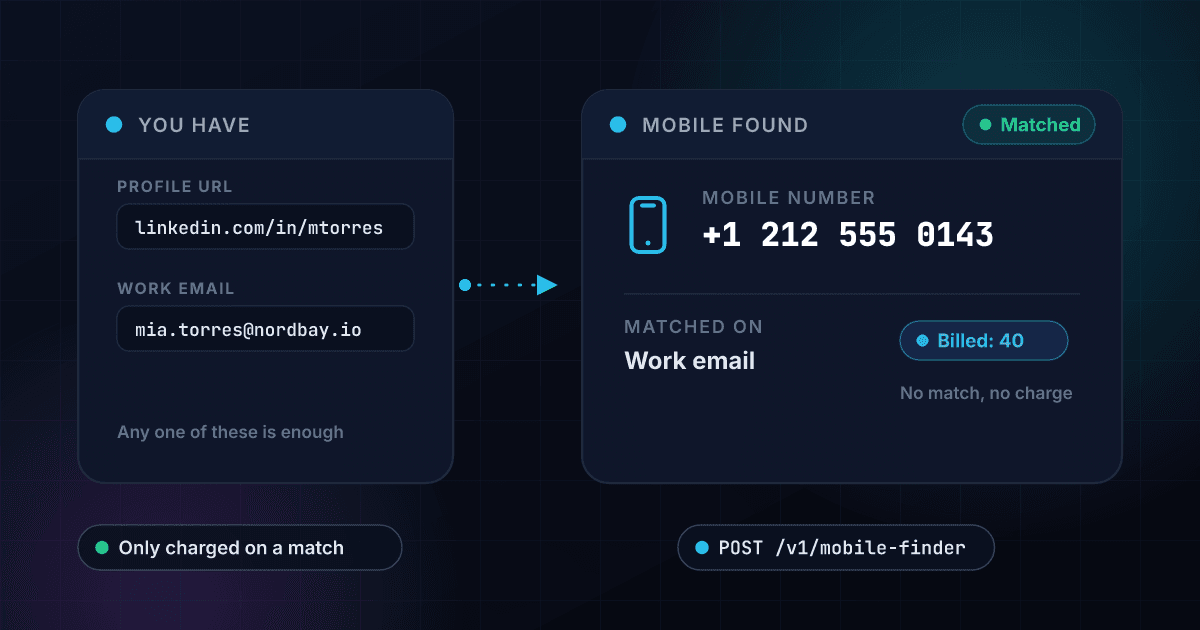
40
Credits per mobile number found
About $0.08 to $0.20 per match by plan
0
Credits when nothing is found
A miss costs you nothing at all
3
Inputs accepted, one is enough
Profile URL, work email, personal email
7 days
Results held in cache
Same input, same key, no charge
What Mobile Finder gives you
Profile URL or email in
Send a professional profile URL, a work email, a personal email, or all three at once. At least one is required and every combination is accepted, so you run it against whatever your CRM already stores instead of reshaping the data first.
- Profile URL accepted
- Work email accepted
- Personal email accepted
- Any combination works
Only charged on a match
When no number comes back, credits_used is 0 and nothing leaves your balance. Prospect and candidate lists always carry people whose mobile is not available anywhere, and those rows are free.
- Zero credits on a miss
- Charged only when a number returns
- Misses still answer with HTTP 200
- Safe to point at messy lists
A plain matched flag
Read one field and move on. Every response carries matched true or false, the mobile number or null, and the profile URL and email that produced the match. The response also includes the standard risk and recommendation blocks every 1Lookup product returns, but for this product they follow the matched flag rather than grading the number, so there is nothing to calibrate.
- matched true or false
- mobile_number or null
- Echoed profile_url and email_used
- Nothing to calibrate
Cached for 7 days
A repeat of the exact same input inside 7 days is answered from cache, and for the key that ran the original lookup it costs nothing. Set bypass_cache when you deliberately want a fresh one.
- 7-day result cache
- Repeats free for the same key
- bypass_cache for a fresh lookup
- cache_hit flag in metadata
Bulk CSV with per-row costs
Upload a CSV with a profile_url column, plus optional work_email and personal_email columns. The output adds Matched, Mobile Number, Profile URL, Email Used and Credits Used to every row. The pre-flight quote assumes every row matches, so the real bill lands under it.
- profile_url CSV column
- Optional email columns
- Per-row credits in the output
- Quote is an upper bound
One key, one balance
The same API key and the same credit balance cover Mobile Finder and every other 1Lookup product, through the API, the dashboard and bulk jobs. Rate limit is 1,000 requests per minute per organization.
- One API key
- Credits roll over
- 1,000 requests per minute
- API, dashboard and bulk
How a lookup runs
Send what you have
One of profile_url, work_email or personal_email is required. Send two or three of them if your CRM has them, in any combination, and skip the ones it does not.
$ POST /api/v1/mobile-finder
"profile_url": "https://www.linkedin.com/in/jane-doe/"
"work_email": "jane.doe@company.com"
> any one of the three is enough
We look for the number
The exact same input inside the last 7 days is answered from cache. Otherwise the lookup runs fresh, and credits are settled against the result rather than the attempt.
Input accepted, one field is enough
No cached result inside 7 days
Mobile number located for this contact
Settling credits on the result...
Read matched, then dial
Back comes matched true or false, the mobile number or null, and the input that produced it. A found number bills 40 credits and a miss bills zero.
matchedtrue
mobile_number+12125550143
credits_used40
One endpoint. A profile URL or work email in, structured data out.
Same authentication, same credit balance, and the same response envelope as every other 1Lookup product. If you have already integrated one endpoint, this one is a URL change.
curl -X POST https://app.1lookup.io/api/v1/mobile-finder \
  -H "Authorization: Bearer $API_KEY" \
  -H "Content-Type: application/json" \
  -d '{
        "profile_url": "https://www.linkedin.com/in/jane-doe/",
        "work_email": "jane.doe@company.com"
}'{
"success": true,
"data": {
"classification": {
"matched": true,
"profile_url": "https://www.linkedin.com/in/jane-doe/",
"email_used": "jane.doe@company.com",
"mobile_number": "+12125550143",
"message": ""
},
"insights": {
"mobile_finder": {
"profile_url": "https://www.linkedin.com/in/jane-doe/",
"email": "jane.doe@company.com",
"mobile_number": "+12125550143",
"message": ""
}
},
"recommendations": {
"primary_action": "APPROVE",
"user_message": "Mobile number found."
},
"metadata": { "credits_used": 40, "cache_hit": false }
}
}What comes back, and what does not
The number, the input that found it, and what it cost. The two amber rows are the honest part: the number arrives exactly as the source holds it, and nothing checks whether anyone still answers there.
- Profile URL sentlinkedin.com/in/jane-doe
- Work email sentjane.doe@company.com
- Matchedtrue
- Mobile number+12125550143
- Email usedjane.doe@company.com
- User messageMobile number found.
- Number validatedNo, not checked
- FormatAs the source returns it
- Cache hitfalse
- Credits used40
- Credits had it missed0
{
  "success": true,
  "data": {
    "classification": {
      "matched": true,
      "profile_url": "https://www.linkedin.com/in/jane-doe/",
      "email_used": "jane.doe@company.com",
      "mobile_number": "+12125550143",
      "message": ""
    },
    "insights": {
      "mobile_finder": {
        "profile_url": "https://www.linkedin.com/in/jane-doe/",
        "email": "jane.doe@company.com",
        "mobile_number": "+12125550143",
        "message": ""
      }
    },
    "recommendations": {
      "primary_action": "APPROVE",
      "user_message": "Mobile number found."
    },
    "metadata": { "credits_used": 40, "cache_hit": false }
  }
}Every field you get back
No hidden tiers. Every field below is returned on a successful lookup at the price shown above.
Input
- profile_url
- work_email
- personal_email
- bypass_cache
Match
- matched
- mobile_number (null)
- email_used
- message
Request record
- id
- type
- input
- timestamp
- processing_time_ms
Metadata
- credits_used
- credits_remaining
- cache_hit
- cached_at
- api_version
Who uses Mobile Finder
SDRs working an outbound list
You have the profile URL of everyone on the account list and not one phone number. Run the list through Mobile Finder and the reps get a mobile for the contacts who have one. Rows that come back empty cost nothing, so a thin list does not inflate the bill.
Recruiters chasing passive candidates
Passive candidates ignore messages and never see a work email. Send the profile URL you already sourced and get a mobile you can text instead. Validate the number before an automated dialer touches it, because this endpoint returns it without checking it.
RevOps filling gaps in the CRM
Inbound contacts arrive with a work email and no phone. Run a nightly job over records missing a mobile, write back the number and the matched flag, and skip anything already looked up inside the last 7 days so you are not paying twice.
Agencies building call lists
A client hands over a spreadsheet of profile URLs. Upload it as a CSV and the output adds Matched, Mobile Number and Credits Used to every row, so you can hand back a list and invoice against what actually matched rather than what was uploaded.
Frequently asked questions
What does Mobile Finder do?
Give it a professional profile URL, a work email, or a personal email, and it returns a mobile number for that person when one exists. At least one of the three is required and any combination is accepted. The response tells you matched true or false, the number itself, and which input produced the match. 40 credits, and only when a number comes back.
Am I charged when no number is found?
No. A miss comes back as HTTP 200 with matched false, mobile_number null, and credits_used 0. Nothing leaves your balance. That is the point of the pricing: prospect and candidate lists always contain people whose mobile is not out there, and those rows should not cost you anything. The same rule applies to API calls, the dashboard and bulk CSV jobs.
Does it verify that the number is live?
No, and that is worth being blunt about. Mobile Finder returns the number on file for that profile. It does not dial it, ping the carrier, check the line type, or confirm anyone still answers there. If you need that, run the result through Phone Validation or HLR Lookup before a dialer or an SMS sequence touches it.
Is the number formatted consistently?
Not guaranteed. The number is passed straight through as the source returns it, with surrounding whitespace trimmed and nothing else changed. Some come back looking like +12125550143 and others carry dashes or spaces. Normalize on your side before you store it or hand it to a dialer, and do not assume E.164 output.
What is the match rate?
We do not publish one, because we do not measure one. Any vendor quoting a single hit rate is quoting it against their own test list, not yours, and match rate depends entirely on who is on your list. Since a miss costs zero credits, the honest way to find out is to run a few hundred of your own rows and read the real number off your own usage.
Does it work outside the US?
Coverage is primarily US. There is no country parameter and nothing stops you sending a non-US contact, but results skew heavily to US mobile numbers and we do not publish international coverage figures. Treat non-US lists as a test rather than a plan. A sample costs you only the rows that actually match, so finding out is cheap.
What inputs does it accept?
Three fields: profile_url, work_email and personal_email. At least one is required, and sending more than one gives the lookup more to work with. profile_url accepts any valid URL or bare domain, so a LinkedIn URL is a convention rather than an enforced format. It does not take a person's name, a company, or a phone number. If that is all you have, start with B2B Contact Append.
How long are results cached?
7 days. Repeating the exact same input inside that window returns the stored result, and for the user who ran the original lookup it is free on any of their keys. A different teammate repeating it is billed up to the original cost, so a cached miss still costs nothing. Send bypass_cache true when you want a fresh lookup instead of the cached one.