B2B Contact Append API — find the verified work email
Give us a name and a company, an email, or a LinkedIn URL. Get back a verified work email, job title, seniority and employment history. You are only charged when we find someone.
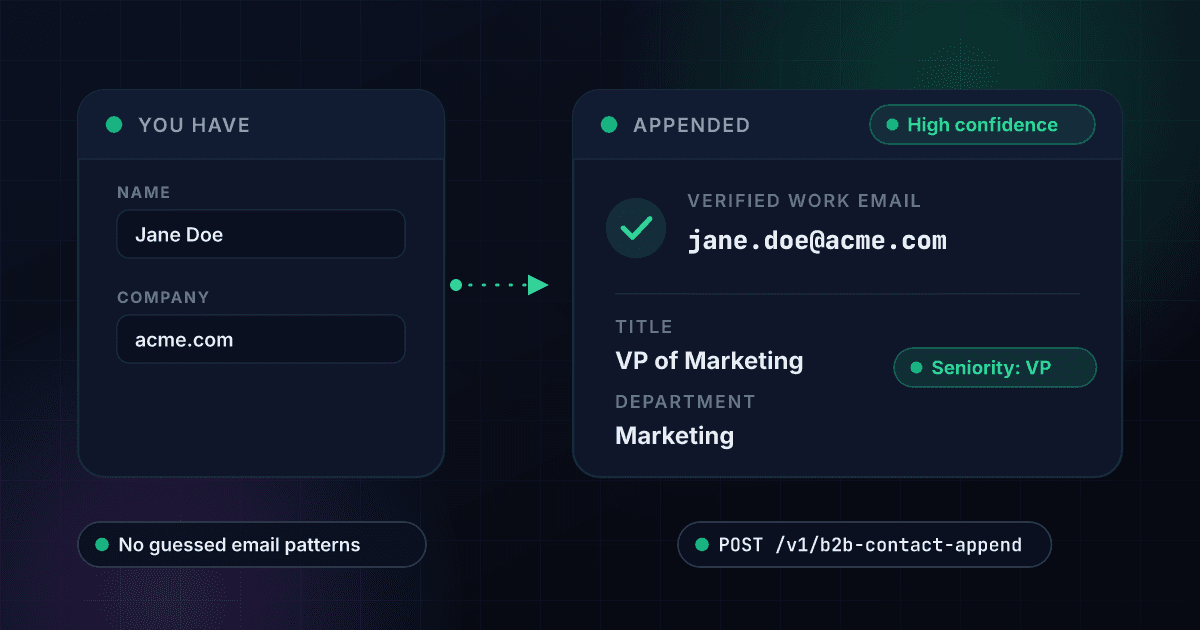
What B2B Contact Append gives you
Verified work emails
Every match carries a verification status, normalized into a plain high, medium or low confidence rating you can branch on.
- Verified work email
- Confidence rating
- Safe-to-send flag
- No guessed patterns
Title and seniority, normalized
Raw job titles are a mess. You get the title as written plus a normalized seniority level and department, so routing and scoring rules actually work.
- Job title
- Normalized seniority
- Department and function
- Professional headline
Employment history
See the current role, when it started, and the previous positions behind it — useful for timing outreach around a job change.
- Current role and start date
- Previous positions
- Company changes
- Tenure signals
Works from any identifier
Email, LinkedIn URL, or name plus company domain. Feed it whatever your CRM actually has rather than reshaping your data first.
- Email in, profile out
- LinkedIn URL supported
- Name + domain supported
- More inputs, better matches
Zero cost on a miss
Contact data vendors typically bill per attempt. Here, a failed match costs nothing, so a messy list does not quietly become an expensive one.
- No charge on no-match
- Applies to bulk jobs
- Predictable spend
- No minimums
Company context attached
Each contact comes with its employer's domain, industry and headcount, so you can qualify the account without a second lookup.
- Company name and domain
- Industry
- Employee count
- One call, both levels
One endpoint. A name and company in, structured data out.
Same authentication, same credit balance, and the same response envelope as every other 1Lookup product. If you have already integrated one endpoint, this one is a URL change.
curl -X POST https://app.1lookup.io/api/v1/b2b-contact-append \
  -H "Authorization: Bearer $API_KEY" \
  -H "Content-Type: application/json" \
  -d '{
        "first_name": "Jane",
        "last_name": "Doe",
        "domain": "acme.com"
}'{
"classification": {
"matched": true,
"full_name": "Jane Doe",
"work_email": "jane.doe@acme.com",
"email_confidence": "high",
"title": "VP of Marketing",
"seniority": "vp",
"company": "Acme Corporation"
},
"insights": {
"b2b_contact_append_result": {
"departments": ["marketing"],
"linkedin_url": "linkedin.com/in/janedoe",
"company_domain": "acme.com",
"current_role_started": "2022-03-01"
}
}
}Every field you get back
No hidden tiers. Every field below is returned on a successful lookup at the price shown above.
Person
- first_name
- last_name
- full_name
- linkedin_url
- city / state / country
Contact
- work_email
- email_status
- email_confidence
- personal_email (null)
- phone_number (null)
Role
- title
- headline
- seniority
- departments[]
- functions[]
Employer
- company_name
- company_domain
- company_website
- company_industry
- company_employee_count
History
- current_role_started
- employment_history[]
Who uses B2B Contact Append
Outbound sales teams
You exported a list of target accounts and the names of the people you want to reach, but not their emails. Append the work email and seniority, then drop only the high-confidence matches straight into a sequence.
RevOps fixing CRM gaps
Thousands of contact records are missing a usable email or a current title. Run them through in bulk and pay only for the ones that come back matched.
Recruiters sourcing candidates
You have LinkedIn URLs from a search but no way to contact anyone. Convert profiles into verified work emails with current role and tenure attached.
Agencies running client campaigns
Client hands over a spreadsheet of company names and contacts. Append and validate in one pass, and bill the client for matched records rather than attempts.
Frequently asked questions
What is a B2B contact append API?
A contact append API takes what you already know about a person — a name plus their employer, an email, or a LinkedIn URL — and returns the missing professional details. In this case that means a verified work email, job title, seniority, department and employment history.
What identifiers can I search with?
Any of: a work email, a LinkedIn profile URL, a person ID from a Prospect Search result, or a full name combined with a company domain. A name on its own is not enough to match reliably, so the API asks for an employer alongside it. Supplying more identifiers improves the match rate.
How much does it cost per contact?
75 credits per successful match, and zero credits when no contact is found. On the Growth plan that is roughly $0.26 per appended contact, which undercuts the per-enrichment pricing of dedicated contact-data vendors while drawing on the same credit balance as the rest of your 1Lookup usage.
Do I pay for contacts you cannot find?
No. This product is success-billed end to end. A no-match costs nothing, which means the quality of your input list does not silently inflate your bill.
Does it return personal emails or mobile numbers?
No. This endpoint returns verified work contact data only. Personal email addresses and direct dial numbers are not part of this product. If you need mobile numbers, use the Mobile Finder endpoint, available through the API and dashboard.
How do I know whether an email is safe to send to?
Every result carries an email confidence rating derived from the email's verification status. Treat 'high' as safe to send, and run anything lower through Email Validation before it enters a sequence.
An appended work email is worth checking before the first send. Our guide shows how to check if an email address is valid.