This Google Reviews API exports up to 100 reviews for any place on Google Maps
Send a Google Maps place and get back up to 100 of its reviews, each with the star rating, the text, the date, the reviewer and the owner's reply. 2 credits per place that has reviews.
2
Credits per place with reviews
$9.90 per 1,000 on Starter
0
Credits when there are no reviews
no reviews, no charge
100
Reviews per place
newest, highest, lowest or relevant
7 days
Repeat exports are free
served from cache
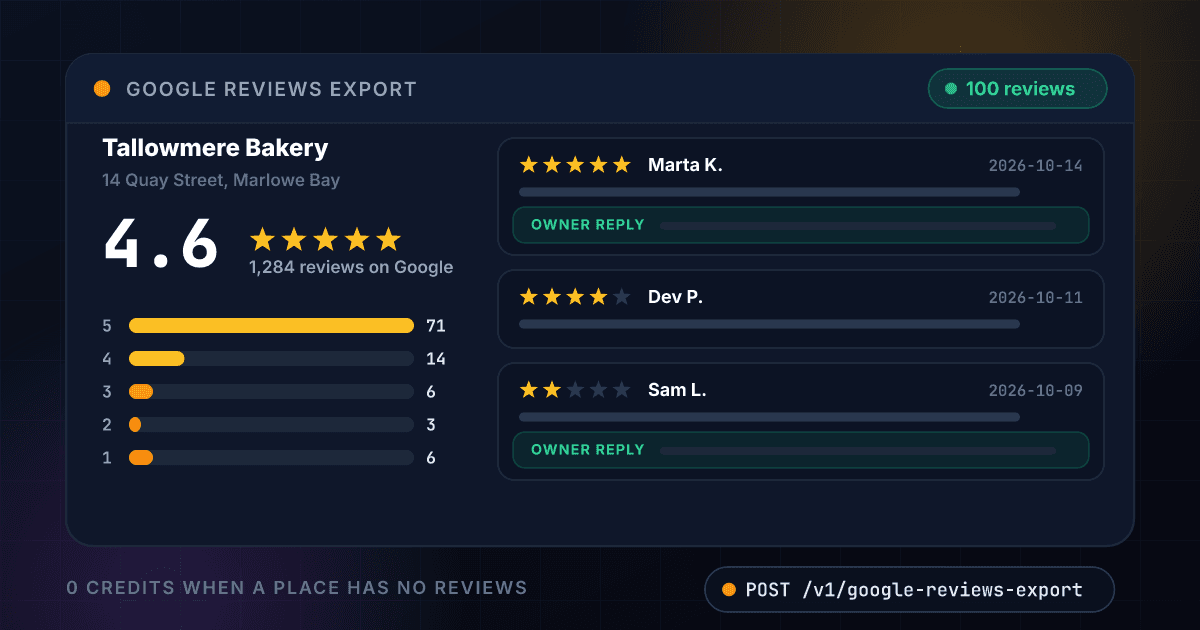
A place comes back as its rating, the star split, the topics and the reviews with owner replies
Each review is one record with the fields your code receives, here for an invented bakery. The same fields come back as JSON in the API response below.
Tallowmere Bakery
14 Quay Street, Marlowe Bay
4.6
1,284 reviews on Google
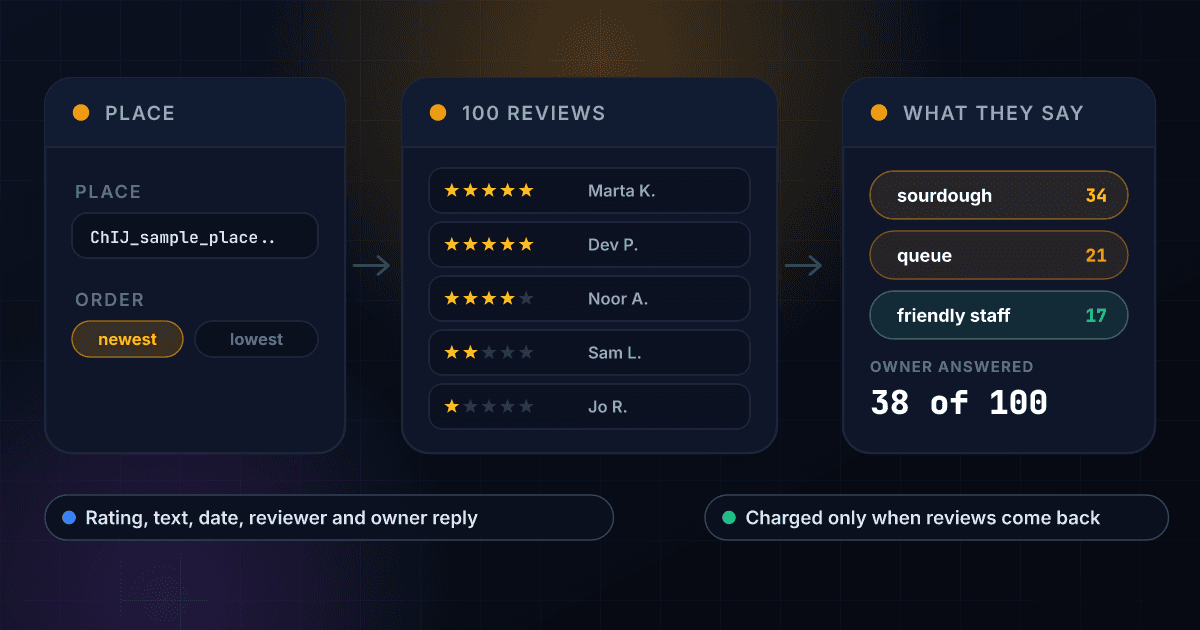
- sourdough34
- queue21
- friendly staff17
How the returned reviews split
- 571
- 414
- 36
- 23
- 16
- Reviews returned
- 100
- Average of the 100
- 4.4
- Owner replies
- 38
- Credits used
- 2
- 2026-10-14
Marta K.
The seeded sourdough is the best loaf in town, and the staff remembered my order after one visit.
Owner reply2026-10-15
Thank you Marta, we will save you a seeded loaf on Saturday.
- 2026-10-11
Dev P.
Great pastries. The queue on a Saturday morning is long, but it moves.
- 2026-10-09
Sam L.
Waited 25 minutes for a coffee and the almond croissant was sold out by 9.
Owner reply2026-10-10
Sorry about the wait, Sam. We have added a second till on weekends.
- 2026-10-07
Noor A.
Lovely, friendly team and the cardamom buns are worth the trip.
96 more reviews in the same response, 2 credits for all 100
Every review arrives as one flat record with its rating, its text and the owner's answer
A place id or a Maps link returns the place's reviews
Send a place id, or paste the Share link from Google Maps. You get up to 100 reviews, with no Google Cloud account to set up.
- A place id or a Maps link
- Up to 100 reviews per place
- No Google Cloud project or key
You choose whether the newest or the worst reviews come first
Sort by newest to follow recent feedback, by lowest to read the complaints, by highest to find quotes or by relevant to see what Google shows first.
- Newest, highest, lowest or relevant
- Newest is the default
- The same order every time you repeat it
Every review arrives with its rating, text, date and reviewer
Each review is a flat record with the star rating, the written text, the date, the reviewer's name and profile link, and how many people found it helpful.
- Stars from 1 to 5
- Text and exact date
- Reviewer name and profile link
Owner replies come back with the review they answer
Where the owner has answered, the reply and its date sit on the same record, and the summary counts how many of the returned reviews have one.
- The reply text and its date
- A count of answered reviews
- Unanswered reviews are easy to filter
The place's rating, the star split and the topics are counted for you
The response carries the place's overall rating and review count, how the returned reviews split across one to five stars and up to eight topics reviewers mention, each with a count.
- Overall rating and review count
- Reviews per star level
- Up to 8 topics with mentions
A place with no reviews costs nothing
You are charged 2 credits only when at least one review comes back. A place with no reviews, an error and a timeout all cost 0 credits, and a repeat export within 7 days is free.
- No reviews, no charge
- Errors are never billed
- Repeat exports within 7 days are free
A place goes in and up to 100 reviews with their owner replies come out
You send a place id or a Google Maps link and pick an order
POST the place id, or the Share link from Google Maps, and add sort to choose newest, highest, lowest or most relevant first. Newest is the default.
$ POST /api/v1/google-reviews-export
"place": "ChIJ_demo_bakery"
"sort": "newest"
We read the place's public reviews and keep the first 100
The reviews are read when you ask, in the order you chose. A place with no reviews is not billed.
Place checked
Reviews read in your order
Owner replies attached
Star split and topics counted
You get the reviews back as one JSON record
Rating, text, date, reviewer and owner reply for each review, with the place's own rating and a summary of the 100 on top.
reviews100
average rating4.4
owner replies38
One endpoint turns a place into reviews and works like every other 1Lookup call
Same authentication, same credit balance, and the same response envelope as every other 1Lookup product. If you have already integrated one endpoint, this one is a URL change.
curl -X POST https://app.1lookup.io/api/v1/google-reviews-export \
  -H "Authorization: Bearer $API_KEY" \
  -H "Content-Type: application/json" \
  -d '{ "place": "ChIJ_demo_bakery", "sort": "newest" }'

# "sort" can be "highest", "lowest" or "relevant", and "place"
# can be the Share link from Google Maps instead of a place id
# -d '{ "place": "https://maps.app.goo.gl/...", "sort": "lowest" }'{
"success": true,
"data": {
"classification": {
"matched": true,
"result_count": 100,
"place_name": "Tallowmere Bakery",
"place_address": "14 Quay Street, Marlowe Bay",
"place_rating": 4.6,
"place_review_count": 1284,
"average_rating": 4.4,
"five_star": 71,
"low_rated": 9,
"with_text": 96,
"with_owner_reply": 38,
"newest_review_at": "2026-10-14T09:12:00.000Z"
},
"insights": {
"google_reviews_export_result": {
"sort": "newest",
"rating_counts": { "5": 71, "4": 14, "3": 6, "2": 3, "1": 6 },
"topics": [
{ "topic": "sourdough", "mentions": 34 },
{ "topic": "queue", "mentions": 21 },
{ "topic": "friendly staff", "mentions": 17 }
],
"reviews": [
{
"rating": 5,
"text": "The seeded sourdough is the best loaf in town.",
"date": "2026-10-14T09:12:00.000Z",
"reviewer": "Marta K.",
"owner_reply": "Thank you Marta, we will save you a seeded loaf on Saturday.",
"owner_reply_date": "2026-10-15T08:03:00.000Z"
}
]
}
},
"metadata": { "credits_used": 2, "cache_hit": false }
}
}A column of places goes in and one summary row per place comes out
Upload a CSV with a place on each row and download a result file with the place's name and rating, how many reviews came back, their average and how many have an owner reply.
- 1place
- 2ChIJ_demo_bakery
- 3ChIJ_demo_coffee
- 4ChIJ_demo_fish
| place | Place | Reviews Returned | With Owner Reply | Credits Used |
|---|---|---|---|---|
| ChIJ_demo_bakery | Tallowmere Bakery | 100 | 38 | 2 |
| ChIJ_demo_coffee | Quayside Coffee | 100 | 12 | 2 |
| ChIJ_demo_fish | Marlowe Fishmonger | 73 | 51 | 2 |
Thirteen more columns in the file, among them Status, Place Rating, Average Rating Returned, 5-Star Reviews, 1 and 2-Star Reviews and Topics.
One row in, one summary row out
Every place becomes one row, so a list of 500 places is a spreadsheet of 500 rows you can sort by rating or by owner replies.
The full reviews are in the JSON export
The CSV carries the counts, the averages and the topics. Every review, with its text and owner reply, is in the JSON file for the same job.
A place with no reviews costs 0 credits
The price stays at 2 credits per place with reviews, however long the list is.
Every review comes back with the same fields at one flat price
A field Google does not show for a review comes back as null, never as a guess, and every field costs the same 2 credits.
It identifies the place
- place_name
- place_address
- place_rating
- place_review_count
- place_id
It returns each review
- rating
- text
- date
- date_text
- likes
- photos
It names the reviewer
- reviewer
- reviewer_url
It returns the owner's answer
- owner_reply
- owner_reply_date
- with_owner_reply
It sums up the reviews that came back
- result_count
- average_rating
- five_star
- low_rated
- with_text
- rating_counts
It dates the list and names its topics
- newest_review_at
- oldest_review_at
- topics[].topic
- topics[].mentions
Local businesses, agencies, analysts and multi-location brands export reviews instead of scrolling them
Local businesses read what customers say about them and their rivals
Export your own place sorted by newest every week and the three places down the road sorted by lowest. The topics tell you what people keep praising, and the complaints show where a rival is weak.
Agencies and sales teams open a pitch with a customer's own reviews
Run a list of prospects and sort by the one and two-star count and the owner replies. A business with many unanswered complaints is an easy conversation to start, and the review text gives you the first line.
Analysts and product teams feed reviews into their own models
Store the rating, text, date and topics of each review as JSON and run sentiment or topic analysis across a whole city or a whole chain. A CSV of places returns one summary row per place for a first look.
Franchise and multi-location brands compare every branch in one pass
Export all 80 branches in one bulk file and sort by average rating, by owner reply count and by the newest review date. The branches that stopped answering reviews are at the top of a sorted column.
A place becomes 100 reviews, and the reviews become the topics customers keep mentioning
The export returns the text of every review and counts the topics for you, so what customers love and what they complain about is one read of the summary.
These are the questions people ask before they export their first place
What does the Google Reviews Export API return?
Send a Google Maps place and it returns up to 100 of its reviews. Each review carries the star rating, the written text, the date, the reviewer's name and the owner's reply with its date where there is one. The response also carries the place's name, address, overall rating and total review count, how the returned reviews split across one to five stars and the topics reviewers mention most.
Is this a Google reviews scraper, and do I need a Google Cloud key?
It does the job of a Google reviews scraper without the scraper. You send a request with your 1Lookup API key and the reviews come back as JSON. You do not need a Google Cloud project, a Places API key, billing set up with Google or a proxy, and there is no script to keep running.
How is it different from the Google Places API?
The Places API returns a handful of reviews for each place. This returns up to 100, in the order you choose, with the owner replies, the star split and the topics included, and it needs no Google Cloud account.
What do I send, a place id or a link?
Either. Send a Google place id, which starts with ChIJ, or a Google Maps link to one business. To get the link, open the business on Google Maps, choose Share and paste what it gives you. A link to a search results page does not name one place and is refused, and you are not charged for it.
How many reviews does one call return, and in what order?
Up to 100, in the order you pick with the sort parameter: newest, highest rated, lowest rated or most relevant. Newest is the default. A place with thousands of reviews returns the first 100 in your order, so choose newest to follow recent feedback and lowest to read the complaints.
Does it include the owner's replies?
Yes. When the owner has answered a review, the reply and its date come back with that review, and the summary counts how many of the returned reviews have one.
How much does a place export cost?
2 credits per place that returns reviews, which is $9.90 per 1,000 places on the Starter plan and $7.04 on Growth. You are charged only when at least one review comes back. A place with no reviews, an error and a timeout cost 0 credits, in the API, the dashboard and bulk jobs.
How fresh are the reviews and how long does an export take?
The reviews are read when you ask. A fresh export usually takes 5 to 12 seconds, so set your client timeout to 120 seconds and a slow one still returns its reviews. The same place and order exported again within 7 days is served from cache and is free.
Can I export a list of places at once?
Yes. Upload a CSV with a place on each row and you get one summary row per place: its name, address, overall rating and review count, how many reviews came back, their average rating, the five-star and the one and two-star counts, how many have an owner reply, the newest and oldest review dates and the topics. The full reviews for every row are in the JSON export. Each place with reviews costs 2 credits and every empty one is free.
How is it different from Business Lookup?
Business Lookup turns a business name and city into the business's record, with its address, phone, website, rating and review count, at 10 credits. Google Reviews Export reads the reviews themselves, up to 100 of them, at 2 credits. Teams often use Business Lookup to find the place and Google Reviews Export to read what its customers say.
Reviews are one view of a business, and these products add the rest
Here is how exporting Google reviews with 1Lookup compares with the other ways to get them
Each page sets a rival's plans and prices beside ours and says where the rival does the job better. Every figure carries its source and the date it was checked.