Email Enrichment API: name and domain in, email out
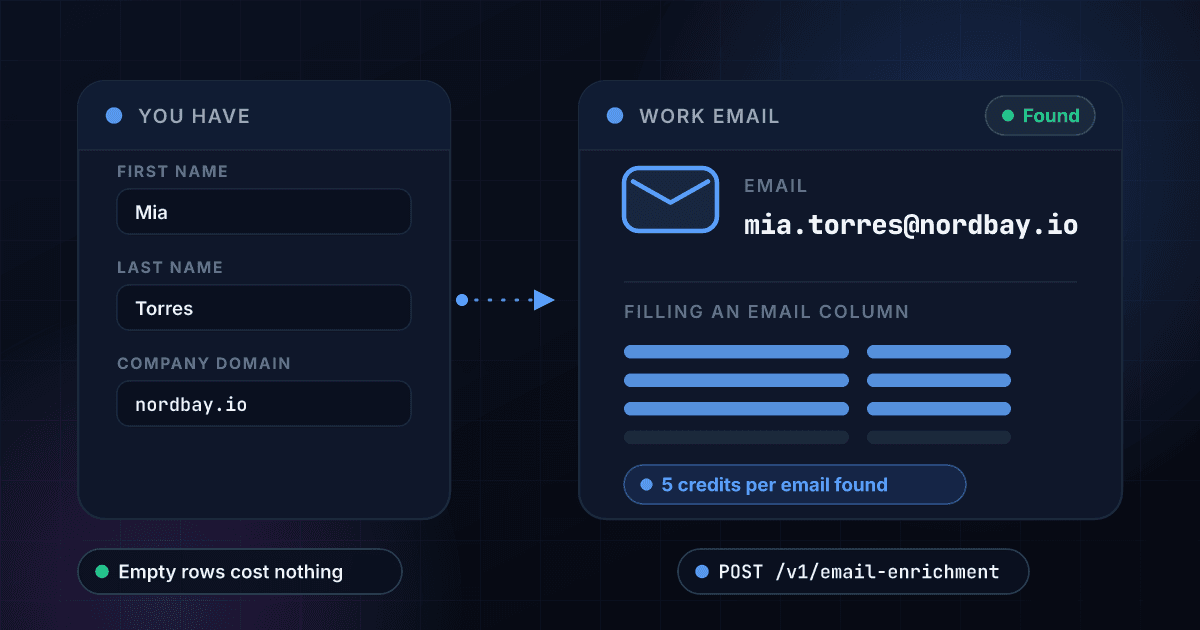
Send a first name, a last name and a company domain. Get back one work email, or an honest null when there is nothing to return. Only charged when an email is found, so a list full of misses does not run up a bill.
5
Credits per email found
About $0.010 to $0.025 by plan
0
Credits when nothing is found
A miss returns 200 and bills nothing
15x
Cheaper than B2B Contact Append
That one is 75 credits per match
7 days
Cache window on repeat lookups
Your own repeat costs nothing
What Email Enrichment gives you
Name and domain in, email out
Send a first name, a last name and the company domain. Back comes one work email on classification.email, or null with a plain message when there was nothing to find. The same shape every time, match or miss.
- Three required inputs
- One work email or null
- Same JSON shape every time
- camelCase or snake_case accepted
Only charged on a match
A no-match is a normal 200 response that deducts zero credits. That rule holds on the API, in the dashboard and in bulk CSV jobs, so a rough list costs you only the rows that actually resolved to an email.
- Zero credits on a miss
- Same rule in bulk jobs
- Misses still return 200
- No minimum commitment
About two cents an email
5 credits per email found is roughly $0.025 on the Starter plan and $0.018 on Growth, dropping to about $0.010 on Enterprise. A thousand found emails lands around $18 to $25 on the mainstream plans, and the rows that come back empty add nothing to that total.
- 5 credits per match
- ~$0.018 each on Growth
- ~$0.025 each on Starter
- Misses are free
Find it here, verify it with Email Validation
Enrichment finds the address. Run the matches through Email Validation before they enter a sequence.
- Finds the address
- Pair it with Email Validation
Bulk CSV with three columns
Upload a CSV with firstname, lastname and domain columns and every row runs the same lookup. The output puts Status, Error, Matched, Email, Domain, First Name, Last Name and Credits Used next to your input column.
- firstname, lastname, domain
- Credits Used shown per row
- Template in the dashboard
- Same credits, one API key
Repeat lookups hit cache
Results are cached for your organization for 7 days. Run the same person and domain again and the response comes back with cache_hit true, free for you. Send bypass_cache true when you want the search run fresh.
- 7 day cache window
- cache_hit and cached_at returned
- Your own repeat is free
- bypass_cache forces a fresh call
How a lookup runs
Send the three fields
First name, last name and company domain, all required. Send fullName instead and we split it at the first space, so a single word will not do. snake_case field names work too.
$ POST /api/v1/email-enrichment
"firstName": "Jane"
"lastName": "Doe"
"domain": "acme.com"
> all three are required
We normalize and search
The domain is trimmed to a bare hostname, so https://www.acme.com/careers becomes acme.com. Then we check the 7-day cache and, if nothing is there, run the search.
Domain normalized to acme.com
Name split into first and last
Cache checked, 7 day window
Searching for a work email...
Take the email or the null
A match returns the address and bills 5 credits. A miss returns a 200 with matched false, a plain message and zero credits, so nothing about the result is hidden behind an error.
matchedtrue
emailjane.doe@acme.com
credits_used5
One endpoint. A name and a company domain in, structured data out.
Same authentication, same credit balance, and the same response envelope as every other 1Lookup product. If you have already integrated one endpoint, this one is a URL change.
curl -X POST https://app.1lookup.io/api/v1/email-enrichment \
  -H "Authorization: Bearer $API_KEY" \
  -H "Content-Type: application/json" \
  -d '{
        "firstName": "Jane",
        "lastName": "Doe",
        "domain": "acme.com"
}'{
"success": true,
"data": {
"classification": {
"matched": true,
"email": "jane.doe@acme.com",
"domain": "acme.com",
"first_name": "Jane",
"last_name": "Doe",
"message": null
},
"insights": {
"email_enrichment": {
"email": "jane.doe@acme.com",
"domain": "acme.com",
"first_name": "Jane",
"last_name": "Doe",
"message": null
}
},
"metadata": {
"credits_used": 5,
"cache_hit": false,
"data_sources": ["1lookup", "email_intelligence"]
}
}
}One email, or an honest null
Every match returns the same short list of contact fields, shown here alongside the standard risk and recommendation blocks that ship with every 1Lookup response. The two rows marked Not included are there on purpose: knowing what this endpoint does not return is what stops it being used for the wrong job.
- Matchedtrue
- Emailjane.doe@acme.com
- Domainacme.com
- First nameJane
- Last nameDoe
- Messagenull
- Cache hitfalse
- Data sources1lookup, email_intelligence
- Credits used5
- Deliverability checkNot included
- Title and companyNot included
{
  "success": true,
  "data": {
    "classification": {
      "matched": true,
      "email": "jane.doe@acme.com",
      "domain": "acme.com",
      "first_name": "Jane",
      "last_name": "Doe",
      "message": null
    },
    "insights": {
      "email_enrichment": {
        "email": "jane.doe@acme.com",
        "domain": "acme.com",
        "first_name": "Jane",
        "last_name": "Doe",
        "message": null
      }
    },
    "metadata": {
      "credits_used": 5,
      "cache_hit": false,
      "data_sources": ["1lookup", "email_intelligence"]
    }
  }
}Every field you get back
No hidden tiers. Every field below is returned on a successful lookup at the price shown above.
Match
- matched
- domain
- first_name
- last_name
- message
Insight
- email_enrichment.email
- email_enrichment.domain
- email_enrichment.first_name
- email_enrichment.last_name
- email_enrichment.message
Billing and cache
- credits_used
- credits_remaining
- cache_hit
- cached_at
- data_sources[]
Request echo
- id
- type
- input
- timestamp
- processing_time_ms
Who uses Email Enrichment
Outbound teams building lists
You scraped or exported a few thousand names with the company each person works at, and no way to reach any of them. Run the list through and the email column fills in. Only the rows that resolve cost anything, so the misses in a scraped list do not decide your bill.
RevOps filling CRM gaps
Contact records carry a name and an account domain but no usable email, which quietly breaks routing and sequencing. Enrich them in one batch and write the matches back. The rows that stay empty are the same rows your reps already could not work.
Agencies running client campaigns
A client hands over a spreadsheet of contacts at target accounts. Fill in the emails at 5 credits a match, pass them through Email Validation before the first send, and invoice on matched records rather than on attempts.
Recruiters contacting candidates
You have a shortlist of names and the companies they currently work at, sourced from public profiles. Turn each one into a work email so outreach does not depend on a platform inbox. A candidate you cannot find costs you nothing.
Frequently asked questions
What does Email Enrichment return?
One work email, or null. The response carries classification.email with the address, the domain, first_name and last_name you sent echoed back for matching, and a message field that explains a miss. Alongside it come the standard risk and recommendation blocks every 1Lookup product returns. What you will not find is a job title, company name, phone number or LinkedIn URL: those belong to B2B Contact Append.
What do I have to send?
A first name, a last name and a company domain. All three are required and a request missing any of them comes back as a 400. You can send fullName or name instead and we split it at the first space to fill the two name fields, but a single word fails because the last name ends up empty. The domain is normalized for you: https://, www. and any path are stripped.
Am I charged when no email is found?
No. A miss is a normal 200 response with matched false and zero credits deducted, and that holds on the API, in the dashboard and in bulk CSV jobs. Results are also cached for your organization for 7 days, so repeating your own lookup inside that window costs nothing either. Send bypass_cache true when you want the search run again.
Is the email verified or deliverable?
No, and this is the limit worth knowing before you buy. Email Enrichment finds an address, it does not test one. There is no SMTP handshake, no MX check, no catch-all detection and no bounce score anywhere in the response, so nothing here promises the address will deliver. If it is going into a sequence, run it through Email Validation first.
What match rate should I expect?
We do not publish one, because we have not measured a number we would stand behind. There is also an honest reason a rate is hard to state: an upstream problem and a genuine miss come back looking identical, so a null does not prove the person has no findable email. The billing is your protection. You pay for the emails you get and nothing for the rest.
How is this different from B2B Contact Append?
Price and depth. Email Enrichment is the cheap, high-volume finder: 5 credits, one work email, nothing else. B2B Contact Append costs 75 credits per match and returns a work email with a confidence rating plus job title, seniority, department, employer details and employment history. Use this one to fill an email column across thousands of rows, and that one when a single record has to be complete.
Can I run a whole list at once?
Yes. Bulk CSV takes three columns, firstname, lastname and domain. A row missing any of the three is skipped rather than failing the batch, so the rest of the file still runs. The dashboard has a template with the exact header row. Your output adds Status, Error, Matched, Email, Domain, First Name, Last Name and Credits Used beside your input column, and the rows that found nothing show zero credits used.
Can it find personal or consumer email addresses?
No. This is a work-email-at-a-company-domain lookup and nothing else. The domain is required and has to contain a dot, so there is no way to point it at a private individual with no employer. If you are trying to reach a consumer rather than someone at a company, Skip Trace is the product for that side of the data.
Enrichment finds an address but does not test it. Before the first send, read how to check if an email address is valid.