The SSL Certificate Check API tells you when a domain's HTTPS certificate expires and whether browsers trust it
Send a domain and get the verdict on the HTTPS certificate it serves: the days left, the issuer, the names it covers, whether browsers trust it, the key and the TLS version. 2 credits per certificate read, whatever its verdict, and nothing when there is no certificate to read.
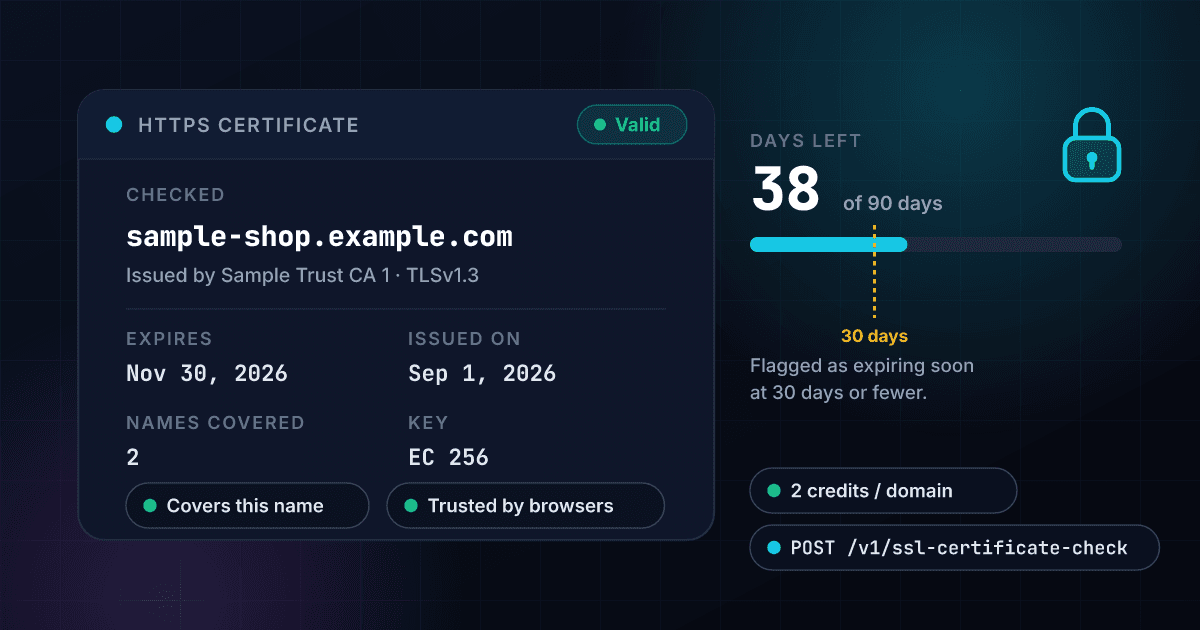
2
Credits per certificate read
about $0.01 on Starter
0
Credits when there is no certificate
no HTTPS, no charge
7
Verdicts
from valid to not trusted
30
Days left that flag a renewal
expiring soon at 30 or fewer
The status turns to expiring soon at 30 days left and to expired once the date has passed
More than 30 days left is valid, 30 or fewer is expiring soon and a date in the past is expired. Three invented domains show where each one sits on the scale.
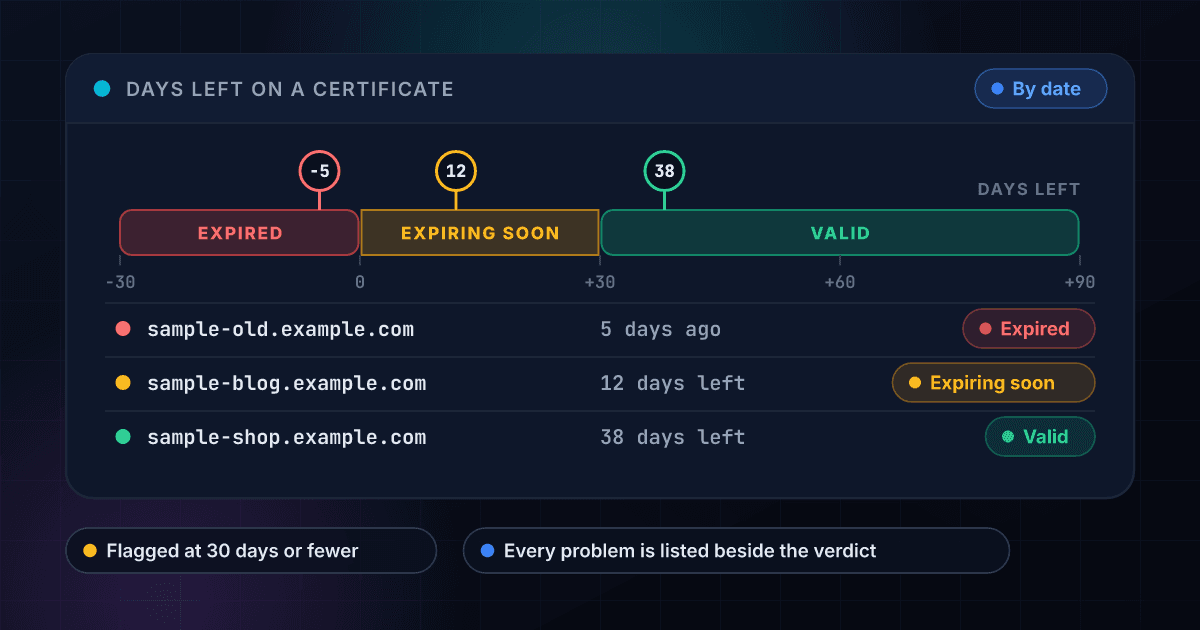
A certificate comes back as a verdict with the facts behind it in one flat payload.
The verdict is worked out for you
The response carries one status: valid, expiring soon, expired, not valid yet, issued for a different name, self-signed or not trusted by browsers. When a certificate has several problems, the status is the first in a fixed order and the issues list names every one of them.
- Seven statuses in one field
- Every problem listed in plain words
- A recommended next step
- Approve or review as the primary action
Days left and dates come ready to compare
The days remaining, the start and end dates and the lifetime in days are plain numbers and dates, so a script can flag every certificate with 30 days or fewer left without parsing a date format.
- Days remaining as a number
- Start and end dates as YYYY-MM-DD
- Lifetime of the certificate in days
- Expiring soon at 30 days or fewer
Trust and name coverage are separate answers
One field says whether the chain leads to an authority browsers trust, and another says whether the domain you sent is one of the names on the certificate. A wildcard covers one label and never the bare domain.
- Trusted by browsers or not
- Covers the name or not
- Self-signed and wildcard flags
- The trust error when there is one
An expired or self-signed certificate is read, not refused
The connection is made with certificate checks switched off, so a broken certificate comes back as an answer with its status instead of a failed call. Any certificate that is read is billed, whatever its verdict.
- Expired certificates are read
- Self-signed certificates are read
- Wrong-name certificates are read
- Each one is a billed answer
The connection details come with the certificate
The TLS version and the cipher the connection used, the key type, size and curve, the serial number, the SHA-256 fingerprint, the issuing organization, up to 100 names and the chain link by link all arrive in the same response.
- TLS version and cipher
- Key type, size and curve
- Serial number and SHA-256 fingerprint
- Up to 100 names and the chain
A domain with no certificate costs nothing
You are charged 2 credits only when a certificate is read. A name that is not in DNS, a server that accepts no secure connection, a private address, a mistyped input and a connection that did not finish cost 0, and that holds for bulk CSV jobs as well as the API.
- Zero credits with no certificate
- Bulk CSV with a domain column
- The same credits as every other product
- One API key for all of it
A domain goes in and a certificate verdict comes out
Send a domain
POST a domain, a web address or an email address. An IP address, a single word or a bare public suffix is refused with a clear error and costs nothing.
$ POST /api/v1/ssl-certificate-check
"domain": "sample-shop.example.com"
> a domain name, not an IP address
We read the certificate
1Lookup looks the name up, connects to a public address on port 443, asks for the certificate and closes the connection. Expired, self-signed and wrong-name certificates are read and not refused, and a private or internal address is never connected to.
Name resolved to public addresses
One secure connection on port 443
Certificate and chain read
Verdict worked out
Get the verdict, flat and structured
The status, the days left, the dates, the issuer, the names and the problems arrive in one JSON payload. A certificate that is read bills 2 credits, and a domain with no certificate to read bills nothing.
statusvalid
expires2026-11-30 (38 days)
issuerSample Trust CA 1
One endpoint checks a domain and works like every other 1Lookup call.
Same authentication, same credit balance, and the same response envelope as every other 1Lookup product. If you have already integrated one endpoint, this one is a URL change.
curl -X POST https://app.1lookup.io/api/v1/ssl-certificate-check \
  -H "Authorization: Bearer $API_KEY" \
  -H "Content-Type: application/json" \
-d '{ "domain": "sample-shop.example.com" }'{
"classification": {
"found": true,
"host": "sample-shop.example.com",
"certificate_status": "valid",
"days_remaining": 38,
"valid_to": "2026-11-30",
"valid_from": "2026-09-01",
"issuer": "Sample Trust CA 1",
"common_name": "sample-shop.example.com",
"hostname_matches": true,
"trusted": true,
"self_signed": false,
"wildcard": false,
"protocol": "TLSv1.3",
"key_type": "EC",
"key_bits": 256,
"alt_names_count": 2,
"issue_count": 0,
"main_issue": null,
"checked_at": "2026-10-23"
},
"insights": {
"ssl_certificate_result": {
"host": "sample-shop.example.com",
"ip_address": "203.0.113.10",
"status": "valid",
"issues": [],
"certificate": {
"common_name": "sample-shop.example.com",
"alt_names": ["sample-shop.example.com", "www.sample-shop.example.com"],
"alt_name_count": 2,
"issuer": "Sample Trust CA 1",
"issuer_organization": "Sample Trust Services",
"valid_from": "2026-09-01",
"valid_to": "2026-11-30",
"days_remaining": 38,
"lifetime_days": 90,
"serial_number": "0A1B2C3D4E5F",
"fingerprint_sha256": "AA:BB:CC:DD:EE:FF:00:11:22:33:44:55:66:77:88:99:AA:BB:CC:DD:EE:FF:00:11:22:33:44:55:66:77:88:99",
"key_type": "EC",
"key_bits": 256,
"curve": "prime256v1",
"wildcard": false,
"self_signed": false
},
"trust": { "trusted": true, "error_code": null, "hostname_matches": true },
"connection": { "protocol": "TLSv1.3", "cipher": "TLS_AES_256_GCM_SHA384" },
"chain": [
{ "subject": "Sample Trust CA 1", "issuer": "Sample Trust Root", "valid_to": "2030-01-01" },
{ "subject": "Sample Trust Root", "issuer": "Sample Trust Root", "valid_to": "2035-01-01" }
],
"data_source": "tls_handshake"
}
},
"recommendations": {
"primary_action": "APPROVE",
"secondary_actions": [],
"user_message": "The certificate for sample-shop.example.com is valid and expires on 2026-11-30 (38 days from now), issued by Sample Trust CA 1.",
"business_rules": { "billable": true, "found": true, "issues": 0 }
},
"metadata": { "credits_used": 2, "cache_hit": false }
}A column of domains goes in and one row per domain comes out
Upload a CSV with a domain column and download a result file with each domain's status, days remaining, expiry date and issuer. The three domains here are invented.
- 1domain
- 2sample-shop.example.com
- 3sample-old.example.com
- 4sample-parked.example.com
| domain | Found | Certificate Status | Days Remaining | Valid To | Issuer | Credits Used |
|---|---|---|---|---|---|---|
| sample-shop.example.com | Yes | valid | 38 | 2026-11-30 | Sample Trust CA 1 | 2 |
| sample-old.example.com | Yes | expired | -5 | 2026-10-18 | Sample Trust CA 1 | 2 |
| sample-parked.example.com | No | 0 |
Fourteen more columns in the file, among them Checked Host, Valid From, Covers The Name, Trusted, TLS Version, Key Bits, Problems Found, Main Problem and Why No Certificate.
One row in, one row out
Every domain becomes one row, so a list of 500 domains is a spreadsheet of 500 rows you can sort by days remaining or filter by status.
A domain with no certificate is a free row
A name that is not in DNS, one that accepts no secure connection or one that points to a private address comes back as a row with the reason in its own column and costs 0 credits.
A broken certificate is an answer, not an error
An expired, self-signed or wrong-name certificate is read and returned as a row with its status, so you find the broken ones by filtering that column.
One call returns the verdict on a domain's HTTPS certificate
One call turns a domain from a list, a form or a monitor into a verdict on the certificate it serves: whether it is valid, when it expires, who issued it, whether it covers the name and whether browsers trust it, with the raw JSON your code receives beside it. The site, the authority and the dates here are invented.
- Domainsample-shop.example.com
- StatusValid
- ExpiresNov 30, 2026 (38 days left)
- Issued onSep 1, 2026
- Issued bySample Trust CA 1
- Trusted by browsersYes
- Covers this nameYes
- TLS versionTLSv1.3
- KeyEC 256, curve prime256v1
- Names covered2
- Lifetime90 days
- Problems foundNone
{
  "classification": {
    "found": true,
    "host": "sample-shop.example.com",
    "certificate_status": "valid",
    "days_remaining": 38,
    "valid_to": "2026-11-30",
    "issuer": "Sample Trust CA 1",
    "hostname_matches": true,
    "trusted": true,
    "protocol": "TLSv1.3",
    "issue_count": 0,
    "checked_at": "2026-10-23"
  },
  "insights": {
    "ssl_certificate_result": {
      "status": "valid",
      "issues": [],
      "data_source": "tls_handshake"
    }
  },
  "metadata": { "credits_used": 2 }
}
Every certificate check returns the same fields at one flat price.
Every certificate that is read returns the same fields and costs the same 2 credits, whatever its verdict.
These fields hold the verdict and every problem found.
- found
- host
- ip_address
- certificate_status
- issue_count
- main_issue
- issues[]
These fields hold the dates and the days left.
- valid_from
- valid_to
- days_remaining
- lifetime_days
- checked_at
These fields name the issuer and the names covered.
- issuer
- issuer_organization
- common_name
- alt_names[]
- alt_names_count
- wildcard
These fields say whether browsers trust the certificate.
- trusted
- hostname_matches
- self_signed
- error_code
These fields describe the key and the connection.
- key_type
- key_bits
- curve
- protocol
- cipher
- serial_number
- fingerprint_sha256
- chain[]
Hosting teams, agencies and security teams read the certificate instead of waiting for a browser warning.
Hosting and platform teams watching customer domains
Run every customer domain through a bulk job each week and list the ones with 30 days or fewer left, so a renewal that failed is found before the customer sees a browser warning.
Web agencies launching, moving or taking over a site
Read the certificate a client's domain serves, who issued it and which names it covers before a launch, a migration or a handover, and keep the result with the project.
Security and IT teams auditing a domain inventory
Check a list of domains for expired, self-signed and wrong-name certificates, keys that are too small and old TLS versions, then sort the results by status.
Developers building a status page or an uptime tool
Call the API on a schedule for each monitored domain and alert when certificate_status stops being valid, or when days_remaining falls under your own threshold.
Lead-list and data teams cleaning company websites
Run a list of company domains and set aside the names that do not exist in DNS or accept no secure connection before anyone spends time on outreach.
Procurement and compliance reviewers
Record the issuer, the key, the TLS version and the dates that a vendor's public site presented on the day you reviewed it, with the checked_at date beside them.
Every certificate that is read is billed, and every other answer is free
A certificate that is read returns the full answer, even when it is expired. A name with no certificate to read, an input that is refused and a connection that does not finish cost nothing.
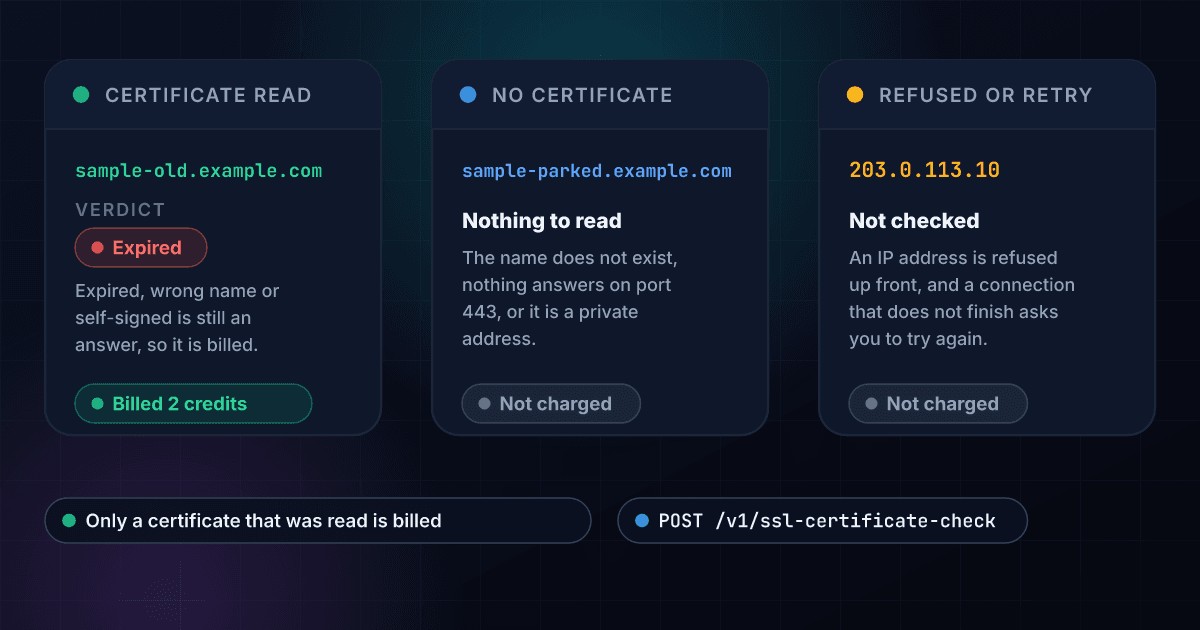
These are the questions people ask before they check their first domain.
What does the SSL Certificate Check API return?
Send a domain and it connects to it over HTTPS, reads the certificate the server presents and returns a verdict (valid, expiring soon, expired, not valid yet, issued for a different name, self-signed or not trusted by browsers), the days left, the issue and expiry dates, the issuer, the names the certificate covers, whether browsers trust the chain, the key, the TLS version and the cipher, a plain list of the problems found and a recommended next step.
How does it get the certificate?
1Lookup looks the name up, then opens one secure connection to a public address on port 443 with your name sent as the site name, and sends no data after the handshake. The connection closes straight away, with a clock of 8 seconds for the whole attempt and at most three addresses tried, IPv4 first. The read is made with certificate checks switched off on purpose, so an expired, self-signed or wrong-name certificate is read and shown rather than refused, and the verdict is worked out afterwards.
How is the verdict decided?
The first match wins, in this order: expired, not valid yet, issued for a different name, self-signed, not trusted by browsers, expiring soon (30 days or fewer left) and otherwise valid. An RSA key under 2048 bits adds a problem to the list without changing the status. A wildcard covers exactly one label and never the bare domain, and the certificate's common name is used only when it lists no names.
How much does a certificate check cost?
2 credits per certificate read, about $0.01 on the Starter plan. You are charged whenever a certificate is read, whatever its verdict, because an expired, self-signed or wrong-name certificate is an answer too. A name that is not in DNS, a server that accepts no secure connection, a private address, a refused input and a connection that did not finish all cost 0 credits, in the API, the dashboard and bulk jobs.
Which domains come back with no certificate?
Three cases return found: false with a reason, a recommended next step and no charge, at 200 OK. The name is not in DNS (no_such_host), nothing accepts connections on port 443 at any of its addresses (no_https), or the name points to a private or internal address that is never connected to (blocked).
What happens when a connection times out?
It is never reported as no certificate, because the fault may be the site's or ours. The API answers 503 with a Retry-After header and a message to try again, the lookup is not charged and the answer is not remembered.
Which inputs does it accept?
A domain, a web address or an email address, cut down to a lowercase domain name. A www. or other subdomain is kept as written, because each name can present its own certificate. An IP address, a single word, a bare public suffix or a wildcard is refused with a 400 error before anything is looked up and at no cost.
How fresh is the answer, and can I ask again?
Every new request makes a new connection. The same domain asked again by the same user within a day is answered from the cache at no charge, and every result shows the day it was checked in checked_at. Send bypass_cache: true to read the certificate again, for example right after a renewal.
What does it not check?
It reads port 443 only, so mail servers and other ports are out. It makes one connection from our network, so a site that serves a different certificate by region, or that blocks our addresses, can read differently from how a visitor sees it. It does not check whether a certificate was revoked, does not search Certificate Transparency logs and does not test or grade the protocols and cipher suites a server supports. It reports the protocol and cipher the connection used.
Can I check a list of domains at once?
Yes. Upload a CSV with a domain column and you get a row per domain with its status, days remaining, dates, issuer, whether it covers the name, whether it is trusted, the TLS version, the key and the main problem. A domain with no certificate is a free row with the reason in its own column. The price stays at the same credits per certificate read, however long the list is.
Can it watch my certificates and alert me?
No. It checks when you ask. To keep watch, call it on a schedule for each domain and act on certificate_status or days_remaining, for example by flagging any certificate that comes back as expiring soon. A service that monitors Certificate Transparency logs for new certificates does a different job, and the SSLMate comparison sets the two side by side.
To check a single domain before you write any code, run it through the free SSL certificate checker.
The certificate shows how a site is set up, and these products check the rest.
Here is how checking a certificate with 1Lookup compares with the other ways to read one.
Each page sets a rival's plans and prices beside ours and says where the rival does the job better. Every figure carries its source and the date it was checked.