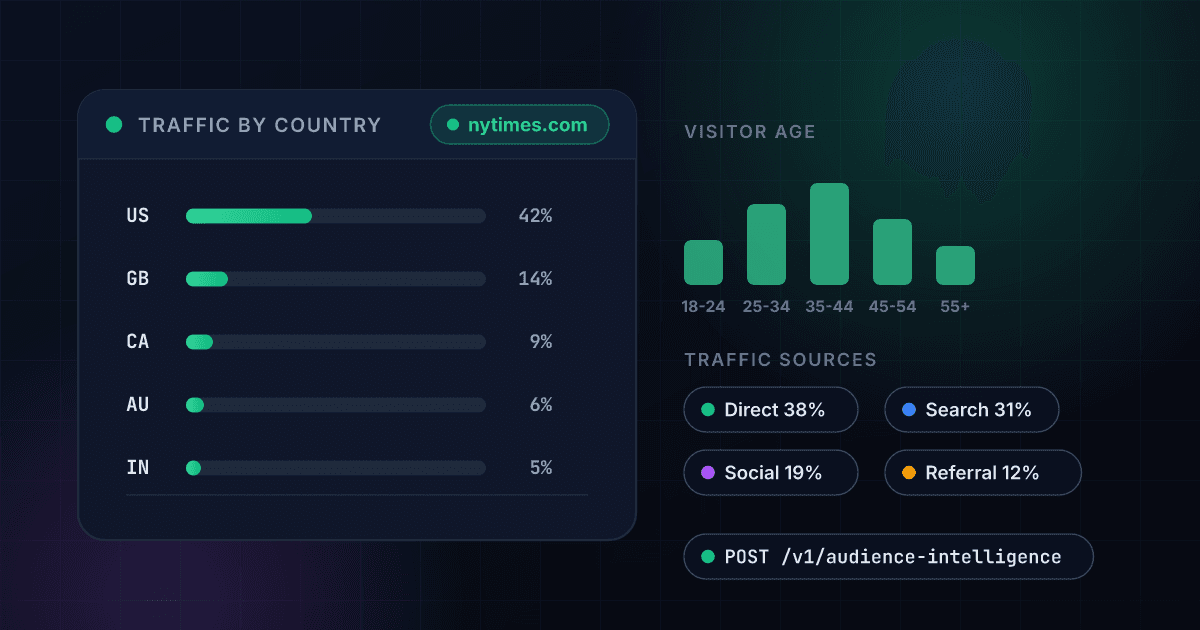
What Website Audience Intelligence gives you
Six reports, one endpoint
Traffic summary, geography, age and gender, income, traffic sources and onward destinations. Pick the one that answers your question.
- Traffic summary
- Country breakdown
- Age, gender, income
- Sources and destinations
Audience demographics
Age and gender split plus income band for a site's visitors — the fields that decide whether an audience is actually yours.
- Age and gender split
- Income bands
- Comparable across sites
- No panel setup
Where traffic comes from and goes
The specific sites sending visitors in, and the sites they visit next. A direct read on partnerships, competitors and referral opportunities.
- Referring sites
- Onward destinations
- Channel mix
- Competitor adjacency
Per report, not per seat
No annual platform contract and no per-user licence. Pay for the reports you actually pull.
- No subscription
- No seats
- Credits roll over
- One API key
Empty results are free
Smaller domains fall below the dataset's coverage threshold. When a report has no data you are not charged for asking.
- No charge when empty
- Honest coverage limits
- Safe to explore
- Predictable spend
Flat price per call
The price does not scale with how many rows come back, so a site with 200 referring countries costs the same as one with 3.
- Flat 86 credits
- No row multipliers
- Predictable at scale
- One report per call
One endpoint. A domain in, structured data out.
Same authentication, same credit balance, and the same response envelope as every other 1Lookup product. If you have already integrated one endpoint, this one is a URL change.
curl -X POST https://app.1lookup.io/api/v1/audience-intelligence \
  -H "Authorization: Bearer $API_KEY" \
  -H "Content-Type: application/json" \
-d '{ "domain": "nytimes.com", "report": "geo" }'{
"classification": {
"found": true,
"target": "nytimes.com",
"report": "geo",
"report_label": "Traffic by country",
"row_count": 24
},
"insights": {
"audience_intelligence_result": {
"rows": [
{
"country": "US",
"traffic": 1250000,
"traffic_share": 0.42,
"bounce_rate": 0.51
}
]
}
}
}Every field you get back
No hidden tiers. Every field below is returned on a successful lookup at the price shown above.
Report meta
- target
- report
- report_label
- row_count
Traffic (geo)
- country
- traffic
- traffic_share
- unique_visitors
Engagement
- bounce_rate
- pages_per_visit
- avg_visit_duration
Demographics
- age_bracket
- female_share
- male_share
- income_band
Who uses Website Audience Intelligence
Agencies pitching new business
Walk into the room already knowing the prospect's traffic, where it comes from and who their audience is — including whether it matches the audience they think they have.
Media buyers picking placements
Before committing budget to a publication, check that its audience age, income and geography actually overlap with your buyer.
Competitive analysts
See which sites feed a competitor's traffic and which sites their visitors go to next — the partnerships and substitutes their strategy depends on.
Sales teams qualifying enterprise accounts
Use traffic scale and audience geography as a qualification signal on inbound accounts, before a rep spends time on discovery.
Frequently asked questions
What does Website Audience Intelligence tell me?
Who visits a website. Six reports are available: a traffic summary, traffic broken down by country, audience age and gender, audience income band, where the traffic comes from, and which sites visitors go to next.
Is this demographics about a person or a website?
A website. These are the aggregate characteristics of a site's visitors, not data about any named individual. If you need person-level or address-level demographics, this is not that product — and we do not currently sell one.
How much does it cost?
86 credits per report. Each report is a separate priced call upstream, so a five-report demographic profile costs five lookups. We price them individually rather than bundling, because bundling at one report's price would be a loss.
Why does a small website return nothing?
The underlying Trends dataset only covers domains above a traffic threshold. Smaller sites legitimately have no data, and we do not charge when a report comes back empty.
How does this compare to a web analytics subscription?
Web analytics platforms sell audience data as seat-based subscriptions, often with sales-gated pricing. Here you pay per report with no plan, no seats and no minimum, which suits teams that need audience data occasionally rather than daily.
What can I actually do with it?
Three things most often: qualify whether a prospect's audience matches your buyer, size a competitor's traffic and where it comes from, and pick media placements by checking whether a publication's audience is actually the one you want to reach.