Job Change Monitoring API: an event the week they move
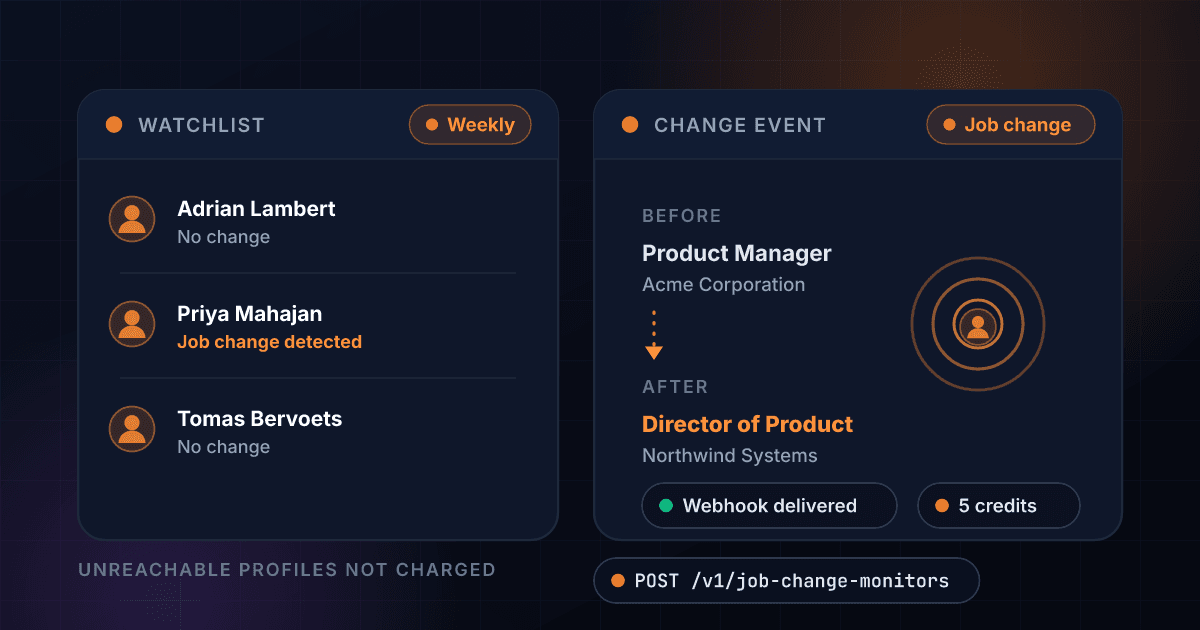
Watch a contact list and get a webhook, email and API event when someone changes company or title. 5 credits per contact per weekly recheck, and unreachable profiles are never charged.
5
Credits per contact per check
About $0.018 on the Growth plan
~$38
Per month to watch 500 contacts
2,500 credits per weekly run
1 week
Max lag from move to event
Every contact rechecked weekly
0
Credits when unreachable
List management is free too
What Job Change Monitoring gives you
The highest-converting outbound trigger
A contact who just started a new role has budget, a mandate to change things, and a memory of what worked at the last job. Job Change Monitoring turns that moment into an event in your stack instead of something a rep stumbles on weeks later.
- Weekly recheck of every contact
- Event within a week of the move
- Company and title changes
- Before/after on every event
Events pushed to you, not exports to diff
No re-enriching the whole list every month to see what moved. Each change lands as one event with the before and after title, company and location, delivered to your webhook, sent by email, and queryable from the events endpoint.
- Webhook delivery
- Email alerts
- Events endpoint in the API
- Four event types
Priced to watch the whole list
5 credits per contact per weekly recheck, about $0.018 per check on the Growth plan. Watching 500 contacts costs 2,500 credits a week, roughly $38 a month, about 8 cents per contact.
- 5 credits per contact per check
- ~$0.018 per check on Growth
- 500 contacts = 2,500 credits/week
- ~8 cents per contact per month
A baseline first, so week one is quiet
The first check on each contact records the title, company and location we saw as a single baseline event. Change events only fire when a later check differs from it, so you never get a wave of phantom changes the day you load a list.
- One baseline event per contact
- Billed like any check: 5 credits
- No phantom change events
- Applies to contacts added later too
Unreachable is never charged
If a profile cannot be checked in a given week, you get a profile_unreachable event and pay nothing for that contact that week. List management is free too: creating monitors, adding and removing contacts costs nothing. You pay for completed checks, full stop.
- 0 credits when unreachable
- Free monitor management
- Free contact add and remove
- Billing follows the current list
Stores the delta, not the dossier
We keep only what change detection needs: the last seen title, company and location per contact. No photos, no connection graphs, no profile archive, and removing a contact deletes its snapshot.
- Title, company, location only
- No full-profile storage
- Snapshot deleted with the contact
- Least data that does the job
How a watch list runs
Create a monitor, load contacts
Create a monitor with email alerts and a webhook URL, then add contacts by public profile URL with a label your team will recognize. Plans include 3 monitors of up to 500 contacts each, and adding or removing contacts is always free.
$ POST /api/v1/job-change-monitors
"name": "Q3 pipeline champions"
"alert_email": true
"webhook_url": "https://..."
> then add contacts by profile URL
Every contact rechecked weekly
Each run deep-fetches every profile live, which takes one to three minutes fresh; a repeat read inside the 7-day cache returns instantly. The first check records a quiet baseline, and later checks compare against it. 5 credits per contact per completed check.
Weekly recheck started
Profiles fetched live (1-3 min)
Compared against baseline
2 changes found, sending events...
The event lands in your stack
When a check differs from the baseline, a job_change or title_change event fires with the before and after title, company and location. It hits your webhook, goes out by email and is queryable from the events endpoint. Unreachable profiles cost nothing that week.
typejob_change
beforeHead of Growth, Acme
afterVP Marketing, Northwind
One endpoint. A contact watch list in, structured data out.
Same authentication, same credit balance, and the same response envelope as every other 1Lookup product. If you have already integrated one endpoint, this one is a URL change.
# 1. Create the monitor
curl -X POST https://app.1lookup.io/api/v1/job-change-monitors \
  -H "Authorization: Bearer $API_KEY" \
  -H "Content-Type: application/json" \
  -d '{
        "name": "Q3 pipeline champions",
        "alert_email": true,
        "webhook_url": "https://api.yourcrm.com/hooks/job-changes"
      }'

# 2. Add contacts to it
curl -X POST https://app.1lookup.io/api/v1/job-change-monitors/{id}/contacts \
  -H "Authorization: Bearer $API_KEY" \
  -H "Content-Type: application/json" \
  -d '{
        "contacts": [
          { "profile_url": "https://www.example.com/in/jane-carter", "label": "Champion at Acme" },
          { "profile_url": "https://www.example.com/in/luis-ortega", "label": "Buyer at Northwind" }
        ]
}'{
"success": true,
"data": {
"monitor": {
"id": "cmon_4t8kq2",
"name": "Q3 pipeline champions",
"frequency": "weekly",
"alert_email": true,
"webhook_url": "https://api.yourcrm.com/hooks/job-changes",
"active": true,
"created_at": "2026-07-30T12:00:00.000Z"
},
"webhook_secret": "whsec_..."
}
}The event, the week it happens
A champion moved and this is how you find out. The panel is the event as your team reads it; the JSON beside it is the exact payload posted to your webhook, with the before and after snapshot on board.
- Eventjob_change
- Contact labelChampion at Acme
- Profileexample.com/in/jane-carter
- WasHead of Growth, Acme
- NowVP Marketing, Northwind
- LocationAustin, TX → New York, NY
- Detected2026-07-30
- WebhookDelivered
- Billed5 credits
{
  "id": "evt_j8x2p4",
  "type": "job_change",
  "profile_url": "https://www.example.com/in/jane-carter",
  "label": "Champion at Acme",
  "before": {
    "title": "Head of Growth",
    "company": "Acme",
    "location": "Austin, TX"
  },
  "after": {
    "title": "VP Marketing",
    "company": "Northwind",
    "location": "New York, NY"
  },
  "detected_at": "2026-07-30T07:12:44.000Z"
}
Every field you get back
No hidden tiers. Every field below is returned on a successful lookup at the price shown above.
Monitor
- id
- name
- frequency
- alert_email
- webhook_url
- active
Contact
- id
- profile_url
- label
- last_checked_at
Event
- id
- type
- profile_url
- label
- detected_at
Before / after snapshot
- before.title
- after.title
- before.company
- after.company
- before.location
- after.location
Who uses Job Change Monitoring
SDR teams reviving champions and closed-lost contacts
The champion who loved the product but lost the budget just landed somewhere new. A job_change event the week it happens puts them into a sequence while the new-role honeymoon is still on, before they have picked a vendor.
Agencies running outbound for clients
Load past champions and closed-won contacts into a shared watch list, tagged per client with the label field (plans include 3 monitors, each holding up to 500 contacts). Job-change events become the highest-intent list you send, and the webhook drops each event straight into the client's CRM or sequencer.
Recruiters tracking placements and silver medalists
Watch placed candidates and the strong runners-up from past searches. A title change means a candidate outgrew the seat; a company change means the seat they left just opened. Either way, you hear about it the same week.
Customer success protecting renewals
When the champion at an account leaves, the renewal is suddenly at risk and nobody tells you. Watch your key contact at every account and get the event while there is still time to build a new relationship before the renewal date.
Frequently asked questions
What does Job Change Monitoring do?
You give it a list of contacts, each identified by a public professional profile URL, and it rechecks every profile on a weekly schedule. When someone's company or title changes, you get an event by webhook and email, and the same event is queryable from the API. Every event carries a before and after snapshot of title, company and location, so your team knows exactly what changed.
How is it billed?
5 credits per contact per weekly recheck, charged whether or not anything changed. The check is the work. Two things are never billed: profiles we cannot reach that week (you get a profile_unreachable event and pay nothing for that contact), and list management, meaning creating monitors, adding contacts and removing contacts is free. The first check on each contact is a normal billed check; it establishes the baseline.
What does watching 500 contacts actually cost?
500 contacts × 5 credits = 2,500 credits per weekly run. On the Growth plan that is about $8.80 a week, roughly $38 a month, around 8 cents per contact per month. For scale: Growth includes 85,000 credits a month, so a 500-contact watch list uses about 13% of the allowance and leaves the rest for other products.
How fast do I hear about a change?
Within a week of the change appearing on the contact's public profile, because rechecks run weekly. The checks themselves happen in the background, so nothing in your workflow waits on them, but to be plain about the mechanics: each fresh check is a deep fetch of live professional network data that takes on the order of a minute, not milliseconds. Results are cached for 7 days, so a repeat read of the same profile inside that window returns instantly.
What event types can I receive?
Four: baseline (the first check on a contact, recording what we saw), job_change (the company changed), title_change (same company, new title), and profile_unreachable (the profile stopped being checkable; emitted once when it happens, not repeated every week, and never billed). job_change and title_change events include the before and after title, company and location.
What do you store about my contacts?
Only what change detection needs: the last seen title, company and location for each contact, plus the profile URL and the label you gave it. We do not store the rest of the profile: no photo, no connections, no work history archive. Removing a contact from a monitor deletes its snapshot.
Will the first check flood me with change events?
No. The first check on each contact produces exactly one baseline event and nothing else, so you always know what we saw on day one. Change events only fire when a later check differs from that baseline, so there are no phantom changes the day you upload a list.
Can I change the watch list mid-stream?
Yes, any time, at no cost. Each weekly run checks the list as it stands: contacts you add get a baseline on their first check, and contacts you remove are not checked or billed again. Billing always follows the current list: 5 credits per contact actually checked that week.