The Tech Stack Lookup API shows what any website runs on
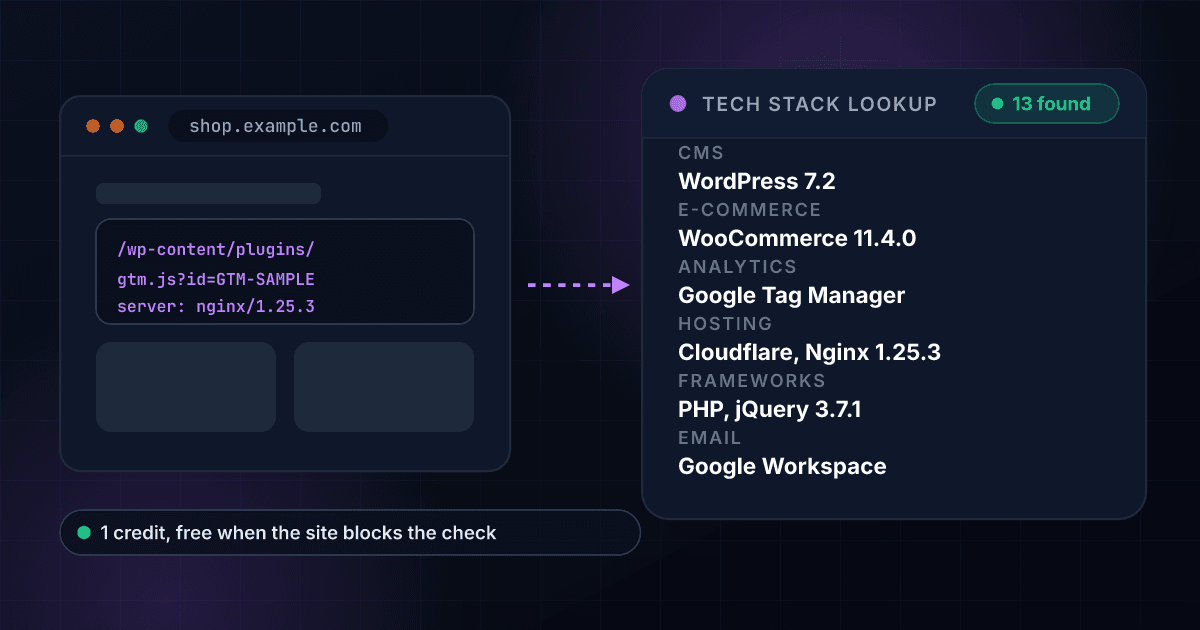
Qualify accounts, enrich a CRM and find the companies on a rival's tools. Send a domain and get its CMS, shop platform, analytics, hosting and email provider, with versions, detected from its headers, HTML and DNS. 1 credit per site that answers, free when a site blocks the check.
1
Credit per site that answers
about $0.005 on Starter
6,000+
Technologies recognised
open fingerprints, kept current
0
Credits when a site blocks the check
or does not exist
11
Groups in every answer
CMS to security
Every site gives its tools away in its headers, its HTML and its DNS
A server header names the web server, a script address names the tag manager, a meta tag names the CMS and its version, and the MX records name the email provider. The site here is invented.
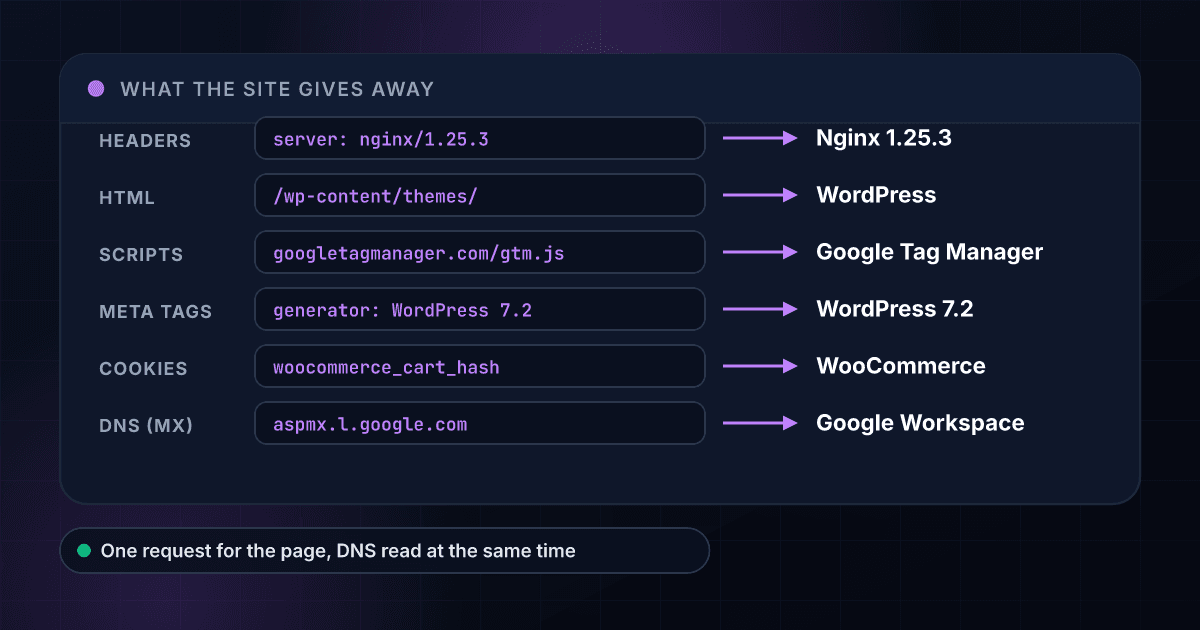
A tech stack comes back grouped, versioned and kept apart from what DNS only hints at.
One website, answered in seconds
Type a domain in the dashboard or send it to the API and get the whole stack back while the prospect is still on your screen: CMS, shop platform, analytics, marketing and chat tools, hosting and frameworks, grouped, with versions.
- 11 groups in every answer
- Versions where the site shows them
- Categories and a confidence score
- Implied tools marked as implied
A whole list in one upload
Drop a CSV of domains and download one row per site with every group in its own column, so a list of 5,000 websites becomes a list you can filter by CMS, shop platform or email provider in one click.
- One row per website
- One column per group
- Blocked and missing sites as free rows
- The same price per site as the API
Straight into your CRM through the API
One POST with your API key returns flat fields made for a CRM column and a structured list for code, on the same key and credit balance as every other 1Lookup product.
- Flat fields for CRM columns
- A structured list for code
- One key for every product
- Results remembered for 1 day
The email provider comes from MX, not from guesswork
The domain's MX records name who handles its email (Google Workspace, Microsoft 365 and others), returned on its own. The DNS host comes from the NS records.
- Email provider from MX
- DNS host from NS
- Read in parallel with the page
- Useful for email and IT sales
Services in DNS are kept apart from the stack
A TXT verification record says someone signed up for a service, not that the site runs on it, so those services come back in their own list and never inflate the stack.
- A cleaner stack
- Signups seen in DNS listed apart
- Which record named each one
- No double counting
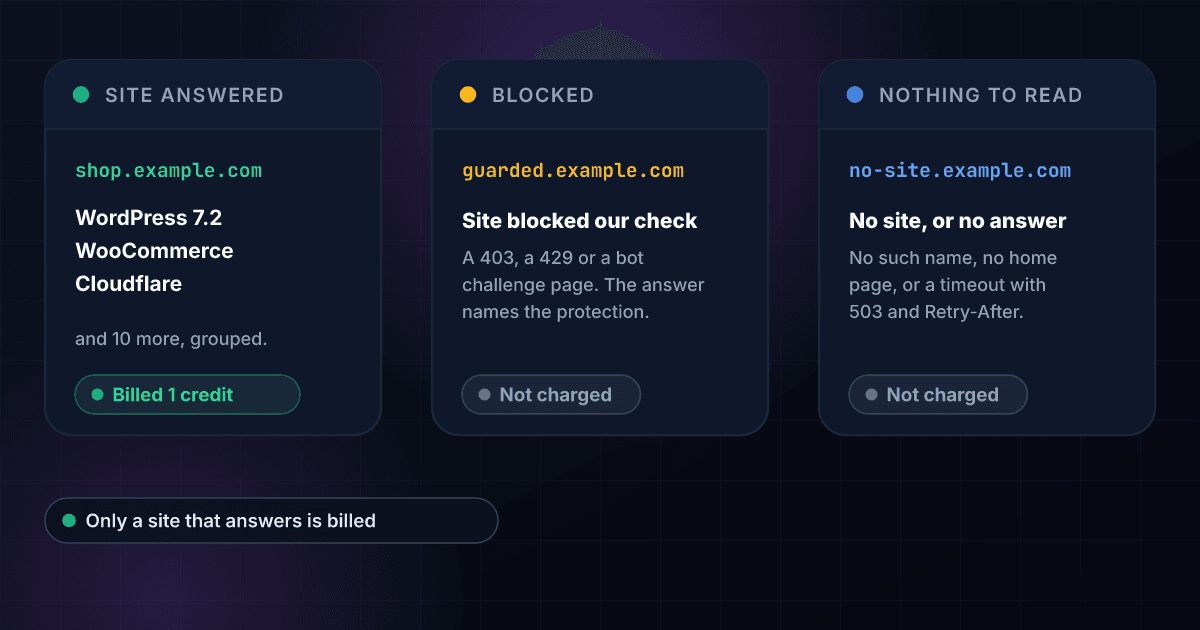
A blocked site is an answer, not a charge
A 403, a 429 or a bot challenge page returns blocked: true with the protection named when it says so. It costs nothing, so a list full of guarded sites never burns your credits.
- blocked: true, at no charge
- The protection named when known
- No charge for missing sites
- No charge for timeouts
Read live, at about half a cent a site
The site is read when you ask, so the answer is today's stack, not last quarter's crawl. 1 credit a site that answers, on the same balance as every other 1Lookup product.
- 1 credit per site that answers
- The day it was read in checked_at
- Bulk CSV with a domain column
- One API key for every product
Safe to point at any address
Every hop is checked before it is connected to: private, loopback, link-local and cloud-metadata addresses are refused, only the first 2 MB is read, and patterns run on a linear-time engine.
- Internal addresses refused
- Redirects checked hop by hop
- A 2 MB cap per page
- A time budget for every pattern
A domain goes in and a grouped stack comes out
Send a domain
POST a domain, a web address or an email address. It is cut down to the site's host name. An IP address or a private name is refused with a clear error and costs nothing.
$ POST /api/v1/tech-stack-lookup
"domain": "sample-shop.example.com"
> a site, an address or an email
We read the home page and DNS at once
1Lookup asks for the home page once and queries MX, TXT, NS and the www CNAME at the same time, with 10 seconds and 2 MB for the page. Internal addresses are refused, redirects included.
Home page read: headers, cookies, HTML
DNS read in parallel: MX, TXT, NS
Matched against 6,000+ fingerprints
Versions read where the site shows them
Get the stack, flat and grouped
Every technology arrives with its version, group and where it was seen, in one JSON payload. A site that answered bills 1 credit; a blocked or missing site bills nothing.
cmsWordPress 7.2
ecommerceWooCommerce 11.4.0
hostingCloudflare | Nginx 1.25.3
email_providerGoogle Workspace
One endpoint reads a site and works like every other 1Lookup call.
Same authentication, same credit balance, and the same response envelope as every other 1Lookup product. If you have already integrated one endpoint, this one is a URL change.
curl -X POST https://app.1lookup.io/api/v1/tech-stack-lookup \
  -H "Authorization: Bearer $API_KEY" \
  -H "Content-Type: application/json" \
-d '{ "domain": "sample-shop.example.com" }'{
"classification": {
"found": true,
"query": "sample-shop.example.com",
"final_url": "https://sample-shop.example.com/",
"http_status": 200,
"technology_count": 6,
"technologies": "WordPress 7.2 | WooCommerce 11.4.0 | Google Tag Manager | Cloudflare | PHP | MySQL",
"cms": "WordPress 7.2",
"ecommerce": "WooCommerce 11.4.0",
"analytics": "Google Tag Manager",
"marketing": null,
"engagement": null,
"hosting": "Cloudflare",
"frameworks": "PHP | MySQL",
"security": null,
"plugins": null,
"media": null,
"other_technologies": null,
"email_provider": "Google Workspace",
"dns_host": "Cloudflare",
"dns_services": "Sample Verification Service",
"detected_from": "Detected from the site's headers, HTML and DNS",
"checked_at": "2026-10-26"
},
"insights": {
"tech_stack_result": {
"technologies": [
{
"name": "WordPress",
"version": "7.2",
"categories": ["CMS", "Blogs"],
"group": "CMS and site builders",
"confidence": 100,
"seen_in": ["meta", "html"],
"implied": false,
"implied_by": null
},
{
"name": "PHP",
"version": null,
"categories": ["Programming languages"],
"group": "Frameworks and languages",
"confidence": 100,
"seen_in": ["implied"],
"implied": true,
"implied_by": "WordPress"
}
],
"email_provider": "Google Workspace",
"dns_services": [
{
"name": "Sample Verification Service",
"categories": ["Miscellaneous"],
"record": "TXT"
}
],
"truncated": false,
"data_source": "site"
}
},
"metadata": { "credits_used": 1, "cache_hit": false }
}A column of websites goes in and one row per site comes out
Upload a CSV with a domain column and download a result file with each site's technology count, its CMS, its shop platform and its email provider, with every group in more columns. The three sites here are invented.
- 1domain
- 2sample-shop.example.com
- 3studio.example.com
- 4guarded.example.com
| domain | Found | Technology Count | CMS | Email Provider | Credits Used |
|---|---|---|---|---|---|
| sample-shop.example.com | Yes | 13 | WordPress 7.2 | Google Workspace | 1 |
| studio.example.com | Yes | 9 | Webflow | Microsoft 365 | 1 |
| guarded.example.com | No | 0 |
More columns in the file, among them Technologies, E-commerce, Analytics, Marketing, Hosting, Frameworks, DNS Host, Services Seen in DNS, Blocked By and Why Nothing Found.
One row in, one row out
Every website becomes one row, so a list of 5,000 domains is a spreadsheet you can filter by CMS or sort by technology count.
A blocked site is a free row
A site that blocks the check, does not exist or has no home page comes back with the reason in its own column and costs 0 credits.
Every group has its own column
Filter the shop platforms, the email providers or the chat tools in one click, without parsing a list.
One call turns a domain into the stack its site runs on
One call turns a domain from a lead list, a CRM or a signup form into the tools behind it, grouped, with versions, beside the raw JSON your code receives. The site and its stack here are invented.
- Websitesample-shop.example.com
- CMSWordPress 7.2
- Shop and paymentsWooCommerce 11.4.0, Stripe
- AnalyticsGoogle Tag Manager, Google Analytics
- MarketingKlaviyo
- ChatIntercom
- HostingCloudflare, Nginx 1.25.3
- FrameworksPHP, MySQL, jQuery 3.7.1
- Email providerGoogle Workspace
- Services seen in DNSSample Verification Service
{
  "classification": {
    "found": true,
    "query": "sample-shop.example.com",
    "technology_count": 13,
    "cms": "WordPress 7.2",
    "ecommerce": "WooCommerce 11.4.0 | Stripe",
    "hosting": "Cloudflare | Nginx 1.25.3",
    "email_provider": "Google Workspace",
    "checked_at": "2026-10-26"
  },
  "metadata": { "credits_used": 1 }
}
Every tech stack lookup returns the same fields at one flat price.
Every site that answers returns the same fields and costs the same 1 credit, however big its stack.
These fields say what was read.
- found
- query
- final_url
- http_status
- technology_count
- checked_at
- detected_from
These fields hold the stack, one column per group.
- technologies
- cms
- ecommerce
- analytics
- marketing
- engagement
- hosting
- frameworks
- security
- plugins
- media
- other_technologies
These fields describe each technology.
- technologies[].name
- technologies[].version
- technologies[].categories
- technologies[].group
- technologies[].confidence
- technologies[].seen_in
- technologies[].implied_by
These fields come from DNS.
- email_provider
- dns_host
- dns_services
- dns_services[].record
These fields say why nothing was found.
- blocked
- protection
- reason
- credits_used
- cache_hit
Built for teams that act on what a website runs on.
Sales teams selling software
Run a lead list and keep the companies on a rival's CMS, shop platform or chat tool, so every call opens with what the prospect already uses.
Agencies and freelancers
See a prospect's CMS, plugins and hosting before the first call, and price the migration or the redesign from what is really there.
Email and IT service providers
Read the email provider from MX for a whole list and find the companies still on the provider you replace.
Product and partnership teams
Check which of your customers run a platform you plan to integrate with, and size the integration before you build it.
Investors and analysts
Read the stack of a list of companies to see who is on a modern shop platform, who still runs an old CMS and who changed tools recently.
Data teams enriching accounts
Add the CMS, shop platform, analytics and email provider to every account record in one bulk job, with blocked sites as free rows.
A site that answers is billed, and every other answer is free
A site that answered returns its full stack. A site that blocked the check, a name that does not exist and a site that did not answer cost nothing.
These are the questions people ask before they look up their first stack.
What does the Tech Stack Lookup API return?
Send a website and it returns the technologies the site runs on, detected from the site's headers, HTML and DNS: the CMS or site builder, the shop platform and payments, analytics and ad tags, marketing and chat tools, hosting, CDN and web server, frameworks and languages, security tools, themes and plugins, each with its version when the site gives it away. It also returns the domain's email provider, read from its MX records, and the services named in its DNS verification records, kept apart from the stack.
Where does the answer come from?
From the site itself, read when you ask. 1Lookup asks for the home page once, the way a browser does, and reads the domain's public DNS at the same time. What it finds (response headers, cookies, meta tags, script addresses, inline scripts, the HTML and the DNS records) is matched against open fingerprints for more than 6,000 technologies. There is no third-party index behind it, so the answer is what the site shows today.
How much does a tech stack lookup cost?
1 credit per site that answers, about $0.005 on the Starter plan. You are charged only when the site answered with its home page. A site that blocks our check, a name that does not exist, a site with no home page and a site that times out cost nothing.
What happens when a site blocks the check?
You get a clean answer and no charge. A site that answers 401, 403, 429 or 451, or shows a bot challenge page instead of its home page, returns found: false with blocked: true and, when the protection says so in its headers or page, its name (for example Cloudflare or DataDome). A visitor's browser may get past a wall our servers cannot, and that answer is free.
Does it return versions?
Yes, where the site gives one away: a version in a generator meta tag, a script address, a header or a file name comes back in the version field (WordPress 7.2, jQuery 3.7.1, Nginx 1.25.3). When the site shows no version, the field is null, never guessed.
Why is the email provider kept apart from the services in DNS?
Because they mean different things. The MX records say who handles the domain's email, so that is a fact about the company, and it comes back as email_provider. A TXT verification record only says someone once signed up for a service, not that the site runs on it, so those come back in their own dns_services list and never join the stack.
Which inputs does it accept?
A domain, a web address or an email address, cut down to the site's host name. An IP address, a single word or a private or internal name is refused with a 400 error before anything is read and at no cost.
Is it safe to point at any address?
Yes. Every address the site resolves or redirects to is checked before it is connected to, and private, loopback, link-local and cloud-metadata addresses are refused, redirects included, with at most 5 redirects. Only the first 2 MB of the page is read, and every pattern runs on a linear-time regular expression engine, so no page can make a lookup run away.
What does it not see?
Only what the home page and DNS show. Tools that a site loads only after its scripts run in a browser (single-page apps, tags added by a tag manager) can be missing, and other pages such as the shop or the login page are not read. It keeps no history of what a site used before and does not sell lists of sites that use a technology.
How fresh is the answer?
The site is read when you ask, and every result shows the day it was read in checked_at. A result is remembered for 1 day. Send bypass_cache: true to read the site again, for example right after a redesign.
Can I look up a list of websites at once?
Yes. Upload a CSV with a domain column and you get one row per site with the technology count, every technology, one column per group, the email provider, the DNS host and the services seen in DNS. A blocked or missing site is a free row with the reason in its own column. The price stays at 1 credit per site that answers.
To see a single site's stack before you write any code, try the free tech stack checker.
The stack shows what a site runs on, and these products tell you the rest.
Here is how a tech stack lookup with 1Lookup compares with the other ways to get one.
Each page sets a rival's plans and prices beside ours, with a calculator for your own volume, and says where the rival does the job better. Every figure carries its source and the date it was checked.