Free Tech Stack Checker
A tech stack checker reads a website's home page, its HTTP headers and its DNS records and matches them against thousands of technology fingerprints. This free tool lists every technology it finds, grouped by what it does, with the version where the site gives it away, and names the domain's email provider.
- No signup needed
- Thousands of technologies recognised
- Versions where the site shows them
Free & rate-limited. No signup required to try.
Example resultSample result for sample-shop.example.com. Run any lookup above and it is replaced with yours.
sample-shop.example.com runs on 13 technologies
Including WordPress, WooCommerce, Stripe.
Detected from the site's headers, HTML and DNS. Tools a site loads only after its page runs in a browser can be missing.
Source: RFC 9110: HTTP Semantics, published by IETF.
Need this at scale? Tech Stack Lookup API
Check a whole list of websites at once: every technology, its version and the email provider in one call, at 1 credit per site that answers.
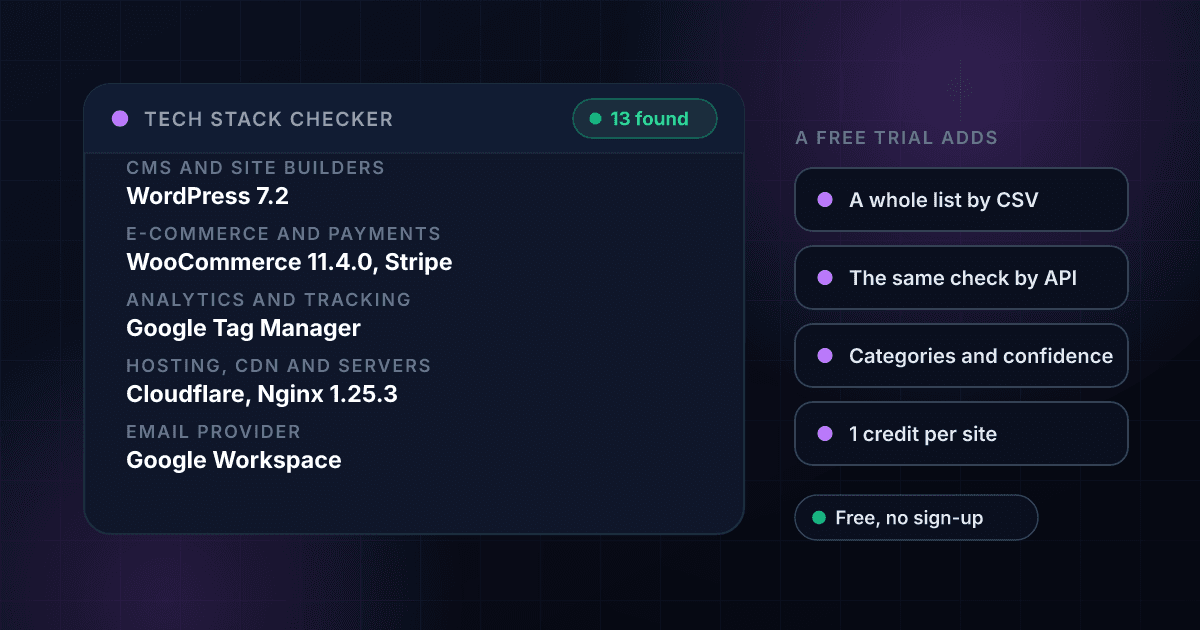
A website's own page and headers say a great deal about what it runs on.
Every website sends small clues with each page. A WordPress site links files under /wp-content/, a Shopify store loads scripts from its own CDN, a server names itself in a header, an analytics tag adds a script with a telling address, and a cookie name can give away a whole platform. This tool reads the home page once, the way a browser asks for it, and checks those clues against thousands of technology fingerprints.
The results are grouped by what each technology does: CMS and site builders, e-commerce and payments, analytics and tracking, marketing and sales, customer engagement, hosting, CDN and servers, frameworks and languages, security, themes and plugins, and media. A version is shown where the site prints it, and a technology that comes with another one, such as PHP under WordPress, is marked with what brought it.
The domain's DNS is read at the same time. The email provider comes from its mail records, and names found only in its verification records are listed apart as services seen in DNS, because a verification record says someone at the company signed up for a service, not that the website runs on it.
A website's stack is one part of what a domain tells you, and these tools read the rest.
To see every DNS record a domain publishes and who hosts its mail, use the free DNS Lookup. To pull a company's logo, colors and fonts from its website, use the free brand kit finder. To see who registered a domain and when, try the free WHOIS lookup.
A tech stack check returns these fields, and each one answers a different question.
This is an invented result for a made-up shop, laid out the way a real one comes back. Every field shown is free on this page, and a free trial adds whole lists by CSV upload and the same check through the API.
- CMS and site buildersWordPress 7.2
- E-commerce and paymentsWooCommerce 11.4.0, Stripe
- Analytics and trackingGoogle Tag Manager, Google Analytics GA4
- Hosting, CDN and serversCloudflare, Nginx 1.25.3
- Frameworks and languagesPHP 8.3 (with WordPress), MySQL (with WordPress), jQuery 3.7.1
- Email providerGoogle Workspace
- Services seen in DNSSample Verification Service
Opens with a free trial
- A list of websitesCSV upload or the API
- Every technology in fullCategories, confidence, where seen
CMS and site builders
What the pages are built with, and its version when the site prints one.
E-commerce and payments
The shop platform and the payment forms the page loads.
Analytics and tracking
Analytics, tag managers and ad pixels found on the page.
Hosting, CDN and servers
The network and the web server that deliver the site.
Frameworks and languages
The code underneath. "With WordPress" means it comes with WordPress rather than being seen directly.
Email provider
Who handles the domain's email, read from its mail records.
Services seen in DNS
Names in the domain's verification records: a sign-up, not proof the site runs on it.
A list of websites
Check hundreds of websites in one file, or from your own code.
Every technology in full
The API returns each technology's categories, confidence and the evidence type it was seen in.
Checking a website's tech stack takes three steps and no signup.
Enter a website
Type a domain like wordpress.org. A full web address works too and is reduced to its domain.
The page and DNS are read together
The home page, its headers and the domain's DNS records are fetched at the same time, with a time limit, and only the first 2 MB of the page is read.
Read the stack, grouped
Each technology appears under its group, with its version when the site shows one. Whole lists of websites are in the free trial.
One check travels from your browser to the website and back in four steps.
This is the path a single check takes. The address is tested first, so a private or internal address is never visited.
- You enter a websiteA web address is reduced to its domain.
- The address is testedA name that leads to a private or internal network address is refused, redirects included.An address that is not a public website is never visited.
- The page and DNS are readOne request for the home page and its headers, and the DNS records at the same time.
- You see the technologiesGrouped by what they do, with versions, the email provider and the DNS host.
These are the groups the checker sorts technologies into.
A technology can belong to more than one category; the result shows it once, under its main group.
| Group | What it covers | Examples |
|---|---|---|
| CMS and site builders | What the pages are built and edited with | WordPress, Shopify, Webflow, Wix, Squarespace |
| E-commerce and payments | Shop platforms, carts and payment forms | WooCommerce, Magento, Stripe, PayPal |
| Analytics and tracking | Visitor analytics, tag managers and ad pixels | Google Analytics, Google Tag Manager, Meta Pixel, Hotjar |
| Marketing and sales | Email marketing, marketing automation and CRM tools | Klaviyo, Mailchimp, HubSpot |
| Customer engagement | Live chat, help desks and reviews | Intercom, Zendesk, Drift, Trustpilot |
| Hosting, CDN and servers | Where the site runs and what serves it | Cloudflare, Amazon CloudFront, Nginx, Apache, Vercel |
| Frameworks and languages | The code underneath | React, Next.js, Vue.js, PHP, Ruby on Rails |
| Security and privacy | Security headers, cookie banners and bot checks | HSTS, reCAPTCHA, OneTrust, Cookiebot |
| Themes and plugins | Add-ons for a CMS or shop | Yoast SEO, Elementor, Shopify apps |
A check ends in one of four ways, and each one means something different.
The page never turns a refused or failed check into a claim about the site.
| What happened | What the tool shows | What it means |
|---|---|---|
| The site answered with its home page | The technologies found, grouped | The stack the site shows. The paid lookup charges for this answer only. |
| The site turned the check away | The site blocked our check, with the protection named | A 403, a 429 or a bot challenge page. Nothing could be read, and the paid lookup charges nothing. |
| No site at that name, or no home page | The site does not exist, or has no home page | Check the spelling. The paid lookup charges nothing. |
| The site did not answer in time | Try again in a few minutes | A timeout is not an answer and is never saved. |
Bulk tech stack checks read a whole list of websites with one CSV file.
The free tool checks one website at a time. With a 1Lookup account you upload a CSV file in the dashboard, pick the column that holds the websites and download the same file back with the technology columns filled in on every row. These rows are invented.
domain
sample-shop.example.com
sample-store.example.net
no-such-site.example.org| domain | Found | Technology Count | CMS | E-commerce | Analytics | Email Provider | Credits Used |
|---|---|---|---|---|---|---|---|
| sample-shop.example.com | Yes | 13 | WordPress 7.2 | WooCommerce 11.4.0 | Stripe | Google Tag Manager | Google Analytics | Google Workspace | 1 |
| sample-store.example.net | Yes | 9 | Shopify | Shopify | Shop Pay | Google Analytics | Meta Pixel | Microsoft 365 | 1 |
| no-such-site.example.org | No | 0 |
- 1 credit for each website that answers, about half a cent on Starter, and nothing for a site that blocks the check, does not exist or does not answer.
- Up to 2 million rows in one CSV file.
- One column per group (CMS, shop, analytics, marketing, hosting and more), so the file sorts and filters by technology.
The Tech Stack Lookup API returns the same technologies as JSON from one request.
Send a domain to the endpoint with your API key. A site that answers costs 1 credit, and a site that blocks the check, does not exist or does not answer costs 0. The groups are flat fields in classification, and each technology with its version and categories is in insights.tech_stack_result.
curl -X POST https://app.1lookup.io/api/v1/tech-stack-lookup \
  -H "Authorization: Bearer YOUR_API_KEY" \
  -H "Content-Type: application/json" \
  -d '{"domain": "sample-shop.example.com"}'
import requests
response = requests.post(
"https://app.1lookup.io/api/v1/tech-stack-lookup",
headers={"Authorization": "Bearer YOUR_API_KEY"},
json={"domain": "sample-shop.example.com"},
)
data = response.json()["data"]
print(data["classification"]["cms"])const response = await fetch('https://app.1lookup.io/api/v1/tech-stack-lookup', {
method: 'POST',
headers: {
'Authorization': 'Bearer YOUR_API_KEY',
'Content-Type': 'application/json'
},
body: JSON.stringify({ domain: 'sample-shop.example.com' })
})
const { data } = await response.json()
console.log(data.classification.cms)Response
{
  "success": true,
  "data": {
    "classification": {
      "found": true,
      "query": "sample-shop.example.com",
      "final_url": "https://sample-shop.example.com/",
      "technology_count": 13,
      "cms": "WordPress 7.2",
      "ecommerce": "WooCommerce 11.4.0 | Stripe",
      "analytics": "Google Tag Manager | Google Analytics GA4",
      "hosting": "Cloudflare | Nginx 1.25.3",
      "email_provider": "Google Workspace",
      "dns_host": "Cloudflare",
      "detected_from": "detected from the site's headers, HTML and DNS"
    },
    "insights": {
      "tech_stack_result": {
        "technologies": [
          { "name": "WordPress", "version": "7.2", "group": "CMS and site builders", "implied": false }
        ]
      }
    },
    "metadata": { "credits_used": 1, "cache_hit": false }
  }
}
For whole lists of websites from a CSV file, with every technology on each row, see our Tech Stack Lookup API.
Thousands of technologies are recognised from one request.
CMS, shop, analytics, ad tags, chat, email marketing, hosting, CDN, server, frameworks and plugins are all read from the same page, so you do not run a separate check for each.
Versions are shown where the site gives them away.
A generator tag, a script address or a server header often carries a version number, and the checker reads it, such as WordPress 7.2 or Nginx 1.25.3.
The email provider is read from DNS, kept apart from the stack.
Google Workspace, Microsoft 365 and others come from the domain's mail records, and services named only in verification records are listed on their own line.
A blocked site is named as blocked, never as empty.
When a site turns automated checks away, the tool says so and names the protection that answered, instead of reporting a site with no technologies.
Who uses this tool
Sales teams qualifying a lead before the first message
See whether a prospect runs Shopify or WooCommerce, HubSpot or another CRM, and which analytics they use, so the pitch fits what they already have.
Agencies and freelancers sizing up a new client's site
Check the CMS, theme, plugins and hosting before you quote a redesign, a migration or a maintenance plan.
Product and marketing teams watching competitors
See which shop platform, email marketing tool and chat widget a competitor runs, and what changed since you last looked.
Developers and site owners checking their own setup
Confirm which server, CDN and security headers your site shows the world, and which versions it gives away.
Frequently asked questions
Is this tech stack checker free?
Yes, with no signup. Each visitor gets a small number of checks a day. A free trial adds whole lists by CSV upload and the same check through the Tech Stack Lookup API.
How does it know what a website is built with?
It reads the home page, its HTTP headers, its cookies and the domain's DNS records, and matches them against thousands of technology fingerprints: a file path, a script address, a header value, a meta tag or a cookie name that only one technology uses.
Why is a technology I know the site uses missing?
Some tools load only after the page runs in a browser, for example a tag added by a tag manager or a single-page app that builds itself in JavaScript. The checker reads what the site sends, without running it, so those can be missing.
What does "blocked our check" mean?
The site answered with a 403, a 429 or a bot challenge page instead of its home page, so nothing could be read. The tool names the protection when it says so. The paid lookup charges nothing for a blocked site.
What are services seen in DNS?
Names found only in the domain's verification records. A company adds one when it signs up for a service, so it shows a sign-up, not that the website runs on that service. That is why they are listed apart from the stack.
Does it check every page of the site?
No. It reads the home page, up to its first 2 MB. A shop, blog or login page on another address can run tools the home page does not.
Is the version always shown?
Only when the site gives it away, in a generator tag, a script address or a server header. Many sites hide their versions on purpose.
Can I check a list of websites at once?
Yes, in a free trial. Upload a CSV with a domain column or call the Tech Stack Lookup API. Each website that answers costs 1 credit, and a site that blocks the check or does not exist costs nothing.