Free DNS Lookup
A DNS lookup shows the records a domain publishes in the Domain Name System. This free tool reads eight types in one go: A and AAAA for addresses, CNAME for aliases, MX for mail, NS for name servers, TXT, CAA for certificates and SOA for the zone. It also names the mail provider and the DNS host.
- No signup needed
- All eight record types in one lookup
- Names the mail provider and DNS host
Free & rate-limited. No signup required to try.
Example resultSample result for sample-shop.example.com. Run any lookup above and it is replaced with yours.
sample-shop.example.com has 12 DNS records
2 A, 1 AAAA, 3 MX, 2 NS, 2 TXT, 1 CAA, 1 SOA
Read from public DNS. A repeat lookup within ten minutes shows the same result.
Source: RFC 1035: Domain Names - Implementation and Specification, published by IETF.
Need this at scale? DNS Lookup API
Look up a whole list of domains at once: every record type, the mail provider and the DNS host in one call, at 2 credits per domain found.
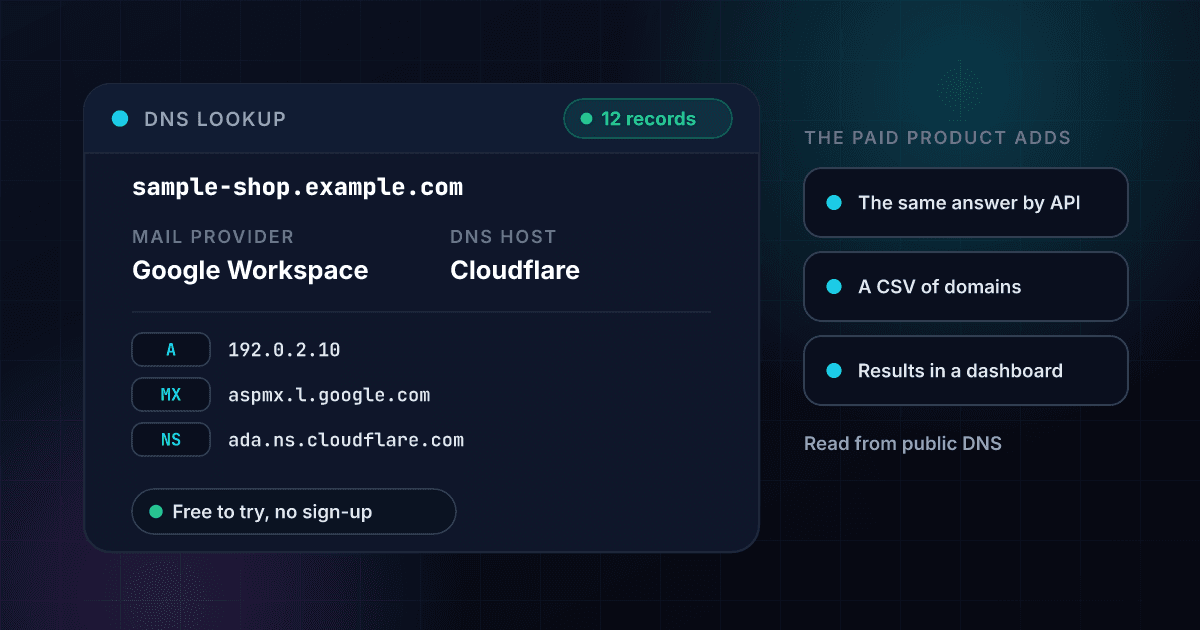
A DNS lookup shows how a domain is wired to its website, its mail and its name servers.
Every domain publishes a small set of public records that tell the internet where to find it. An A or AAAA record gives the address of its website, an MX record names the servers that take its email, an NS record names the servers that answer for the domain, and TXT, CAA and SOA records carry the rest: email policy, ownership checks, certificate rules and zone timing. This tool asks for all eight types in one go and lists what comes back.
Two plain labels are worked out for you. The mail provider is read from the endings of the mail server names, so aspmx.l.google.com reads as Google Workspace. The DNS host is read from the name server names, so a name like ns-423.awsdns-52.com reads as Amazon Route 53. Both say where the records point, not what is inside anyone's account, and a name the tool does not recognise is shown as self-hosted or unrecognised.
Each name has its own records, so www.example.com and example.com are two different lookups, and names that start with an underscore, such as _dmarc.example.com, work too. A web address or an email address is reduced to its domain. To keep the tool free for everyone, a lookup that someone made within ten minutes is shown again, and a lookup where DNS did not answer is never saved.
DNS records are the base of every other domain check, and these tools read them one at a time.
To read only a domain's mail servers and priorities, use the free MX record lookup. To check who is allowed to send mail for a domain, use the free SPF record checker. To see a domain's policy for mail that fails its checks, use the free DMARC checker. To read a domain's signing keys, use the free DKIM checker. To find the name published for an IP address, use the free Reverse DNS Lookup. To see who registered a domain and when, try the free WHOIS lookup.
A DNS lookup returns these fields, and each one answers a different question.
This is an invented result for a made-up shop, laid out the way a real one comes back. Every field shown is free on this page, and a free trial adds whole lists by CSV upload and the same lookup through the API.
- Mail providerGoogle Workspace
- DNS hostCloudflare
- A records (IPv4)192.0.2.10, 192.0.2.11
- AAAA records (IPv6)2001:db8::10
- MX priority 1aspmx.l.google.com
- Name serversada.ns.cloudflare.com, bob.ns.cloudflare.com
- TXT recordv=spf1 include:_spf.google.com ~all
- CAA issueletsencrypt.org
- SOA primary name serverada.ns.cloudflare.com
- SOA zone contactdns@sample-shop.example.com
- SOA timersrefresh 10000 seconds, retry 2400 seconds, expire 7 days, negative cache 1800 seconds
Opens with a free trial
- Every record in fullAll TXT records, uncut
- A list of domainsCSV upload or the API
Mail provider
Who handles the domain's email, read from the mail server names.
DNS host
Who answers DNS for the domain, read from the name server names.
A records (IPv4)
The IPv4 addresses the name points to.
AAAA records (IPv6)
The IPv6 addresses the name points to.
MX priority 1
A mail server and its priority. The lowest number is tried first, and equal numbers share the load.
Name servers
The servers that answer for the domain.
TXT record
One line of free text. Email policy and ownership checks live here.
CAA issue
A certificate authority the domain allows to issue its certificates.
SOA primary name server
The main server of the zone, the source its copies refresh from.
SOA zone contact
The contact address for the zone, written as an email address.
SOA timers
How often copies refresh, retry and expire, and how long a no-such-name answer is kept.
Every record in full
The card shows the first six TXT records cut at 160 characters. The API returns every record in full.
A list of domains
Look up hundreds of domains in one file, or from your own code.
Looking up DNS records takes three steps and no signup.
Enter a domain
Type a domain like github.com. A web address or an email address works too, and a subdomain such as www.github.com is looked up as written.
Eight record types are asked at once
A, AAAA, CNAME, MX, NS, TXT, CAA and SOA are requested together from public DNS, each with its own time limit, so one slow answer does not hold up the rest.
Read the records and the two labels
You see the mail provider, the DNS host and every record found. Whole lists of domains, with the same fields on every row, are in the free trial.
One lookup travels from your browser to public DNS and back in four steps.
This is the path a single lookup takes. The name is tested first, so a typo or an IP address never reaches DNS.
- You enter a domainA web address or an email address is reduced to its domain.
- The name is testedAn IP address is pointed to the Reverse DNS Lookup, and a single word with no dot is refused.A name that cannot be looked up never reaches DNS.
- Eight record types are askedEach type is a separate question to public DNS, with its own time limit.
- You see the records and the labelsA type that did not answer is named, never shown as empty.
These are the eight DNS record types the lookup reads.
Each type answers a different question about the domain. A, NS, CNAME, SOA, MX and TXT are defined in RFC 1035, AAAA in RFC 3596 and CAA in RFC 8659.
| Type | What it holds | What it is used for |
|---|---|---|
| A | An IPv4 address | Where the domain's website or service is hosted |
| AAAA | An IPv6 address | The same, for IPv6 |
| CNAME | The name this name is an alias of | Pointing www or a service name at another host |
| MX | A priority number and a mail server name | Delivering email, with the lowest priority number tried first |
| NS | The name servers that answer for the domain | Telling the internet where the domain's records are kept |
| TXT | Free text | Email policy such as SPF, ownership checks for services and other notes |
| CAA | A tag and a certificate authority | Naming who may issue certificates for the domain |
| SOA | The primary name server, a contact, a serial number and timers | The start of the zone: how often copies refresh and how long a no-such-name answer is kept |
Source: RFC 1035: Domain Names - Implementation and Specification.
These hostname endings are how the tool names a mail provider and a DNS host.
The tool reads the ending of each hostname the records point to. These are examples from the longer list it uses, and a hostname that matches none of the list reads as self-hosted or unrecognised.
| Hostname ends with | Shown as | Read from |
|---|---|---|
| aspmx.l.google.com or googlemail.com | Google Workspace | MX |
| .mail.protection.outlook.com | Microsoft 365 | MX |
| .zoho.com | Zoho Mail | MX |
| .protonmail.ch | Proton Mail | MX |
| .messagingengine.com | Fastmail | MX |
| .ns.cloudflare.com | Cloudflare | NS |
| awsdns-52.com (also .net, .org and .co.uk) | Amazon Route 53 | NS |
| .domaincontrol.com | GoDaddy | NS |
| .azure-dns.com | Azure DNS | NS |
| .nsone.net | NS1 | NS |
A lookup ends in one of three ways, and each one means something different.
Telling these apart is the point of a lookup tool, so the page never turns a failed query into a claim about the domain.
| What happened | What the tool shows | What it means |
|---|---|---|
| The name is not in DNS | The domain does not exist | DNS answered that no such name exists (NXDOMAIN), so check the spelling or whether the domain is registered. |
| The name exists and holds none of the eight types | The name has no DNS records | DNS knows the name, which is normal for a name that only exists to hold other names under it. |
| DNS did not answer in time | The types that did not answer, named | A timeout is not an answer. The result is never saved, and if every type fails the tool asks you to try again. |
Bulk DNS lookups read a whole list of domains with one CSV file.
The free tool looks up one domain at a time. With a 1Lookup account you upload a CSV file in the dashboard, pick the column that holds the domains and download the same file back with the DNS columns filled in on every row. An IP address in that column gets its reverse DNS name instead. These rows are invented.
domain
sample-shop.example.com
sample-studio.example.net
no-such-name.example.org| domain | Found | Mail Provider | DNS Host | Record Count | MX | NS | Credits Used |
|---|---|---|---|---|---|---|---|
| sample-shop.example.com | Yes | Google Workspace | Cloudflare | 12 | 1 aspmx.l.google.com | 5 alt1.aspmx.l.google.com | 5 alt2.aspmx.l.google.com | ada.ns.cloudflare.com | bob.ns.cloudflare.com | 2 |
| sample-studio.example.net | Yes | Microsoft 365 | Amazon Route 53 | 6 | 0 sample-studio-example-net.mail.protection.outlook.com | ns-100.awsdns-12.com | ns-200.awsdns-25.net | 2 |
| no-such-name.example.org | No | 0 |
- 2 credits for each domain that returns a record, about 1 cent on Starter and 0.4 cents on Enterprise, and nothing for a name that does not exist or has no records.
- Up to 2 million rows in one CSV file.
- The same file can mix domains and IP addresses, and each row is read for what it is.
The DNS Lookup API returns the same records as JSON from one request.
Send a domain to the endpoint with your API key, or send an ip for its reverse DNS name. A name that returns at least one record costs 2 credits, and a name that does not exist, has no records or does not answer costs 0. The mail provider and the DNS host are in classification, and the structured records are in insights.dns_lookup_result.
curl -X POST https://app.1lookup.io/api/v1/dns-lookup \
  -H "Authorization: Bearer YOUR_API_KEY" \
  -H "Content-Type: application/json" \
  -d '{"domain": "sample-shop.example.com"}'
import requests
response = requests.post(
"https://app.1lookup.io/api/v1/dns-lookup",
headers={"Authorization": "Bearer YOUR_API_KEY"},
json={"domain": "sample-shop.example.com"},
)
data = response.json()["data"]
print(data["classification"]["mail_provider"])const response = await fetch('https://app.1lookup.io/api/v1/dns-lookup', {
method: 'POST',
headers: {
'Authorization': 'Bearer YOUR_API_KEY',
'Content-Type': 'application/json'
},
body: JSON.stringify({ domain: 'sample-shop.example.com' })
})
const { data } = await response.json()
console.log(data.classification.mail_provider)Response
{
  "success": true,
  "data": {
    "classification": {
      "found": true,
      "query_type": "domain",
      "query": "sample-shop.example.com",
      "mail_provider": "Google Workspace",
      "dns_host": "Cloudflare",
      "record_count": 12,
      "a_records": "192.0.2.10 | 192.0.2.11",
      "aaaa_records": "2001:db8::10",
      "cname_records": null,
      "mx_records": "1 aspmx.l.google.com | 5 alt1.aspmx.l.google.com | 5 alt2.aspmx.l.google.com",
      "ns_records": "ada.ns.cloudflare.com | bob.ns.cloudflare.com",
      "txt_records": "google-site-verification=sample-token-0000 | v=spf1 include:_spf.google.com ~all",
      "caa_records": "0 issue \"letsencrypt.org\"",
      "soa_record": "ada.ns.cloudflare.com dns@sample-shop.example.com 2349871520 10000 2400 604800 1800",
      "ptr_names": null,
      "unanswered_types": null,
      "checked_at": "2026-10-26"
    },
    "insights": {
      "dns_lookup_result": {
        "query_type": "domain",
        "null_mx": false,
        "records": {
          "a": ["192.0.2.10", "192.0.2.11"],
          "mx": [{ "priority": 1, "host": "aspmx.l.google.com" }],
          "ns": ["ada.ns.cloudflare.com", "bob.ns.cloudflare.com"]
        },
        "unanswered_types": [],
        "data_source": "dns"
      }
    },
    "metadata": { "credits_used": 2, "cache_hit": false }
  }
}
For whole lists of domains from a CSV file, and every record for each one, see our DNS Lookup API.
All eight record types come back from one lookup.
Addresses, aliases, mail servers, name servers, TXT, CAA and SOA are asked together, so you do not run eight separate checks to see how a domain is set up.
The mail provider and the DNS host are named for you.
Google Workspace, Microsoft 365, Cloudflare, Amazon Route 53 and many others are read from the hostnames, so you see who runs the domain's mail and DNS without decoding the records.
A silent resolver is never reported as an empty domain.
If a record type does not answer in time, the tool names it and asks you to run the lookup again. It never tells you that a real domain has no mail servers.
Subdomains and underscore names are looked up exactly as typed.
mail.example.com, www.example.com and _dmarc.example.com each have their own records, and each is looked up on its own, with nothing stripped from the front.
Who uses this tool
Email admins checking where a domain's mail goes
Read the MX and TXT records of a domain you are moving or troubleshooting, and see at a glance which provider takes its mail.
Developers and site owners confirming a DNS setup
Check which address a domain points at, which name servers answer for it and whether a CAA record limits who can issue certificates.
Sales and security teams researching a domain
See the mail provider and the DNS host of a company's domain before you write to it, scan it or build a list of companies that use a given provider.
Anyone asking why mail or a website is not arriving
A domain with no MX record cannot take mail, and a domain with no A record has nowhere to send a visitor. The lookup shows which one is missing.
Frequently asked questions
Is this DNS lookup free?
Yes, with no signup. Each visitor gets a small number of lookups a day. A free trial adds whole lists by CSV upload, every TXT record in full and the same lookup through the DNS Lookup API.
Which DNS record types does it show?
Eight: A, AAAA, CNAME, MX, NS, TXT, CAA and SOA. They are asked together, so one lookup shows the addresses, the mail servers, the name servers, the text records, the certificate rules and the zone details.
Where does the data come from?
From public DNS, asked over HTTPS when you press the button. It is not a stored database, so it shows what the domain publishes, within the ten minutes a repeat lookup is reused.
How does it know the mail provider and the DNS host?
It reads the endings of the hostnames the records point to. Mail servers ending in aspmx.l.google.com read as Google Workspace, and name servers ending in ns.cloudflare.com read as Cloudflare. A hostname it does not recognise is shown as self-hosted or unrecognised.
Why does www.example.com show different records from example.com?
Every name has its own records. A domain's website address, its mail and its name servers are often set on different names, so the tool looks up exactly the name you type and strips nothing from the front.
What is the difference between a domain that does not exist and one with no records?
A domain that does not exist is not in DNS at all (NXDOMAIN). A name with no records exists but holds none of the eight types, which is normal for a name that only exists to hold other names under it.
Why does a record I just changed not show yet?
A repeat lookup within ten minutes shows the same result, and public resolvers also keep an answer until the record's own time to live runs out. Wait a few minutes and look up the name again.
Can I look up an IP address here?
Not on this page. An IP address asks a different question, which is the name published for it. Use the free Reverse DNS Lookup for that, or send the address to the DNS Lookup API.
Does it check DNSSEC or show how a change has spread?
No. It asks public DNS once and shows what comes back, with no signature check and no map of how a change has reached different resolvers around the world.
Can I look up a list of domains at once?
Yes, in a free trial. Upload a CSV with a domain column or call the DNS Lookup API. Each domain that returns a record costs 2 credits, and a name that does not exist or has no records costs nothing.