Free Reverse DNS Lookup
A reverse DNS lookup finds the hostname published for an IP address, the opposite of looking up a domain's address. It reads the address's PTR record, which lives under in-addr.arpa for IPv4 and ip6.arpa for IPv6. An address with no PTR record has no reverse name, and that is common.
- No signup needed
- IPv4 and IPv6
- Says why a private address has no name
Free & rate-limited. No signup required to try.
Example resultThis is a real lookup we captured on 2026-10-26 for 8.8.8.8. Run any lookup above and it is replaced with yours.
8.8.8.8 resolves to dns.google
Read from public DNS. A repeat lookup within ten minutes shows the same result.
Source: RFC 3596: DNS Extensions to Support IP Version 6, published by IETF.
Need this at scale? DNS Lookup API
Send an IP address and get its reverse DNS name back, or send a domain and get every record: one endpoint, 2 credits per lookup that finds something.
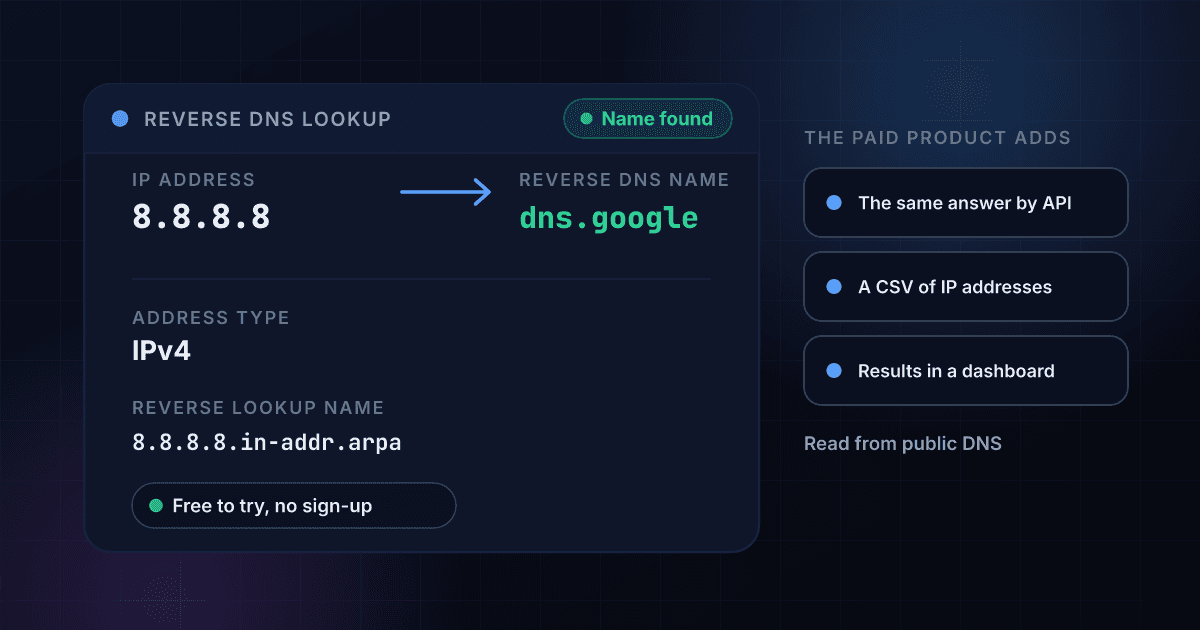
A reverse DNS lookup turns an IP address back into the hostname its owner chose for it.
A normal DNS lookup starts with a name and returns an address. A reverse lookup starts with an address and returns a name. The name is a PTR record, and it is published by whoever controls the block the address belongs to, usually a hosting company, an internet provider or a mail host, and not by the owner of any website that happens to run on the address.
To ask, the address is turned into a special name. An IPv4 address has its four parts reversed and ends in in-addr.arpa, and an IPv6 address is written one hex digit at a time, reversed, and ends in ip6.arpa. The tool does this for you and shows the name it asked for, so you can check it against a command-line result. Many addresses have no PTR record at all, and the tool reports that as a finding, not as an error.
Private ranges such as 10.0.0.0 and 192.168.0.0, loopback, link-local and documentation addresses have no public reverse name, so they are explained and never sent to DNS. A lookup where DNS did not answer is never saved or shown as having no name. To keep the tool free for everyone, an answer that someone looked up within ten minutes is shown again.
A reverse name is one clue about an address, and these tools read the others.
To see every DNS record a domain publishes, including the addresses a name points to, use the free DNS lookup. To find which network and internet provider an address belongs to, use the free ISP lookup. To check whether an address is on a spam blocklist, use the free IP blacklist check. To see where an address is and whether it is a proxy or a VPN, try the free IP address lookup.
A reverse DNS lookup returns these fields, and each one answers a different question.
This is a real result for 8.8.8.8, a public DNS resolver address that belongs to no private person, read from public DNS on 26 October 2026. A free trial adds whole lists by CSV upload and the same lookup through the API.
- Reverse DNS namedns.google
- Address typeIPv4
- Reverse lookup name8.8.8.8.in-addr.arpa
Opens with a free trial
- A list of addressesCSV upload or the API
Reverse DNS name
The hostname published for the address. More than one can be published, and the first is highlighted.
Address type
Whether the address is IPv4 or IPv6.
Reverse lookup name
The name that was asked, built from the address under in-addr.arpa or ip6.arpa.
A list of addresses
Look up hundreds of IP addresses in one file, or from your own code.
Finding a reverse DNS name takes three steps and no signup.
Enter an IP address
Type an IPv4 address like 8.8.8.8 or an IPv6 address like 2001:4860:4860::8888.
The address is turned into its reverse name and asked
8.8.8.8 becomes 8.8.8.8.in-addr.arpa, and public DNS is asked for the PTR record published under that name.
Read the name
You see every hostname published for the address and the reverse name that was asked. Whole lists of addresses are in the free trial.
One lookup turns an address into a reverse name and asks DNS for it in four steps.
This is the path a single lookup takes. The address is tested first, so a private address is explained here and never sent to DNS.
- You enter an IP addressIPv4 or IPv6, written the usual way.
- The address is tested and its reverse name builtA private or reserved address stops here, with the reason.A private or reserved address is explained here and never sent to DNS.
- Public DNS is asked for the PTR recordOne question, for the name under in-addr.arpa or ip6.arpa.
- You see the name or the lack of oneNo PTR record is a finding. A resolver that did not answer is not.
This is how an IP address becomes the name the lookup asks for.
The name is built from the address, and its ending tells DNS which kind of address it is. in-addr.arpa is defined in RFC 1035 and ip6.arpa in RFC 3596. Each of these three addresses returned a name from public DNS on 26 October 2026.
| Address | Name asked for | Kind |
|---|---|---|
| 8.8.4.4 | 4.4.8.8.in-addr.arpa | IPv4 |
| 1.1.1.1 | 1.1.1.1.in-addr.arpa | IPv4 |
| 2001:4860:4860::8888 | 8.8.8.8.0.0.0.0.0.0.0.0.0.0.0.0.0.0.0.0.0.6.8.4.0.6.8.4.1.0.0.2.ip6.arpa | IPv6 |
These address ranges have no public reverse DNS name, and the tool says why.
They are set aside for private networks and for special uses, so a public resolver has nothing to say about them.
| Range | What it is |
|---|---|
| 10.0.0.0/8, 172.16.0.0/12 and 192.168.0.0/16 | Private addresses for home and company networks |
| 100.64.0.0/10 | The shared range internet providers use for carrier-grade NAT |
| 127.0.0.0/8 and ::1 | Loopback: always the machine asking |
| 169.254.0.0/16 and fe80::/10 | Link-local: used on one local network only |
| 192.0.2.0/24, 198.51.100.0/24, 203.0.113.0/24 and 2001:db8::/32 | Reserved for documentation and examples |
| 224.0.0.0/4 and ff00::/8 | Multicast: not a single machine |
A lookup ends in one of three ways, and each one means something different.
Telling these apart is the point of a lookup tool, so the page never turns a failed query into a claim about the address.
| What happened | What the tool shows | What it means |
|---|---|---|
| A PTR record is published | The address resolves to the name | The owner of the address block set a reverse name. Several names can be published for one address. |
| No PTR record is published | The address has no reverse DNS name | DNS answered, and the owner chose not to publish one. This is common and is not an error. |
| DNS did not answer in time | The lookup did not answer | A timeout is not a finding about the address. The result is never saved, so run the lookup again. |
Bulk reverse DNS lookups read a whole list of IP addresses with one CSV file.
The free tool looks up one address at a time. With a 1Lookup account you upload a CSV file in the dashboard, pick the column that holds the addresses and download the same file back with the reverse names filled in on every row. The first two rows are public resolver addresses and the third is a public IPv6 address.
domain
8.8.8.8
1.1.1.1
2001:4860:4860::8888| domain | Found | Query Type | PTR Names | Credits Used |
|---|---|---|---|---|
| 8.8.8.8 | Yes | ip | dns.google | 2 |
| 1.1.1.1 | Yes | ip | one.one.one.one | 2 |
| 2001:4860:4860::8888 | Yes | ip | dns.google | 2 |
- 2 credits for each address that has a reverse name, about 1 cent on Starter and 0.4 cents on Enterprise, and nothing for an address with no name.
- Up to 2 million rows in one CSV file.
- An IP address goes in the same column as a domain, and a domain in the same file gets its records instead.
The DNS Lookup API returns the reverse name as JSON from one request.
Send an ip to the endpoint with your API key. An address that has a reverse name costs 2 credits, and an address with no name, or a lookup where DNS does not answer, costs 0. The names are in classification.ptr_names, and the list is in insights.dns_lookup_result.ptr.
curl -X POST https://app.1lookup.io/api/v1/dns-lookup \
  -H "Authorization: Bearer YOUR_API_KEY" \
  -H "Content-Type: application/json" \
  -d '{"ip": "8.8.8.8"}'
import requests
response = requests.post(
"https://app.1lookup.io/api/v1/dns-lookup",
headers={"Authorization": "Bearer YOUR_API_KEY"},
json={"ip": "8.8.8.8"},
)
data = response.json()["data"]
print(data["classification"]["ptr_names"])const response = await fetch('https://app.1lookup.io/api/v1/dns-lookup', {
method: 'POST',
headers: {
'Authorization': 'Bearer YOUR_API_KEY',
'Content-Type': 'application/json'
},
body: JSON.stringify({ ip: '8.8.8.8' })
})
const { data } = await response.json()
console.log(data.classification.ptr_names)Response
{
  "success": true,
  "data": {
    "classification": {
      "found": true,
      "query_type": "ip",
      "query": "8.8.8.8",
      "mail_provider": null,
      "dns_host": null,
      "record_count": 1,
      "ptr_names": "dns.google",
      "unanswered_types": null,
      "checked_at": "2026-10-26"
    },
    "insights": {
      "dns_lookup_result": {
        "query_type": "ip",
        "query": "8.8.8.8",
        "ip_version": 4,
        "ptr": { "reverse_name": "8.8.8.8.in-addr.arpa", "names": ["dns.google"] },
        "unanswered_types": [],
        "data_source": "dns"
      }
    },
    "metadata": { "credits_used": 2, "cache_hit": false }
  }
}
For whole lists of IP addresses from a CSV file, and every DNS record of a domain from the same endpoint, see our DNS Lookup API.
IPv4 and IPv6 addresses are both read.
The tool builds the right reverse name for either kind, including a compressed IPv6 address and an IPv4 address written inside an IPv6 one, and shows the name it asked for.
A private address is explained, not sent out.
Home, company, loopback, link-local, documentation and multicast addresses get a plain sentence on what they are, because DNS cannot say anything useful about them.
No name is reported as a result, and a silent resolver is not.
An address with no PTR record is shown as having no reverse name. If DNS did not answer, the tool says so and asks you to try again, and never saves that as an answer.
Every name published for the address is shown.
An address can carry more than one PTR record. The tool lists each name, with the first one highlighted, instead of keeping only one.
Who uses this tool
Email admins checking a sending server
Many receiving mail servers look at the reverse name of the address a message comes from, and a missing or generic name can count against the sender. Check yours.
Security analysts reading logs
Turn an address from a log or an alert into the hostname its owner published, which often names the hosting company or the network.
Network engineers verifying a PTR record
After you set a reverse name with your provider, look the address up again to confirm that the name has been published.
IT teams identifying an unknown address
A reverse name such as a hosting company's server name tells you quickly whether an unfamiliar address is a data centre, a home connection or a mail host.
Frequently asked questions
Is this reverse DNS lookup free?
Yes, with no signup. Each visitor gets a small number of lookups a day. A free trial adds whole lists of IP addresses by CSV upload and the same lookup through the DNS Lookup API.
What is reverse DNS?
It is the lookup that goes from an IP address to a hostname, the opposite of the lookup that goes from a name to an address. The answer is a PTR record published under in-addr.arpa for IPv4 or ip6.arpa for IPv6.
Why does my IP address have no reverse DNS name?
Because nobody published one. The owner of the address block decides, and many home connections, cloud servers and small networks never set a PTR record. It is a finding about the address, not a fault in the lookup.
Who sets the reverse DNS name of an IP address?
The organisation that controls the address block, usually your hosting company or internet provider. To change it you ask them, or use their control panel if they offer one, because the domain's own DNS settings cannot change it.
Does reverse DNS list every website on an IP address?
No. It returns the PTR names published for the address, which is usually one hostname chosen by the network owner. Finding all the websites that share an address is a different lookup, often called a reverse IP lookup.
Can I look up an IPv6 address?
Yes. The tool writes the address one hex digit at a time, reverses it and asks for it under ip6.arpa, and it shows you the long name it asked for. A compressed address such as 2001:4860:4860::8888 works.
Why are private addresses not looked up?
Addresses such as 192.168.1.1 or 10.0.0.5 are used inside one network, so no public reverse name exists for them. The tool says what kind of address it is instead of asking a public resolver and showing noise.
Does the tool check that the name points back to the address?
No. It shows the PTR names only. To confirm that a name points back, look the name up in the free DNS Lookup and compare its A or AAAA records with the address you started from.
How fresh is the answer?
The tool asks public DNS when you press the button. To keep it free for everyone, an address that someone looked up within ten minutes is shown again, and a lookup where DNS did not answer is never saved.
Can I look up a list of IP addresses at once?
Yes, in a free trial. Upload a CSV with the addresses in the domain column or call the DNS Lookup API with an ip. Each address that has a reverse name costs 2 credits, and an address with no name costs nothing.