Find the internet provider behind an IP address.
Enter an IP address to see which internet provider carries it. It is free, with no signup.
Free & rate-limited. No signup required to try.
An ISP lookup names the internet service provider behind an IP address. 1Lookup's free lookup shows the provider, the organization that holds the address block, its AS number, its country and an approximate city. To see your own provider, our what is my IP tool shows your public address and your ISP in one step.
- Free, no signup
- IPv4 and IPv6 addresses
- Never contacts the address
- Shows N/A when the record has no value
You can find the provider behind an address in under a minute.
Enter the address.
Type any IPv4 or IPv6 address, or use one of the examples. To see your own, open the what is my IP tool first and copy your address.
Read the headline.
It is the name of the internet provider. When the record has no provider name, it shows the organization instead.
Read the other fields.
The organization, the AS number, the country and the approximate city sit under it, and the organization can differ from the provider.
Treat the city as approximate.
The city is the place the location record gives for the address, and the person using the address can be somewhere else.
Need this at scale? IP Lookup API
Add the provider, network and AS number to every address in a log or a list, one request per address.
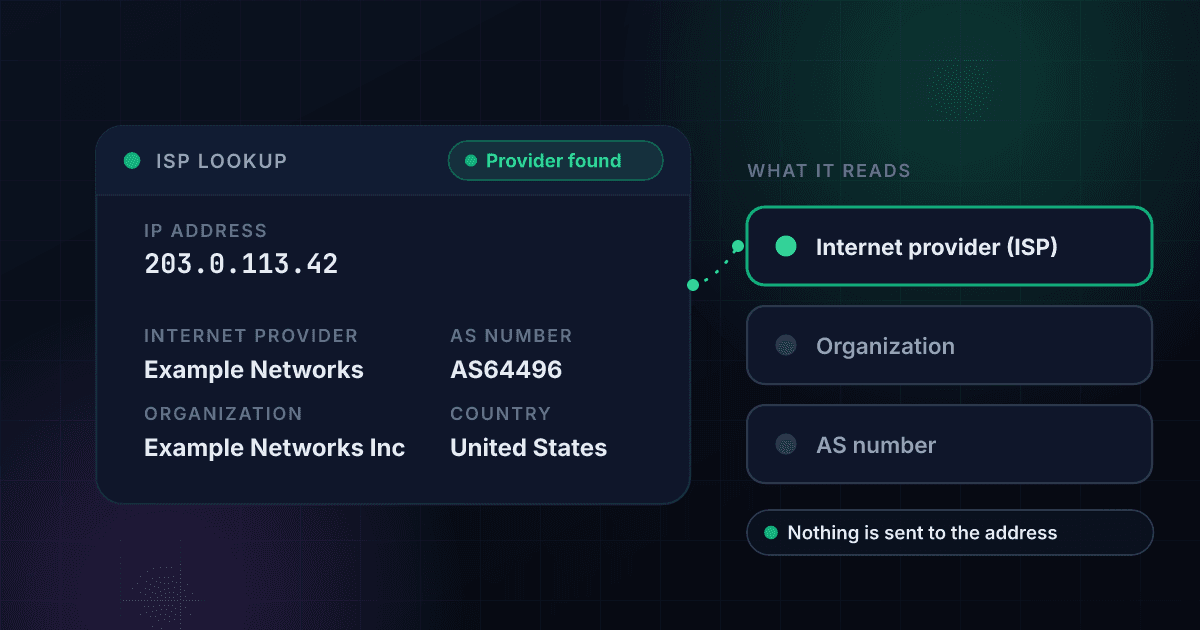
An ISP lookup names the provider that carries an address, and the provider is not always the one that holds it.
Every public IP address belongs to a block that a regional internet registry handed to an organization. The organization may be a provider, a company, a university or a hosting firm, and the provider that carries the traffic can be a different company. A lookup reads both, so you see the provider on record and the organization that holds the block.
The AS number is the autonomous system that announces the block on the internet, written AS followed by digits. The country and the city come from a separate location record, and the city is approximate. The lookup never contacts the address, so nobody who uses it is told.
It cannot say who uses the address. An address can serve one household, a whole office or many mobile users at once, and a provider's customer records are not public. Use the lookup to learn which network an address belongs to, for example when you read a server log, check a login or trace where an email came from.
The IP lookup API returns the provider, the organization and the AS number for every address you collect.
When the lookup has to run on every login, signup or log line, the IP lookup endpoint returns them for 1 credit a lookup. See the IP lookup API. To see your own public address and provider in one step, use our free what is my IP tool. To read the network and AS number behind an address in detail, use our free ASN lookup. To see whether an address is flagged as a proxy or VPN, use our free proxy checker. To geolocate an address, use our free IP address lookup. To read the guide behind this lookup, see our guide to IP geolocation APIs.
An ISP lookup returns these fields, and each one answers a different question.
This is an invented result for a documentation address, laid out the way a lookup comes back. The first five fields are free on this page, and a free account opens the rest.
- Internet provider (ISP)Example Networks
- OrganizationExample Networks Inc
- AS numberAS64496
- CountryUnited States
- Region and city, approximateSpringfield, Illinois
Opens with a free trial
- Proxy, VPN and Tor flagsNone raised
- Risk levelLow
- Time zoneAmerica/Chicago
Internet provider (ISP)
The internet service provider on record for the address, and the headline of the result.
Organization
Who holds the address block, which can be a different company from the provider.
AS number
The autonomous system that announces the block on the internet.
Country
The country the location record gives for the address.
Region and city, approximate
The approximate place the location record gives for the address, not where the person using it sits.
Proxy, VPN and Tor flags
Whether the address is flagged as a proxy or VPN, sits in hosting space or is a Tor exit.
Risk level
A rating from low to critical for the address.
Time zone
The time zone the location record gives for the address.
The lookup reads the provider behind an address in three steps.
You enter an IP address.
Type an IPv4 or IPv6 address. A private address such as 192.168.1.1 is told apart, because it belongs to no provider.
We read its network and location records.
1Lookup looks up the provider, the organization and the AS number for the block the address sits in, and the country and approximate city from the location record. Nothing is sent to the address.
You read the provider first.
The headline is the provider's name. The fields under it show the organization, the AS number, the country and the city, and a free account opens the rest.
An ISP lookup reads two records for one address, and neither of them says who uses it.
The block an address sits in has a holder and a provider, and the location comes from a separate record.
- You enter the addressIPv4 or IPv6, with no port.
- Its network record is readThe record gives the provider, the organization that holds the block and the AS number.A private or reserved address has no provider to read
- Its location record is readThe record gives the country and an approximate city.
- You read the resultThe provider's name first, then the other fields. Who uses the address stays outside what the records show.
ARIN holds 44.6% of the 3,687,640,032 IPv4 addresses allocated or assigned so far, and AFRINIC holds 3.2%.
The five regional internet registries hand out address space to providers in their regions, and every provider's address block traces back to one of them. The Number Resource Organization publishes one combined file of what each registry has allocated or assigned. This table adds up the IPv4 addresses with those two statuses in the file of 23 October 2026.
| Registry | Region it serves | IPv4 addresses allocated or assigned | Share |
|---|---|---|---|
| ARIN | United States, Canada and parts of the Caribbean | 1,644,561,152 | 44.6% |
| APNIC | Asia and the Pacific | 888,915,840 | 24.1% |
| RIPE NCC | Europe, the Middle East and parts of Central Asia | 856,051,040 | 23.2% |
| LACNIC | Latin America and parts of the Caribbean | 181,934,848 | 4.9% |
| AFRINIC | Africa | 116,177,152 | 3.2% |
Source: Number Resource Organization, extended delegated statistics, file of 23 October 2026.
The United States holds 43.6% of all allocated IPv4 addresses, more than the next seven countries combined.
The file records the country of the organization each block was allocated or assigned to, which is not always where the addresses are used. The last row adds up every other country in the file.
| Country | IPv4 addresses | Share of all allocated IPv4 addresses |
|---|---|---|
| United States | 1,606,241,184 | 43.6% |
| China | 342,985,472 | 9.3% |
| Japan | 188,718,912 | 5.1% |
| United Kingdom | 138,744,896 | 3.8% |
| Germany | 126,365,312 | 3.4% |
| South Korea | 112,497,984 | 3.1% |
| France | 81,586,768 | 2.2% |
| Brazil | 79,321,344 | 2.2% |
| All other countries | 1,011,178,160 | 27.4% |
Source: Number Resource Organization, extended delegated statistics, file of 23 October 2026.
Cable and fiber carry 83.7% of the fixed internet connections in the US, and cable alone carries 55.2%.
An address on a home or office line is a fixed connection. Providers report their connections to the FCC on Form 477, and the FCC sorts every fixed connection into one of six technology groups. It reports the group called Other together with Copper Wire, which is why five rows show. These are the shares as of 30 June 2025, and rounding keeps them from adding to exactly 100.
| Technology | Share of fixed connections |
|---|---|
| Coaxial cable | 55.2% |
| Fiber to the premises | 28.5% |
| Fixed wireless | 8.5% |
| Copper wire and other | 5.4% |
| Satellite | 2.3% |
Source: FCC, Internet Access Services: Status as of June 30, 2025, Figure 4.
Mobile connections grew 12.6% and fixed connections 9.3% from June 2021 to June 2025, reaching 424.2 million and 134.9 million.
An address can sit on a fixed line or on a mobile network, and the provider can be a different one for each. The FCC counts connections and not people, and one person can hold several. These are millions of connections as of June and December of each year, and the all-connections column is the FCC's own total, which can differ from the sum of the two by 0.1 because of rounding.
- Fixed
- Mobile
| Period | Fixed | Mobile | All connections |
|---|---|---|---|
| Jun 2021 | 123.4 | 376.8 | 500.3 |
| Dec 2021 | 125.8 | 384.4 | 510.2 |
| Jun 2022 | 126.3 | 391.9 | 518.2 |
| Dec 2022 | 127.9 | 400.3 | 528.3 |
| Jun 2023 | 129.4 | 406.8 | 536.3 |
| Dec 2023 | 130.9 | 413.3 | 544.1 |
| Jun 2024 | 132.9 | 416.1 | 548.9 |
| Dec 2024 | 133.8 | 418.7 | 552.5 |
| Jun 2025 | 134.9 | 424.2 | 559.1 |
Source: FCC, Internet Access Services: Status as of June 30, 2025, Figure 1.
The provider, the organization and the AS number are three different answers, and a lookup shows all three.
Each field of the free result answers its own question, and the answers can point at different companies.
| Field | What it holds | Why it can differ from the others |
|---|---|---|
| Internet provider (ISP) | The internet service provider on record for the address. | A business can hold a block and buy its connection from a provider, so the provider is the carrier and not the customer. |
| Organization | Who holds the address block. | It can be a provider, a company, a university or a hosting firm. |
| AS number | The autonomous system that announces the block on the internet, written AS and digits. | A large provider can run more than one AS number. |
| Country | The country the location record gives for the address. | It is not the country of the provider's head office. |
| Region and city, approximate | The approximate place the location record gives for the address. | It is not where the person using the address sits. |
| Cloud provider | The cloud operator and region, shown only inside a range the operator publishes. | An address outside every published range shows no row. |
An ISP lookup can answer five questions about an address and cannot answer four others.
The network and location records cover some questions, and other checks or the provider's own records cover the rest.
| Question | Can this lookup answer it? | Where the answer lives |
|---|---|---|
| Which provider carries the address? | Yes | The network record of the address block |
| Who holds the address block? | Yes | The organization on the same record |
| Which AS number announces it? | Yes | The AS number on the same record |
| Which country is it in? | Yes | The location record of the address |
| What is the approximate city? | Yes | The location record of the address |
| Who uses the address? | No | The provider's own customer records, which are not public |
| Where does the person using it sit? | No | The city is approximate, and it is the place the record gives for the address |
| Is it a home line, a mobile network or a datacenter? | No | The record can only guess that from the provider's name, so the result does not show it |
| Is it a proxy, a VPN or a Tor exit? | No | The free proxy checker, or the flags a free account opens |
An ISP lookup costs 1 credit, about $4.95 per 1,000 lookups on Starter and $2.00 on Enterprise.
These are the monthly plans on the pricing page. The provider, the organization and the AS number come back on the same lookup. Every plan starts with a 7-day free trial, and the same credits pay for every other 1Lookup check.
| Plan | About per 1,000 lookups | Monthly price | ISP lookups included |
|---|---|---|---|
| Starter | $4.95 | $99 | 20,000 |
| Growth | $3.52 | $299 | 85,000 |
| Professional | $3.20 | $799 | 250,000 |
| Enterprise | $2.00 | $1,999 | 1,000,000 |
The IP lookup API returns the provider as JSON from one request.
Send the address to the IP lookup endpoint with your API key. Each request costs 1 credit, and every account can send up to 1,000 requests a minute. The provider is in insights.network.isp, the organization in insights.network.org and the AS number in insights.network.asn, and the country and approximate city are in insights.location.
curl -X POST https://app.1lookup.io/api/v1/ip \
  -H "Authorization: Bearer YOUR_API_KEY" \
  -H "Content-Type: application/json" \
  -d '{"ip": "203.0.113.42"}'
import requests
response = requests.post(
"https://app.1lookup.io/api/v1/ip",
headers={"Authorization": "Bearer YOUR_API_KEY"},
json={"ip": "203.0.113.42"},
)
data = response.json()["data"]
print(data["insights"]["network"]["isp"])const response = await fetch('https://app.1lookup.io/api/v1/ip', {
method: 'POST',
headers: {
'Authorization': 'Bearer YOUR_API_KEY',
'Content-Type': 'application/json'
},
body: JSON.stringify({ ip: '203.0.113.42' })
})
const { data } = await response.json()
console.log(data.insights.network.isp)Response
{
  "success": true,
  "data": {
    "request": { "type": "ip", "input": "203.0.113.42" },
    "insights": {
      "network": {
        "isp": "Example Networks",
        "org": "Example Networks Inc",
        "asn": "AS64496 Example Networks"
      },
      "location": {
        "city": "Springfield",
        "region": "Illinois",
        "country": "United States"
      },
      "network_intelligence": { "is_bogon": false }
    },
    "metadata": { "credits_used": 1, "credits_remaining": 9998 }
  }
}
To run the same lookup on every address you collect, see our IP lookup API.
It puts the provider's name on the first line.
The answer to the question you came with comes first, and the organization, the AS number and the place sit under it.
It shows the provider and the organization apart.
The two can be different companies, so each has its own field instead of one name standing for both.
It says N/A when the record has no value.
A field the record leaves empty shows as N/A, and the lookup does not fill it with a guess.
It never contacts the address.
The lookup reads records, so nothing is sent to the address and nobody who uses it is told.
Who uses this tool
Developers and site owners read the network behind an address in a log.
A line in a server log is an address, and the provider and AS number show which network sent it.
Support teams see which provider a customer is on.
Knowing the provider helps when a problem only shows up on one network.
Fraud and security teams add the network to a login or signup.
The provider and AS number sit beside the email, the phone number and the flags on the address.
People check an address from an email or a message.
An address in an email header or a notice can be looked up to see which network it belongs to.
Frequently asked questions
How do I find out who my ISP is?
Your ISP is the provider behind your public IP address. Open the what is my IP tool, which shows your address and your provider in one step, or copy your address from it and look it up here to see the organization, the AS number and the approximate city.
What is an ISP lookup?
It is a lookup that names the internet service provider behind an IP address. This one also shows the organization that holds the address block, its AS number, its country and an approximate city.
Is the ISP the same as the organization?
Not always. The organization holds the address block, and the provider is the network that serves it. A company can hold a block and buy its connection from a provider, so the two names can differ.
What is an AS number?
It is the number of an autonomous system, a network under one operator that announces address blocks on the internet. It is written AS followed by digits, and a large provider can run more than one.
Can an ISP lookup tell me who uses an IP address?
No. The lookup names the network that carries the address and the organization that holds the block. Which household or person uses the address is in the provider's customer records, which are not public.
How accurate is the city shown for an IP address?
It is approximate. The city is the place the location record gives for the address, and it can be far from the person using it. Treat it as a hint about the region, not as a street address.
Why does the lookup show a company I never heard of?
Because it shows the provider or the organization on record for the block. The block can be held by a parent company, a wholesale carrier or a company your provider bought, and your provider's brand name may not appear on it.
Can I look up a private address such as 192.168.1.1?
No. A private or reserved address is not on the public internet, so the result says so instead of showing a provider. Look up your public address instead, which the what is my IP tool shows.
Does the ISP lookup work for IPv6 addresses?
Yes. The box takes IPv4 and IPv6 addresses, and the result has the same fields for both.
Does the lookup tell me whether an address is a VPN or a proxy?
Not on the free result. A free account shows the proxy, VPN and Tor flags next to the provider, and the free proxy checker shows the same flags for one address at a time.
What does the cloud provider row mean?
It appears only when the address sits inside a range that a cloud operator publishes, and it names the operator and the region. An address outside every published range shows no such row.
Who holds the most IPv4 addresses?
ARIN, the registry for the United States, Canada and parts of the Caribbean, holds 1,644,561,152 of the 3,687,640,032 IPv4 addresses allocated or assigned in the file of 23 October 2026, which is 44.6%. By the country of the holder, the United States holds 43.6%.
Does the person who uses the address know I looked it up?
No. The lookup reads records only. Nothing is sent to the address, so nobody who uses it is told.
How much does an ISP lookup cost per address?
An ISP lookup costs 1 credit per address in the API. That is about $4.95 per 1,000 on the Starter plan, $3.52 on Growth, $3.20 on Professional and $2.00 on Enterprise. The free tool on this page checks one address at a time with no signup, and every plan starts with a 7-day free trial.
Is there an API that returns the ISP for a list of IP addresses?
Yes. The IP lookup endpoint returns the provider, the organization and the AS number for each address, 1 credit a request. Every account can send up to 1,000 requests a minute.
Is this ISP lookup really free?
Yes. Looking up one address takes no signup. A free account opens the proxy, VPN and Tor flags, the risk level and the time zone, and looking up many addresses by API uses credits.