This LinkedIn post scraper lists up to 100 people who reacted to a post, or commented on it
Send the link to a public LinkedIn post and get back up to 100 people who reacted to it or commented on it, each with a name, profile link and headline. 5 credits per list that finds people.
5
Credits per post and list
$24.75 per 1,000 on Starter
0
Credits when nobody is found
no people, no charge
100
People per list
reactions or comments
7 days
Repeat pulls are free
served from cache
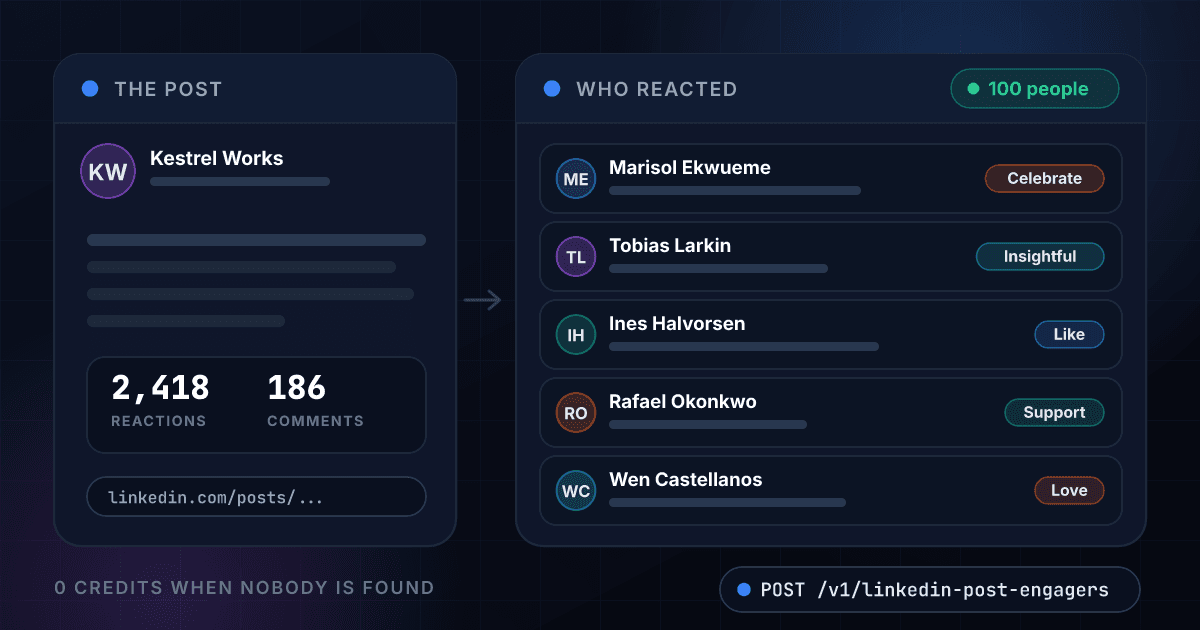
A post link comes back as a list of people with their headlines and reactions
Each row is one person with the fields your code receives, here for an invented company post. The same fields come back as JSON in the API response below.
Kestrel Works
Company page
Today we are opening the beta of our shared planning board, built for teams that are tired of status meetings. Here is what changes for your Monday.
2,418 reactions186 comments
- People returned
- 100
- With a headline
- 92
- Top reaction
- Like
- Credits used
- 5
The mix of reactions in the list
- Like52
- Celebrate21
- Insightful14
- Support9
- Love3
- Funny1
Marisol Ekwueme
linkedin.com/in/marisol-ekwueme-demo
Head of Growth at Loomwright Studio
CelebrateTobias Larkin
linkedin.com/in/tobias-larkin-demo
Founder at Pinegate Analytics
InsightfulInes Halvorsen
linkedin.com/in/ines-halvorsen-demo
VP Sales at Stonebridge Logistics Software
LikeRafael Okonkwo
linkedin.com/in/rafael-okonkwo-demo
Operations Manager at Quillfeather Freight
SupportWen Castellanos
linkedin.com/in/wen-castellanos-demo
Talent Partner at Harlow & Finch Recruiting
LoveDaria Whitcombe
linkedin.com/in/daria-whitcombe-demo
Customer Success Lead at Brindle Cloud
Like
94 more people in the same response, 5 credits for all 100
Every person arrives as one flat record with a profile link, a headline and what they did
A post link returns the people who engaged with the post
Copy the link from the post's three-dot menu and send it. You get up to 100 people with a name, a profile link and a headline.
- A post link or a post id
- Up to 100 people per list
- Public posts, no LinkedIn login
Every person arrives with a profile link and a headline
The headline carries the job title and the company, so you can sort the list by role without opening a single profile.
- Name and profile link
- Headline with title and company
- A count of how many people have a headline
Reactions come with the kind of reaction and the mix across the list
Each person's reaction is one of Like, Celebrate, Support, Love, Insightful or Funny, and the summary counts them so you can see how the post landed.
- The reaction of every person
- The count of each kind
- The most common reaction
Comments come with the text, the time and the likes
Set engagement to comments and each person arrives with what they wrote, when they wrote it, how many likes and replies it got and a link to the comment.
- The comment text
- Time, likes and replies
- A link to each comment
A post nobody can read costs nothing
You are charged 5 credits only when at least one person comes back. A private post, a wrong link, an error and a timeout all cost 0 credits, and a repeat pull within 7 days is free.
- No people, no charge
- Errors are never billed
- Repeat pulls within 7 days are free
There is no scraper to build and no LinkedIn account to put at risk
You send a request with your 1Lookup API key. There is no LinkedIn login to manage, no proxy to rent and no script to keep running.
- One API key for every product
- The same JSON shape every time
- Works from code, a CSV upload or the dashboard
A post link goes in and up to 100 people with their headlines come out
You send a post link and choose reactions or comments
POST the link you get from the post's three-dot menu, and set engagement to comments if you want the people who commented. Reactions is the default.
$ POST /api/v1/linkedin-post-engagers
"post_url": "linkedin.com/posts/..."
"engagement": "reactions"
We read the public post and keep the first 100 people
The list is read from the post when you ask. A post with nobody to list is not billed.
Post link checked
Public post read
People structured
Headlines and profile links attached
You get the people back as one JSON record
Name, profile link and headline for each person, with the reaction or the comment, and a summary of the whole list on top.
people100
with job title92
top reactionLike
One endpoint turns a post link into people and works like every other 1Lookup call
Same authentication, same credit balance, and the same response envelope as every other 1Lookup product. If you have already integrated one endpoint, this one is a URL change.
curl -X POST https://app.1lookup.io/api/v1/linkedin-post-engagers \
  -H "Authorization: Bearer $API_KEY" \
  -H "Content-Type: application/json" \
  -d '{ "post_url": "https://www.linkedin.com/posts/kestrel-works_launch-day-demo-activity-7300000000000000001-AbCd", "engagement": "reactions" }'

# "engagement" can be "comments" to list the people who commented
# -d '{ "post_url": "...", "engagement": "comments" }'{
"success": true,
"data": {
"classification": {
"matched": true,
"result_count": 100,
"engagement": "reactions",
"post": "urn:li:activity:7300000000000000001",
"with_job_title": 92,
"with_profile_link": 100,
"top_reaction": "Like",
"reaction_breakdown": {
"Like": 52, "Celebrate": 21, "Insightful": 14,
"Support": 9, "Love": 3, "Funny": 1
}
},
"insights": {
"linkedin_post_engagers_result": {
"engagement": "reactions",
"result_count": 100,
"people": [
{
"name": "Marisol Ekwueme",
"profile_url": "https://www.linkedin.com/in/marisol-ekwueme-demo",
"job_title": "Head of Growth at Loomwright Studio",
"reaction_type": "Celebrate"
},
{
"name": "Tobias Larkin",
"profile_url": "https://www.linkedin.com/in/tobias-larkin-demo",
"job_title": "Founder at Pinegate Analytics",
"reaction_type": "Insightful"
}
]
}
},
"metadata": { "credits_used": 5, "cache_hit": false }
}
}The same call with engagement set to comments lists what people wrote
Each row is one comment with its author, headline, time and likes. It is a second call on the same post and costs 5 credits when comments come back.
Kestrel Works
Company page
Today we are opening the beta of our shared planning board, built for teams that are tired of status meetings. Here is what changes for your Monday.
2,418 reactions186 comments
- Comments returned
- 100
- Newest comment
- 2026-10-21 08:14
- Top comment likes
- 41
- Credits used
- 5
Ines Halvorsen
linkedin.com/in/ines-halvorsen-demo
VP Sales at Stonebridge Logistics Software
Does the board connect to our CRM, or do the deal updates stay in two places?
2026-10-21 08:14
41Tobias Larkin
linkedin.com/in/tobias-larkin-demo
Founder at Pinegate Analytics
We dropped our weekly status call last quarter and never missed it. Curious how this compares.
2026-10-20 17:52
23Wen Castellanos
linkedin.com/in/wen-castellanos-demo
Talent Partner at Harlow & Finch Recruiting
We would join the beta for our hiring team. Is there a waitlist link?
2026-10-20 15:09
9
97 more comments in the same response, 5 credits for all 100
A column of post links goes in and one summary row per post comes out
Upload a CSV with a post link on each row and download a result file with the people returned, how many have a headline and the top reaction for every post.
- 1post_url
- 2linkedin.com/posts/kestrel-works_launch-demo-7301
- 3linkedin.com/posts/kestrel-works_hiring-demo-7302
- 4linkedin.com/posts/kestrel-works_roadmap-demo-7303
| post_url | People Returned | With Job Title | Top Reaction | Credits Used |
|---|---|---|---|---|
| ...launch-demo-7301 | 100 | 92 | Like | 5 |
| ...hiring-demo-7302 | 100 | 87 | Celebrate | 5 |
| ...roadmap-demo-7303 | 64 | 58 | Insightful | 5 |
Six more columns in the file: Status, Matched, Names, Profile URLs, Job Titles and Error.
One row in, one summary row out
Every post becomes one row, so a list of 200 posts is a spreadsheet of 200 rows you can sort by how many people have a headline.
The full people list is in the JSON export
The CSV carries the counts and the lists of names, profile links and job titles. Each person, with their reaction, is in the JSON file for the same job.
A post with nobody to list costs 0 credits
The price stays at 5 credits per post with people, however long the list is.
Every person comes back with the same fields at one flat price
A field LinkedIn does not show for a person comes back as null, never as a guess, and every field costs the same 5 credits.
It names each person
- name
- profile_url
- job_title
It records how each person reacted
- reaction_type
- reaction_breakdown
- top_reaction
It returns what each person wrote
- comment
- commented_at
- comment_likes
- comment_replies
- comment_url
It sizes the list
- result_count
- with_job_title
- with_profile_link
It summarizes comments at a glance
- newest_comment_at
- top_comment_author
- top_comment_text
- top_comment_likes
It lists the names, links and titles side by side
- names[]
- profile_urls[]
- job_titles[]
Sales, content, recruiting and community teams read who engages with a post instead of counting it
Sales teams turn a competitor's post into a list of people who care
Pull the reactions on a rival's launch post and keep the people whose headline says Head, VP or Founder. They are already interested in the problem you solve, and each one comes with a profile link.
Content and brand teams learn which job titles respond to their posts
Run your last ten posts and count the headlines in each list. If the Celebrate reactions come from founders and the Insightful ones from analysts, you know which post spoke to whom.
Recruiters find people who care about a topic or a technology
Pull the people who commented on a post about a tool or a role, read what they wrote, and send the profile links of the interesting ones into LinkedIn Profile Lookup for the full job history.
Founders and community teams thank the people who joined the conversation
Pull the comments on a launch post, sort by likes and reply to the ones asking a real question. The link on each comment takes you straight to it.
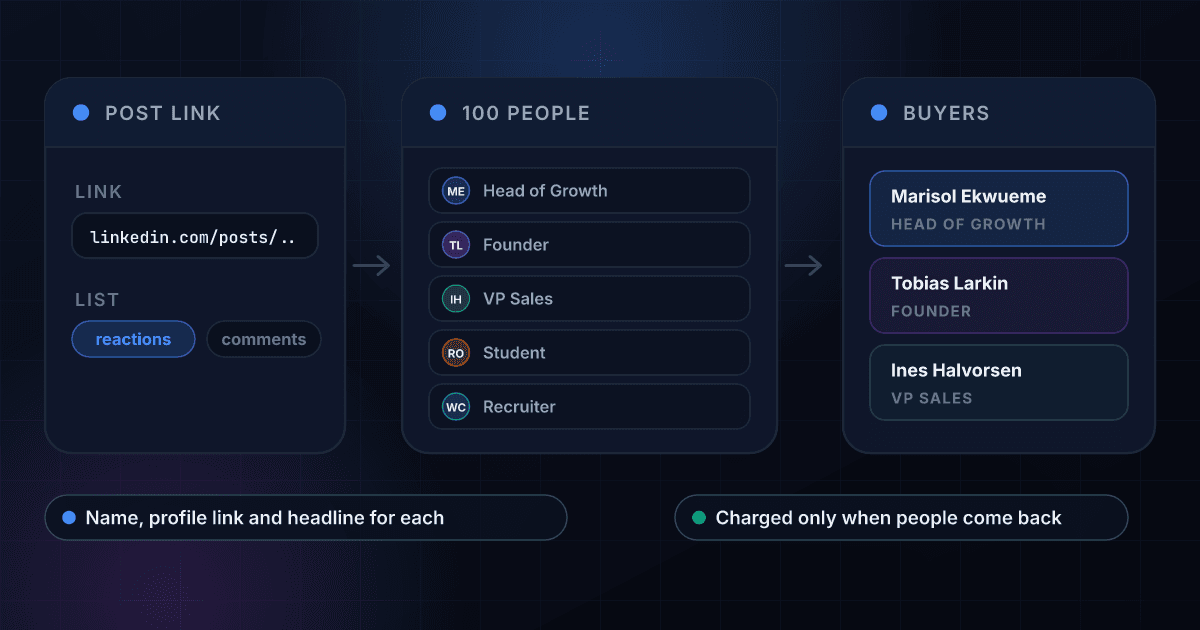
A post becomes 100 people, and the people become a short list of buyers by job title
The call returns a headline and a profile link for everyone, so narrowing 100 people to the three who match your buyer takes one filter in your own code.
These are the questions people ask before they pull their first LinkedIn post
What does the LinkedIn Post Engagers API return?
Send the link to a public LinkedIn post and it returns up to 100 people who reacted to it, or up to 100 who commented on it. Each person comes with a name, a profile link and a headline. Reactions add the kind of reaction each person left and the mix across the list, and comments add the comment text, the time and the likes.
Is this a LinkedIn scraper, and do I need a LinkedIn login?
It does the job of a LinkedIn post scraper without the scraper. You send a request with your 1Lookup API key and the people come back as JSON. You do not need a LinkedIn account, a browser extension, a cookie or a proxy, and there is no script to keep running.
Can I get both the reactions and the comments?
Yes, in two calls. Each call returns one list, so send engagement as reactions for the people who reacted and again as comments for the people who commented. Each call costs 5 credits when it returns people.
How many people does one call return?
Up to 100 per list. On a post with more engagement you get the first 100 it returns, which is plenty to see which job titles respond to a topic.
Does it return email addresses?
No. It returns names, profile links and headlines. To turn a profile link from the list into a verified work email, pass it to LinkedIn Email Finder at 30 credits per email found, and for the full job history behind a profile use LinkedIn Profile Lookup.
Which posts can I use, and where do I get the link?
Any public LinkedIn post. Open the post, choose the three-dot menu and then Copy link to post. A post id works too. A link to a profile or a company page does not name a post and returns nothing, and you are not charged for it.
How much does a post pull cost?
5 credits per post and list that returns people, which is $24.75 per 1,000 lists on the Starter plan and $17.60 on Growth. You are charged only when at least one person comes back. A post nobody can read, an error and a timeout cost 0 credits, in the API, the dashboard and bulk jobs.
How fresh is the list and how long does a pull take?
The list is read from the post when you ask. A fresh pull usually takes 3 to 10 seconds, so set your client timeout to 120 seconds and a slow one still returns its people. The same post and list pulled again within 7 days is served from cache and is free.
Can I run a list of posts at once?
Yes. Upload a CSV with a post link on each row and you get one summary row per post: how many people came back, how many have a headline, the most common reaction, and the lists of names, profile links and job titles. Bulk jobs pull the reactions list. For the comments, use the API or the dashboard. Each post with people costs 5 credits and every empty one is free.
How do I use it to find leads?
Pull the reactions on a post about the problem you solve, such as a competitor's launch, and keep the people whose headline says Head, VP or Founder. Then pass their profile links to LinkedIn Profile Lookup to read the full role, or to LinkedIn Email Finder to reach them.
A list of people is where the work starts, and these products finish it
Here is how pulling post engagers with 1Lookup compares with the automation platforms
Each page sets a rival's plans and prices beside ours and says where the rival does the job better. Every figure carries its source and the date it was checked.