This X (Twitter) profile scraper returns the latest 20 posts from any account
Send a handle or a profile link and get back that account's latest 20 posts, each with its text, time, likes, reposts, replies and views, plus the account's followers and bio. 15 credits per account that returns posts.

15
Credits per account that returns posts
about $0.07 on Starter
0
Credits when an account has no posts
private or empty, no charge
20
Latest posts per account
pinned post and reposts marked
3
Ways to write the account
handle, @handle or profile link
An account comes back as its name, followers and bio above its latest posts
Each row is one post with the numbers your code receives, and the pinned post, quotes and reposts are marked. The same fields come back as JSON in the API response below.
Tallowmere Analytics
@tallowmere_demo
Weekly notes on pricing and retention for small SaaS teams.
48.2K
Followers
- Posts returned
- 20
- Newest post
- 2026-10-20
- Oldest post
- 2026-10-14
- Top post likes
- 1,180
- Oct 2Pinned
Every Friday we publish a pricing page teardown. This week: why a free tier with no upgrade path costs more than it saves.
- 2,904
- 311
- 88
- 412K
- Oct 20
Retention tip: email the customers who did not log in this week before they churn, not after.
- 412
- 36
- 19
- 48.1K
- Oct 19Repost
Great breakdown of annual versus monthly pricing for small teams.
- 96
- 14
- 6
- 9.8K
- Oct 18
Three pricing mistakes we see in every audit: no anchor plan, hidden limits and a free tier with no upgrade path.
- 1,180
- 204
- 57
- 130K
- Oct 17Quote
Churn is a pricing problem until proven otherwise. Agree or disagree?
- 262
- 21
- 73
- 32K
- Oct 15
We just shipped cohort retention charts. A short demo is in the replies.
- 340
- 29
- 14
- 38K
14 more posts in the same response, 15 credits for all 20
An account comes back as one flat record with its followers, bio and latest posts
A handle, an @handle or a profile link all work
Write the account the way you have it. Every spelling of the same account is one lookup, so it is never charged twice inside 15 minutes.
- Handle with or without the @
- A profile link such as x.com/handle
- A post link is refused for free
You get the latest 20 posts of the account, newest first
The window shows what an account has been posting lately, with each post's text, time and link, without opening its page.
- The text and time of each post
- A link to every post
- The date range the 20 posts cover
Reposts, quotes, replies and the pinned post are marked
Every post says what kind it is, so the account's own posts are the ones that are not reposts, quotes or replies.
- is_repost, is_quote and is_reply flags
- The pinned post marked and kept out of the date range
- in_reply_to for a reply
Likes, reposts, replies, quotes and views arrive as numbers
Each count is a plain integer, so you can compare a post with the account's average without parsing anything.
- Likes, reposts, replies and quotes
- Bookmarks and views where X shows them
- The most-liked post in the summary
The account's followers and bio come with its posts
The account's display name, follower count, bio, location and verified flag are in the same record, so one call covers who they are and what they post.
- Followers and following
- Bio and location
- Verified flag
An account with no posts costs nothing
You are charged 15 credits only when posts come back. A private, suspended or empty account, an error and a timeout all cost 0 credits.
- No posts, no charge
- Errors are never billed
- Repeat lookups within 15 minutes are free
A handle goes in and the account's latest 20 posts come out
You send a handle or a profile link and nothing else
POST the account, with or without the @. A link to a single post is refused before anything is charged, because it names a post and not an account.
$ POST /api/v1/x-profile-posts
"handle": "tallowmere_demo"
> with or without the @
We read the account on X (Twitter) live and keep its latest 20 posts
The account is read when you ask, so the newest post is the newest one. An account with no posts is not billed.
Handle checked and cleaned
Account read on X (Twitter) live
Pinned post and reposts marked
Followers and bio attached
You get the account and its posts back as one JSON record
The account's name, followers and bio, and for each post the text, time, likes, reposts, replies, views and a link.
accountTallowmere Analytics
followers48,200
posts20
One endpoint reads an account's posts and works like every other 1Lookup call
Same authentication, same credit balance, and the same response envelope as every other 1Lookup product. If you have already integrated one endpoint, this one is a URL change.
curl -X POST https://app.1lookup.io/api/v1/x-profile-posts \
  -H "Authorization: Bearer $API_KEY" \
  -H "Content-Type: application/json" \
  -d '{ "handle": "tallowmere_demo" }'

# a profile link works too
# -d '{ "handle": "x.com/tallowmere_demo" }'{
"success": true,
"data": {
"classification": {
"matched": true,
"result_count": 20,
"account_handle": "tallowmere_demo",
"account_name": "Tallowmere Analytics",
"account_followers": 48200,
"account_bio": "Weekly notes on pricing and retention for small SaaS teams.",
"account_verified": true,
"newest_post_at": "2026-10-20T11:42:08.000Z",
"oldest_post_at": "2026-10-14T09:15:40.000Z",
"top_post_likes": 1180
},
"insights": {
"x_profile_posts_result": {
"posts": [
{
"url": "https://x.com/tallowmere_demo/status/1900000000000000201",
"text": "Retention tip: email the customers who did not log in this week before they churn, not after.",
"posted_at": "2026-10-20T11:42:08.000Z",
"likes": 412,
"reposts": 36,
"replies": 19,
"views": 48100,
"is_pinned": false,
"is_repost": false
}
]
}
},
"metadata": { "credits_used": 15, "cache_hit": false }
}
}A column of handles goes in and one summary row per account comes out
Upload a CSV with a handle column and download a result file with each account's name, followers and bio, how many posts came back and its most-liked post.
- 1handle
- 2@tallowmere_demo
- 3x.com/growthloop_demo
- 4coldoutbound_demo
| handle | Status | Followers | Verified | Posts Returned | Credits Used |
|---|---|---|---|---|---|
| @tallowmere_demo | Success | 48200 | Yes | 20 | 15 |
| x.com/growthloop_demo | Success | 4310 | No | 20 | 15 |
| coldoutbound_demo | Success | 22100 | Yes | 20 | 15 |
Ten more columns in the file, among them Account Name, Bio, Top Post Likes and Post URLs.
Any spelling of the handle works
@handle, handle and a profile link all read the same account, and every spelling is cleaned before the lookup.
The full posts are in the JSON export
The CSV carries the account summary and the links. Every post, with all its counts, is in the JSON file for the same job.
An account with no posts costs 0 credits
The price stays at 15 credits per account that returns posts, however long the list is.
Every account comes back with the same fields at one flat price
A count X does not show for a post comes back as null, never as a guess, and every field costs the same 15 credits.
It names the account and sizes its reach
- account_handle
- account_name
- account_followers
- account_bio
- account_verified
It returns each post's text and time
- id
- url
- text
- posted_at
- language
It counts the engagement on each post
- likes
- reposts
- replies
- quotes
- bookmarks
- views
It marks reposts, quotes, replies and the pinned post
- is_repost
- is_quote
- is_reply
- is_pinned
- in_reply_to
It describes the author of each post
- author.handle
- author.name
- author.url
- author.followers
- author.following
- author.location
It summarizes the 20 posts
- result_count
- newest_post_at
- oldest_post_at
- top_post_likes
- top_post_url
Sales, brand, creator and research teams read an account's posts instead of scrolling its page
Sales teams read a prospect's last 20 posts before they reach out
Pull the latest posts of a founder or a buyer and open with something they wrote this week. The account's bio and follower count arrive with the posts, so the research starts from the record.
Competitor and brand teams track what a rival account has been posting
Run a competitor's handle and see what they announced, which post earned the most likes and what they reposted. The pinned post and the reposts are marked, so their own posts are easy to tell from the ones they shared.
Creator and influencer teams check an account's recent engagement
Compare the likes, reposts and views across an account's last 20 posts and see the dates they cover. A creator whose recent posts earn a small fraction of their follower count is easy to spot before a deal.
Researchers and journalists build a timeline of what an account said
Save the latest posts of a public account as JSON with their times, links and engagement. A CSV of handles returns one summary row per account for a first pass across a whole list.
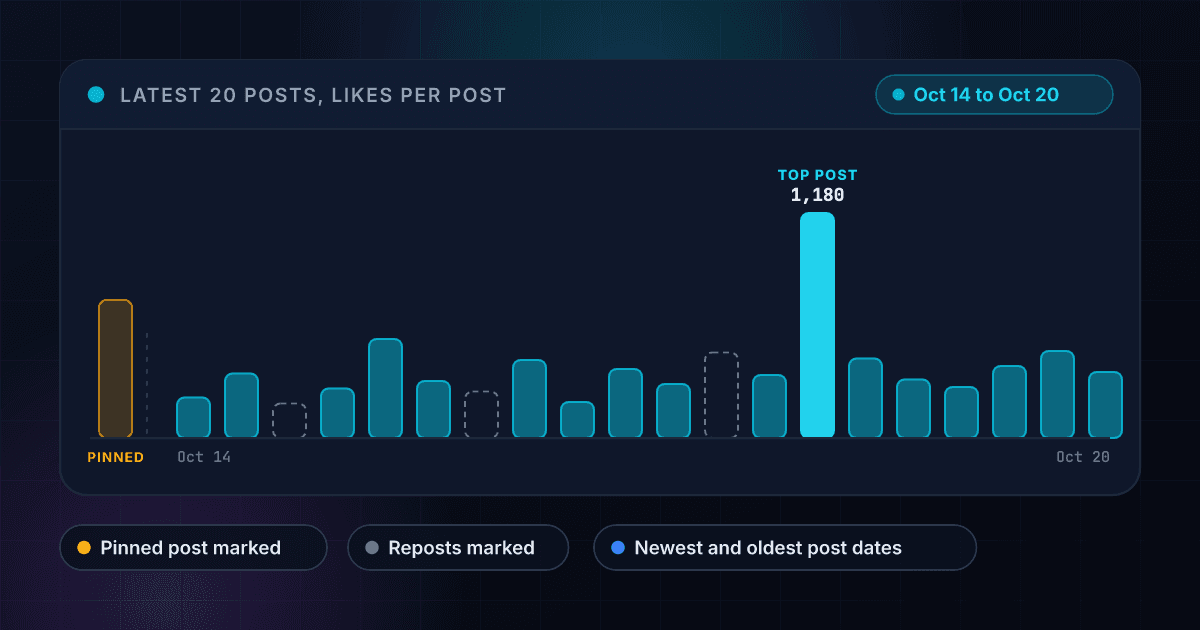
The 20 posts show how often an account posts and which post people liked most
Each bar is one post, with the pinned post set apart because it can be much older and the reposts outlined. The newest and oldest post dates come back with the result.
These are the questions people ask before they read their first account
What does the X Profile Posts API return?
Send a handle and it returns that account's latest 20 posts from X (Twitter). Each post carries its text, the time it was posted, its likes, reposts, replies, quotes and views where X shows them, and a link, with reposts, quotes, replies and the pinned post marked. The result also carries the account's display name, follower count, bio and verified flag, and the dates the 20 posts cover.
Is this a Twitter profile scraper, and do I need an X account?
It does the job of a profile scraper without the scraper. You send a request with your 1Lookup API key and the account's posts come back as JSON. You do not need an X account, an X developer application or a proxy, and there is no script to keep running.
Which ways of writing the account does it accept?
The handle with or without the @, or the profile link such as x.com/example_handle. Every spelling of the same account is one lookup, so the same account written two ways is not charged twice inside 15 minutes. A link to a single post is refused before anything is charged, because it names a post and not an account.
Does it include reposts and the pinned post?
Yes, and it marks them. A repost carries is_repost, a quote carries is_quote and a reply carries is_reply, so the account's own posts are the ones that are none of those. The pinned post comes first and carries is_pinned. It can be much older than the rest, so the date range in the summary leaves it out.
How many posts do I get per account?
The latest 20, with no pagination. That is a window onto what the account has posted lately, not its full history. For an account that posts a few times a day the 20 posts span a few days, and for a quiet account they can span months.
How much does a profile lookup cost?
15 credits per account that returns posts, about $0.07 on the Starter plan and $0.05 on Growth, so 100 accounts cost about $7 and $5. You are charged only when posts come back. A private, suspended or empty account, an error and a timeout cost 0 credits.
How fresh are the posts?
They are live. The account is read on X when you ask, so the newest post is the newest one. The same account from your organization within 15 minutes is served from cache and is free, and after 15 minutes it is read again.
How long does a lookup take?
Usually 10 to 40 seconds, because the account is read live. Set your client timeout to at least 60 seconds so a slow lookup still returns its posts.
Can I look up a list of accounts at once?
Yes. Upload a CSV with a handle column and you get one summary row per account: its name, followers, verified flag and bio, how many posts came back, the newest and oldest post times, and the most-liked post with its link. The full posts for every row are in the JSON export. Each account that returns posts costs 15 credits and every empty one is free.
Can I check one account for free first?
Yes. The free X (Twitter) profile viewer shows an account's followers, following and post count with no account needed. Use this API when you need the posts themselves, for one account or a whole list.
To see one account's followers and post count before you pull its posts, use the free X (Twitter) profile viewer.
An account is one part of the picture, and these products cover the rest
Here is how reading an account's posts with 1Lookup compares with the official X API
Each page sets a rival's plans and prices beside ours and says where the rival does the job better. Every figure carries its source and the date it was checked.