Free Phishing Email Checker
A phishing email impersonates a company you trust to get your password, card details or a payment. The clearest signs are a sending address that does not match the real domain, links whose destination differs from their text, unexpected attachments, and pressure to act immediately. Paste the email into 1Lookup's free phishing checker to see which signs are present.
Example resultThis is a real lookup we captured on 2026-08-23 for From: security@paypa1-alerts.com Subject: Your account has been limited Dear customer, unusual activity was detected on…. Run any lookup above and it is replaced with yours.
This is almost certainly a PayPal phishing scam.
This email impersonates PayPal with a fake domain, demands urgent action within 24 hours, and directs you to a fake verification link designed to steal your login credentials.
What we found
- Sender domain 'paypa1-alerts.com' mimics PayPal using a numeral '1' instead of the letter 'l' in 'paypal'
- Threat of account suspension within 24 hours creates false urgency
- Link 'http://paypal-secure-id.net/verify' uses an unrelated domain, not PayPal's official site
- Email requests identity verification through a link, a classic credential-harvesting technique
- PayPal does not suspend accounts via unverified email links—this is not how the real company operates
Confidence: 99%
This is an automated assessment of the content you pasted, not a guarantee. When money or credentials are involved, contact the organisation directly using a number or address you already trust.
This tool provides an automated assessment of the email content you submit. It is not legal or security advice and cannot guarantee that an email is safe or malicious. It reads only what you paste: it does not authenticate the sender, open attachments, visit linked pages, or query external threat intelligence. A low-risk result means no clear phishing indicators were found, not that the message is verified as genuine. Where credentials or payments are involved, verify with the organisation directly using contact details you already hold. Report phishing to your IT team, to the impersonated company, and at reportphishing@apwg.org.
Need this at scale? Email Validation API
Verify sender addresses, catch disposable domains and score risk on every address you receive.
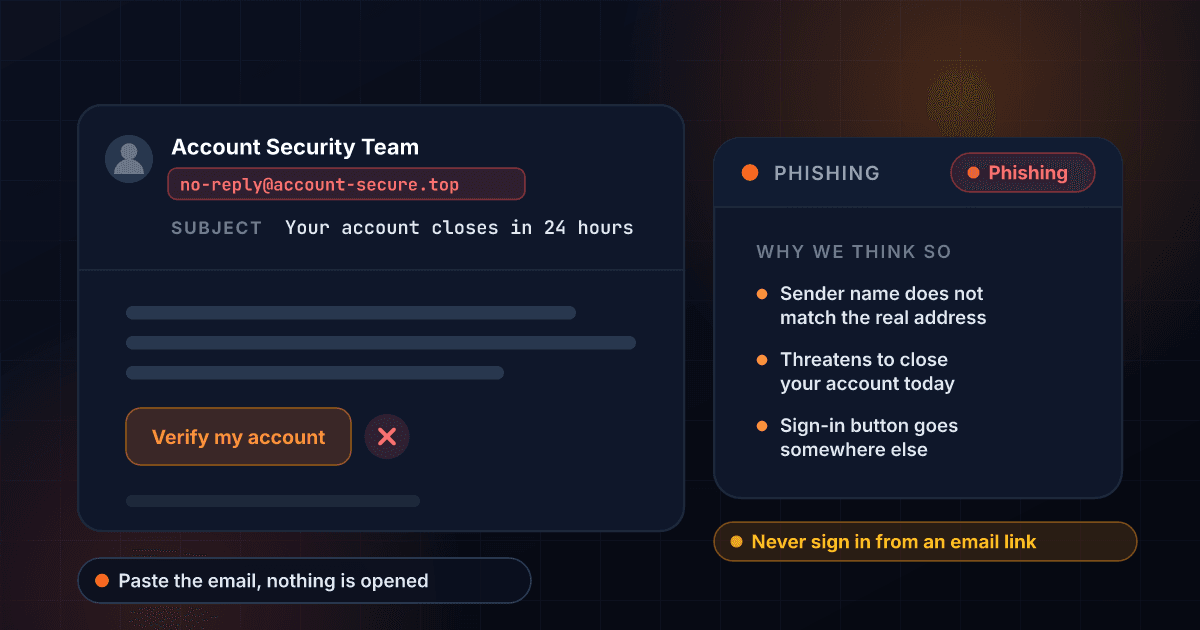
Is This Email Phishing?
Phishing is the most common way accounts get taken over, and the emails have stopped being obvious. The spelling is fixed, the logo is right, the layout is copied from the real thing. What still gives them away is the plumbing: the address it actually came from, where the links actually point, and what you are actually being asked to do.
Paste the email here, ideally including the From and Reply-To lines, and the checker works through it the way a security analyst would. It compares the display name against the real sending address, watches for lookalike domains that swap or add a character, checks whether link text matches link destination, flags attachment lures, and weighs the urgency and authority the message is leaning on.
Two patterns are worth committing to memory. First, real companies do not email you a link and ask you to log in to fix an urgent problem; go to the site yourself instead. Second, an invoice or payment-details change that arrives by email is worth a phone call to a number you already have, because business email compromise is where the largest losses happen.
Stopping forged mail sent as your own domain
An email that appears to come from your company is only possible because receiving mail servers accept forged mail claiming to be you. What they do with it is set by the DMARC policy published in your DNS, which you can read with the free DMARC checker.
What a phishing email actually looks like
Every red flag in this made-up example is numbered, and each number is explained beside it. Phishing is a pattern, and the pattern barely changes.
- From:
- Account Security Team (red flag 1) no-reply@account-secure-alerts.icu (red flag 2)
- Subject:
- Unusual sign-in detected: verify within 24 hours (red flag 3)
Dear Customer (red flag 4),
We detected a sign-in to your account from a new device. If this was not you, verify your identity now or your account will be suspended (red flag 5).
Red flag 1: A display name anyone can set
The friendly name on an email is typed by the sender. It is not checked by anything.
Red flag 2: A sending address that does not match
This is the part that cannot be faked as easily. Read it, and read the part just before the ending.
Red flag 3: A deadline attached to a threat
Urgency plus a consequence is the core of the technique. It is there to stop you thinking.
Red flag 4: A greeting with no name in it
A company that holds your account knows your name. A bulk send does not.
Red flag 5: A punishment for not acting
Suspension, closure, a fine. Real providers warn you; they do not put a clock on it in the first email.
Red flag 6: A button instead of an address
A button hides where it goes. Real notices tell you to log in the way you normally do.
The example above is invented for illustration. It names no real company, and the address in it is not a live site.
How the Phishing Email Checker Works
Paste the email
Include as much as you can see: the From address, the Reply-To, the subject line, the body, and any links written out in full. Headers help a lot. Do not open attachments to inspect them.
We examine sender, links and language
The checker looks for display-name spoofing, lookalike sender domains, a Reply-To pointing somewhere unrelated, mismatched link destinations, credential and payment requests, and the urgency scripts phishing relies on.
Read the verdict and act
You get a risk level, a confidence score and the specific findings. Then verify the sender's address with our free email verifier and the linked domain with the website legit checker.
Checks the real sending address
Display names are trivial to fake. The tool compares the friendly name against the actual address and flags the gap, which is the single most reliable phishing tell there is.
Spots lookalike domains
A swapped letter, an added hyphen, a brand name pushed into a subdomain of something else. These read as correct at a glance and are the standard way phishing survives a quick look.
Reads headers when you include them
Paste the From, Reply-To, Return-Path and Authentication-Results lines and the checker will use them, which often settles the question outright. There is no need for the entire raw source, and it will not fit.
Recognises business email compromise
Invoice redirects, changes to bank details, and urgent requests that appear to come from a colleague or executive are weighed specifically, because they cost organisations more than any other email scam.

Who uses this tool
An account security alert
Messages claiming unusual sign-in activity are the most copied template in phishing. Check it here, then go to the service directly rather than through any link in the email.
An unexpected invoice or payment change
A supplier emailing new bank details is the highest-cost scam in business. Run it through the checker, then confirm by phone using a number from your own records.
A message that looks internal
An urgent request that appears to be from your boss, often asking for gift cards or a quiet transfer. The tool flags the pattern and the sender mismatch behind it.
Training and awareness
Security teams use the explanations as teaching material, because they name the specific tell rather than saying be careful with email.
Frequently asked questions
What is the fastest way to tell if an email is phishing?
Look at the actual sending address, not the display name, and hover a link to see where it really goes. If either does not match the company being claimed, stop there. Those two checks catch the large majority of phishing.
Should I include the email headers?
Yes, but paste the useful lines rather than the whole thing. A full raw source runs tens of thousands of characters and the checker reads the first 4,000. In Gmail use Show original, in Outlook use View message details, then copy just the From, Reply-To, Return-Path and Authentication-Results lines, and add the message body after them. Those four lines carry the true sending path and are what settles most cases.
Is it safe to open a phishing email?
Opening the email itself is generally safe on a modern mail client. The danger is clicking links, opening attachments and enabling content. If you have done none of those, you are almost certainly fine.
I clicked a link and entered my password. What now?
Change that password immediately, and change it anywhere you reused it. Turn on two-factor authentication. Check the account for new forwarding rules or recovery addresses, which is what attackers add first. If it is a work account, tell your IT team now rather than later.
Can you tell me who really sent it?
Not with certainty from the content alone. Sender addresses can be spoofed. The tool tells you whether what you can see is internally consistent, which is usually enough to make a decision.
Where should I report phishing?
Forward it to reportphishing@apwg.org and to the impersonated company's own phishing address. In a workplace, report it internally first, since your IT team may need to pull it from other inboxes.
Related Phishing and Email Scam Searches
More free tools
Scam Checker
Paste any message and get an instant read on whether it's a scam.
Scam Text Checker
Check a suspicious SMS for the signs of a smishing scam.
Website Legit Checker
Check whether a site is a real business or a scam storefront.
Link Safety Checker
Check a link before you click it, without opening it.