This Google Trends API shows how interest in up to five keywords rose and fell over time
Send up to five keywords and get back a score from 0 to 100 for every date in the range, plus each keyword's average, peak, latest score and direction. 2 credits per comparison, charged only when readings come back.
2
Credits per comparison
$9.90 per 1,000 on Starter
5
Keywords on one 0 to 100 scale
compared side by side
6
Time ranges to choose from
from the past day to 5 years
1 day
Repeat comparisons are free
served from cache
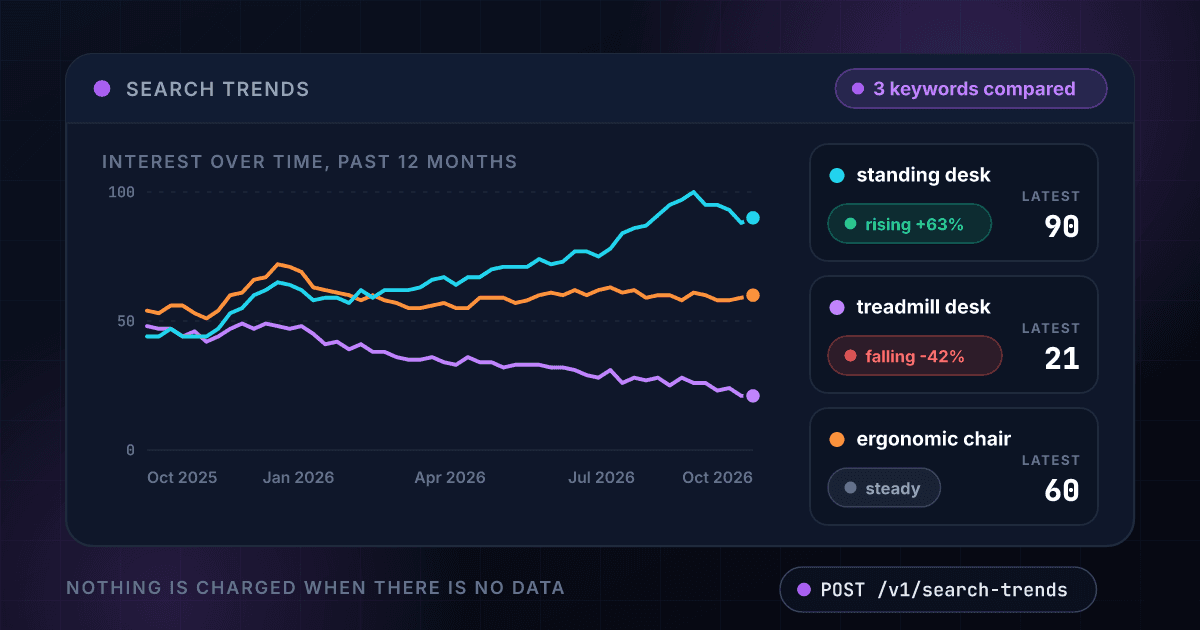
Three keywords come back as one chart, with the average, the peak and the direction of each
Each line is a set of scores your code receives, here for three invented search terms in the United States over the past 12 months. The same fields come back as JSON in the API response below.
Interest over time, 100 is the busiest moment
standing desk
90
latest reading- Average
- 68.8
- Peak
- 100
- Peak date
- Sep 13, 2026
treadmill desk
21
latest reading- Average
- 35.9
- Peak
- 49
- Peak date
- Dec 21, 2025
ergonomic chair
60
latest reading- Average
- 59.4
- Peak
- 72
- Peak date
- Jan 11, 2026
52 readings for each keyword in the same response, 2 credits for the whole comparison
Every comparison comes back as a set of scores with the average, the peak and the direction of each keyword
Up to five keywords are compared on one shared scale
All the keywords in a request are scored against the busiest moment of the comparison, so a line that sits at 60 really is three times as busy as one at 20.
- 1 to 5 keywords per request
- Each keyword up to 10 words
- One scale from 0 to 100
Every date in the range comes back with its score
You get the full series, one reading per date, ready to chart or to store. Nothing is summarized away, and the list of dates is shared by every keyword.
- A score for every date
- The same dates for every keyword
- Up to 400 readings per keyword
Each keyword comes with its average, its peak and its latest score
The average tells you the keyword's usual weight, the peak and its date show when it was busiest and the latest score shows where it stands today.
- Average and peak score
- The date of the peak
- The latest score
Rising, falling or steady is worked out for you
The last third of the range is set against the first third. A move of 10 percent or more either way is a direction, anything less is steady, and the change in percent comes with it.
- Rising, falling or steady
- The change in percent
- The keyword with the most interest named
The range runs from the past day to the past 5 years
Choose the past day, 7 days, 30 days, 90 days, 12 months or 5 years. The longer ranges show seasons, and the shorter ones show what is happening this week.
- Six ranges
- The past 12 months by default
- A country or the whole world
A comparison with no data costs nothing
You are charged 2 credits only when readings come back, whatever the number of keywords. An error, a timeout and a comparison with no data cost 0 credits, and a repeat within 1 day is free.
- No readings, no charge
- Errors are never billed
- Repeat comparisons within 1 day are free
A few keywords go in and a chart of their interest comes out
You send up to five keywords and, if you like, a country and a time range
POST the keywords as a list. Add a country, or leave it out for the whole world, and choose a range from the past day to the past 5 years.
$ POST /api/v1/search-trends
"keywords": ["standing desk", "treadmill desk"]
"country": "US"
"range": "past_12_months"
We read the interest in every keyword on one shared scale
Every keyword is scored against the busiest moment of the comparison, then averaged, peaked and compared from the start of the range to the end. Nothing is charged if there is no data.
Keywords cleaned and de-duplicated
Interest read for the range
Scores set on one 0 to 100 scale
Direction worked out for each keyword
You get every reading and the summary of each keyword back as one JSON record
The score for every date, each keyword's average, peak, latest score and direction, and the keyword that draws the most interest.
standing deskrising +63%
treadmill deskfalling -42%
most searchedstanding desk
One endpoint turns a few keywords into a chart of their interest and works like every other 1Lookup call
Same authentication, same credit balance, and the same response envelope as every other 1Lookup product. If you have already integrated one endpoint, this one is a URL change.
curl -X POST https://app.1lookup.io/api/v1/search-trends \
  -H "Authorization: Bearer $API_KEY" \
  -H "Content-Type: application/json" \
  -d '{ "keywords": ["standing desk", "treadmill desk", "ergonomic chair"], "country": "US", "range": "past_12_months" }'

# country and range are optional: leave the country out for the whole world, and the range defaults to past_12_months
# -d '{ "keywords": ["electric bike", "scooter"], "country": "GB", "range": "past_90_days" }'{
"success": true,
"data": {
"classification": {
"matched": true,
"keywords": [
"standing desk",
"treadmill desk",
"ergonomic chair"
],
"keyword_count": 3,
"country_code": "US",
"country_name": "United States",
"time_range": "Past 12 months",
"top_keyword": "standing desk",
"average_interest": [
"standing desk: 68.8",
"treadmill desk: 35.9",
"ergonomic chair: 59.4"
],
"peak_interest": [
"standing desk: 100 on 2026-09-13",
"treadmill desk: 49 on 2025-12-21",
"ergonomic chair: 72 on 2026-01-11"
],
"latest_interest": [
"standing desk: 90",
"treadmill desk: 21",
"ergonomic chair: 60"
],
"direction": [
"standing desk: rising +63%",
"treadmill desk: falling -42%",
"ergonomic chair: steady"
]
},
"insights": {
"search_trends_result": {
"keywords": ["standing desk","treadmill desk","ergonomic chair"],
"country_code": "US",
"country_name": "United States",
"range": "past_12_months",
"range_label": "Past 12 months",
"dates": [
"2025-10-26", "2025-11-02", "2025-11-09", "2025-11-16", "2025-11-23", "2025-11-30",
"2025-12-07", "2025-12-14", "2025-12-21", "2025-12-28", "2026-01-04", "2026-01-11",
"2026-01-18", "2026-01-25", "2026-02-01", "2026-02-08", "2026-02-15", "2026-02-22",
"2026-03-01", "2026-03-08", "2026-03-15", "2026-03-22", "2026-03-29", "2026-04-05",
"2026-04-12", "2026-04-19", "2026-04-26", "2026-05-03", "2026-05-10", "2026-05-17",
"2026-05-24", "2026-05-31", "2026-06-07", "2026-06-14", "2026-06-21", "2026-06-28",
"2026-07-05", "2026-07-12", "2026-07-19", "2026-07-26", "2026-08-02", "2026-08-09",
"2026-08-16", "2026-08-23", "2026-08-30", "2026-09-06", "2026-09-13", "2026-09-20",
"2026-09-27", "2026-10-04", "2026-10-11", "2026-10-18"
],
"series": [
{
"keyword": "standing desk",
"values": [
44, 44, 47, 44, 44, 44, 47, 53, 55, 60, 62, 65, 64,
62, 58, 59, 59, 57, 62, 59, 62, 62, 62, 63, 66, 67,
64, 67, 67, 70, 71, 71, 71, 74, 72, 73, 77, 77, 75,
78, 84, 86, 87, 91, 95, 97, 100, 95, 95, 93, 88, 90
],
"average": 68.8,
"peak": 100,
"peak_date": "2026-09-13",
"latest": 90,
"change_pct": 63,
"direction": "rising"
},
{
"keyword": "treadmill desk",
"values": [
48, 47, 47, 44, 46, 42, 44, 47, 49, 47, 49, 48, 47,
48, 45, 41, 42, 39, 41, 38, 38, 36, 35, 35, 36, 34,
33, 36, 34, 34, 32, 33, 33, 33, 32, 32, 31, 29, 28,
31, 26, 28, 27, 28, 25, 28, 26, 26, 23, 24, 21, 21
],
"average": 35.9,
"peak": 49,
"peak_date": "2025-12-21",
"latest": 21,
"change_pct": -42,
"direction": "falling"
},
{
"keyword": "ergonomic chair",
"values": [
54, 53, 56, 56, 53, 51, 54, 60, 61, 66, 67, 72, 71,
69, 63, 62, 61, 60, 58, 60, 58, 57, 55, 55, 56, 57,
55, 55, 59, 59, 59, 57, 58, 60, 61, 60, 62, 60, 62,
63, 61, 62, 59, 60, 60, 58, 61, 60, 58, 58, 59, 60
],
"average": 59.4,
"peak": 72,
"peak_date": "2026-01-11",
"latest": 60,
"change_pct": -1,
"direction": "steady"
}
],
"leader": "standing desk",
"point_count": 52
}
},
"metadata": { "credits_used": 2, "cache_hit": false }
}
}A column of comparisons goes in and one summary row per comparison comes out
Upload a CSV with one comparison on each row, keywords separated by semicolons, and download a result file with the leader and the direction of every keyword.
- 1keywords
- 2standing desk; treadmill desk
- 3electric bike; scooter | GB | past_90_days
- 4meal kit; takeout | US | past_5_years
| keywords | Most Searched | Direction | Credits Used |
|---|---|---|---|
| standing desk; treadmill desk | standing desk | standing desk: rising +63% | treadmill desk: falling -42% | 2 |
| electric bike; scooter | GB | past_90_days | electric bike | electric bike: rising +21% | scooter: steady | 2 |
| meal kit; takeout | US | past_5_years | takeout | meal kit: falling -18% | takeout: rising +12% | 2 |
Seven more columns in the file, among them Status, Country, Time Range, Average Interest, Peak Interest and Latest Interest.
One row in, one row out
Every comparison becomes one row, so a weekly watch list of 100 comparisons is a spreadsheet of 100 rows you can filter by direction.
Every reading is in the JSON export
The CSV carries the leader, the averages, the peaks and the directions. The score for every date is in the JSON file for the same job.
A comparison with no data costs 0 credits
The price stays at 2 credits per comparison that returns readings, however long the list is.
Every comparison comes back with the same fields at one flat price
A comparison with no data comes back with matched set to false and no charge, and every comparison that returns readings costs the same 2 credits.
It scores every keyword for every date
- dates[]
- series[].keyword
- series[].values[]
- point_count
It summarizes each keyword
- series[].average
- series[].peak
- series[].peak_date
- series[].latest
It says which way each keyword is moving
- series[].change_pct
- series[].direction
It names the keyword with the most interest
- leader
- top_keyword
It describes the comparison that was made
- keywords
- country_code
- country_name
- range
- range_label
It reports what the call cost
- metadata.credits_used
- metadata.cache_hit
Marketers, product teams and analysts watch interest in a topic before they commit to it
Marketers time their campaigns and content to the weeks when interest peaks
Compare a product with its category over the past 5 years and see which months it climbs in. Schedule the launch a few weeks before the usual peak.
Product and brand teams see which name is gaining on the others
Put your brand and three competitors in one request. The leader, the latest scores and the direction of each line show who is gaining without a single survey.
Analysts and investors watch demand before it reaches the revenue line
Track a consumer product or a topic weekly from a bulk file and flag any keyword whose direction turns from steady to rising.
Developers and data teams add trend lines to dashboards and reports
One call returns every reading as plain numbers and dates, so a chart in your own product needs no scraping and no manual export.
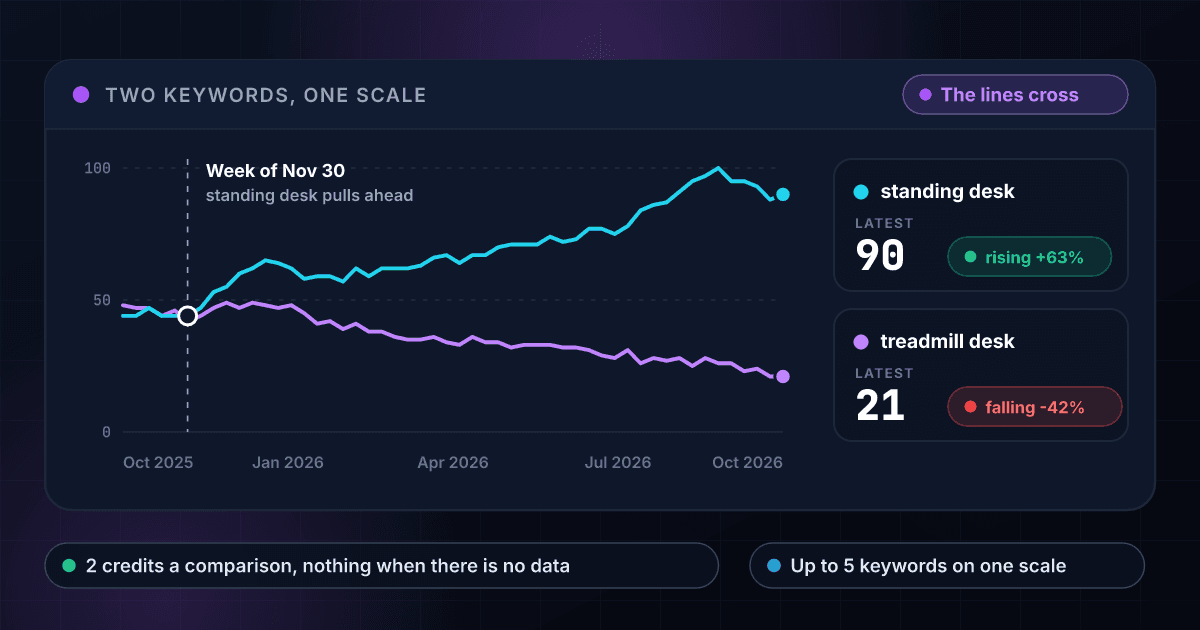
Two keywords on one scale show the moment one overtakes the other
Both lines are scored against the same busiest moment, so a crossing is a real change in what people search for.
These are the questions people ask before they run their first comparison
What does Search Trends return?
Send up to five keywords and it returns, for each one, a score from 0 to 100 for every date in the time range, plus its average, its peak and the date of the peak, its latest score, how much it changed from the start of the range to the end, and a direction of rising, falling or steady. It also names the keyword that draws the most interest.
Is this a Google Trends API I can call from code?
Yes. You send a request with your 1Lookup API key and get the scores back as JSON, so a dashboard, a report or a spreadsheet can chart the same comparison every week without anyone opening Google Trends.
What does the 0 to 100 score mean?
It is relative. 100 is the busiest moment of the whole comparison, so a score of 50 means half as busy, not 50 searches. Compare keywords in the same request to read them against each other, because scores from separate requests are not on the same scale.
How many keywords can I compare?
One to five in a single request, each up to 10 words. They share one scale, so you can see at a glance which one draws the most interest and where lines cross.
Which time ranges can I choose?
The past day, the past 7 days, the past 30 days, the past 90 days, the past 12 months or the past 5 years. The past 12 months is the default.
Can I compare interest in one country?
Yes. Choose any of 29 countries, or leave the country out for the whole world, which is the default. The same keywords can rise in one country while they fall in another.
How does it decide that a keyword is rising or falling?
It compares the average score over the first third of the range with the average over the last third. A rise of 10 percent or more is rising, a fall of 10 percent or more is falling and anything in between is steady. The change in percent comes back with the direction.
How much does a comparison cost?
2 credits per comparison that returns readings, whatever the number of keywords, which is $9.90 per 1,000 comparisons on the Starter plan and $7.04 on Growth. You are charged only when readings come back. A comparison with no data, an error and a timeout cost 0 credits, in the API, the dashboard and bulk jobs.
What happens when a keyword has too little interest?
You get a result with matched set to false and you are charged 0 credits. Very rare keywords often have no readings. Try a broader phrase or a longer time range.
How fresh is a comparison and how long does it take?
Each comparison is made live and usually takes 4 to 10 seconds, so set your client timeout to 120 seconds and a slow one still returns its data. The same comparison made again within 1 day is served from cache and is free.
Can I run a list of comparisons at once?
Yes. Upload a CSV with one column named keywords and put one comparison on each row, with the keywords separated by semicolons and, if you like, a country and a time range after a bar, like electric bike; scooter | GB | past_90_days. You get one row per comparison with the keyword that draws the most interest, the average, peak and latest scores and the direction of each keyword. Every reading is in the JSON export. Each comparison with data costs 2 credits.
How is it different from Keyword Metrics?
Keyword Metrics, at 6 credits, describes one keyword: its monthly search volume, cost per click, difficulty, intent and a 12-month trend. Search Trends, at 2 credits, compares up to five keywords against each other over any range up to 5 years. Teams use Keyword Metrics to size a keyword and Search Trends to see which one is gaining.
Interest over time is one signal, and these products add the rest
Here is how comparing Google Trends keywords with 1Lookup differs from the alternatives
Each page sets a rival's plans and prices beside ours and says where the rival does the job better. Every figure carries its source and the date it was checked.