The DNS Lookup API returns every record of a domain, or the name behind an IP address
Send a domain and get its A, AAAA, CNAME, MX, NS, TXT, CAA and SOA records in one call, with the mail provider and the DNS host named in plain words. Send an IP address and get its reverse DNS name. 2 credits per lookup that finds something, and nothing when the name has no records.
2
Credits per lookup
about $0.01 on Starter
0
Credits when nothing is found
no such name, no charge
8
Record types in one call
A, AAAA, CNAME, MX, NS, TXT, CAA, SOA
15
Minutes a result is remembered
or read it fresh on request
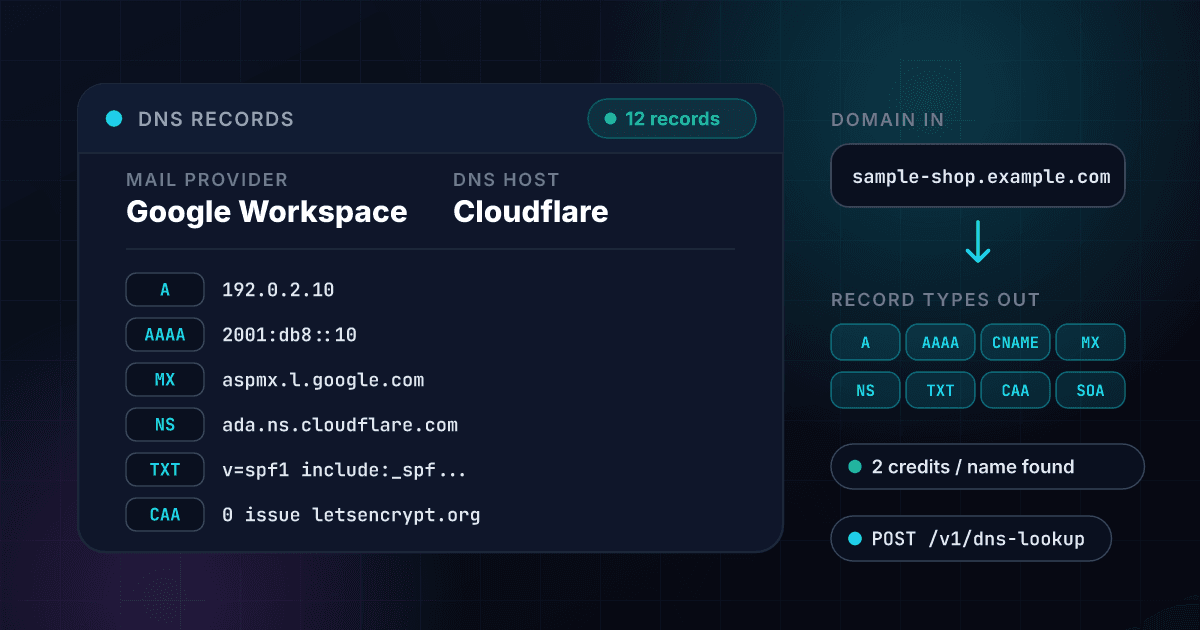
One question to DNS returns eight record types, and two labels are worked out from them
The MX hosts name the mail provider and the name servers name the DNS host, while the address, text, CAA and SOA records come back as they are published. The domain here is invented.
A DNS lookup comes back as the records the name publishes, in one flat payload.
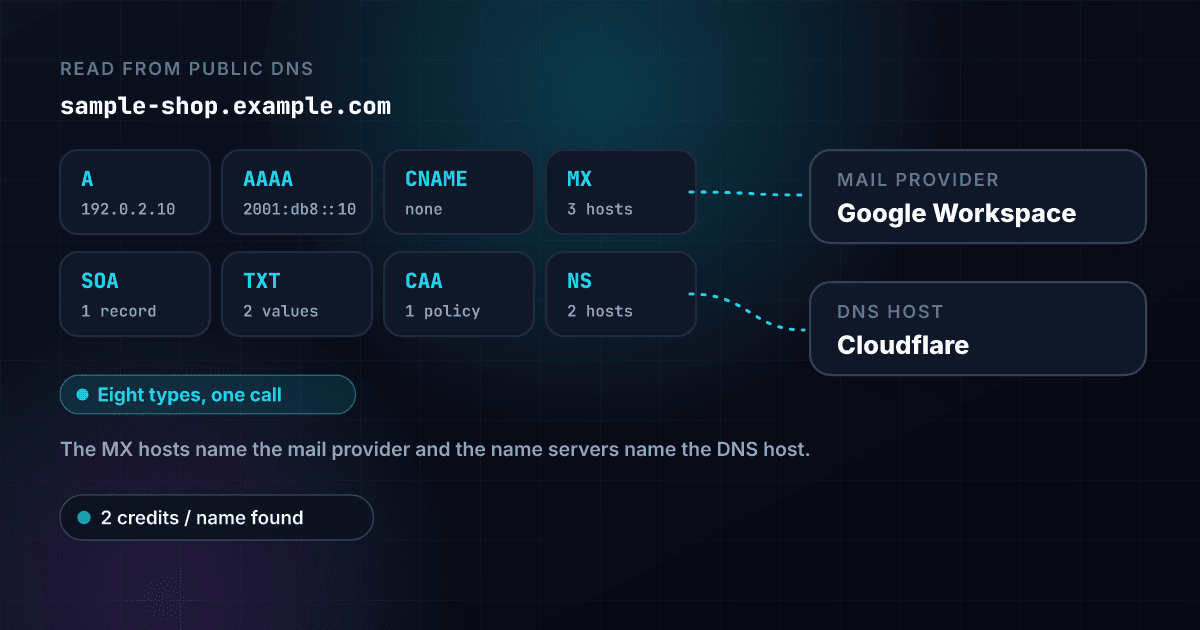
All eight record types come back from one call
The A, AAAA, CNAME, MX, NS, TXT, CAA and SOA records of the name arrive together, in a stable order, lower case and without trailing dots, so a cached answer and a fresh one are equal and a diff of two lookups shows a real change.
- Eight record types in one request
- MX records with their priorities
- SOA timers as named fields
- Lists sorted and de-duplicated
The mail provider and the DNS host are named for you
The MX hosts are matched to a mail provider such as Google Workspace or Microsoft 365, and the name servers to a DNS host such as Cloudflare or Amazon Route 53, so a list of domains can be grouped by who runs their mail without reading a single record.
- One plain label for mail
- One plain label for DNS
- Split zones show every host
- A null MX is flagged on its own
Reverse DNS works on the same endpoint
Send an IPv4 or IPv6 address and the PTR names published for it come back, with the reverse lookup name that was asked. There is no second product or second price to learn.
- IPv4 and IPv6 both read
- Every PTR name listed
- The same credits and the same key
- A free answer when there is no PTR
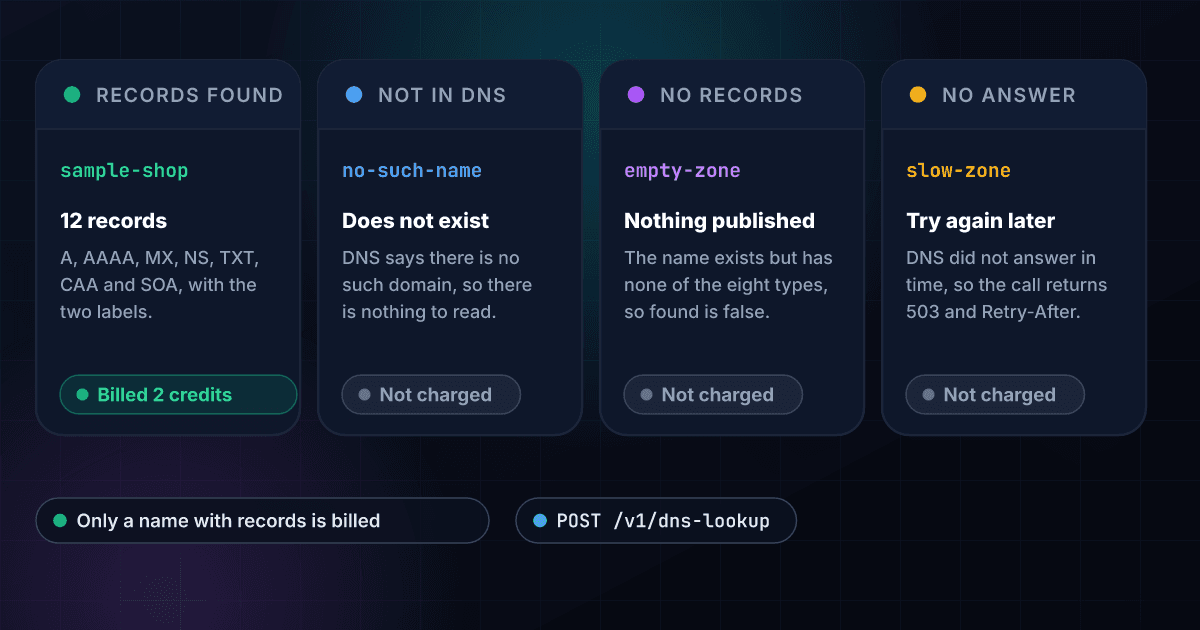
A name with nothing to show costs nothing
You are charged 2 credits only when a record or a reverse name is found. A name that is not in DNS, a name with none of the eight types and an IP address with no PTR cost 0, and that holds for bulk CSV jobs as well as the API.
- Zero credits when nothing is found
- Bulk CSV with a domain column
- The same credits as every other product
- One API key for all of it
A failed lookup is never passed off as an empty one
A name that does not exist, a name with no records and a lookup that could not be answered are three different results. The first two are free answers with a reason. The third returns a 503 with a Retry-After header, is never billed and is never remembered.
- no_such_domain, no_records and no_ptr named
- 503 with Retry-After on a failure
- Types that did not answer are listed
- Errors kept apart from answers
Read it live or take the 15-minute answer
A result is remembered for 15 minutes, so a repeat of the same question costs the same and returns the same thing. Send bypass_cache: true to read the name again right after you change a record.
- The day it was read in checked_at
- Remembered for 15 minutes
- Bypass the memory on request
- Subdomains and underscore names allowed
A domain or an IP address goes in and its DNS records come out
Send a domain or an IP address
POST a domain, a web address or an email address, or an IP address. It is cut down to the domain or the address. A single word, an internal name or a private address is refused with a clear error and costs nothing.
$ POST /api/v1/dns-lookup
"domain": "sample-shop.example.com"
> a domain, an address or an IP
We ask DNS for all eight record types at once
1Lookup asks for the A, AAAA, CNAME, MX, NS, TXT, CAA and SOA records together, each under its own time limit, then reads the mail provider from the MX hosts and the DNS host from the name servers. An IP address is asked for its reverse name instead.
A, AAAA and CNAME read
MX and NS read
TXT, CAA and SOA read
Mail provider and DNS host named
Get the records, flat and structured
The records arrive in one JSON payload, flat for a spreadsheet and structured for code. A name with records bills 2 credits, and a name with none bills nothing.
mailGoogle Workspace
DNS hostCloudflare
12 records across 7 types
One endpoint reads DNS and works like every other 1Lookup call.
Same authentication, same credit balance, and the same response envelope as every other 1Lookup product. If you have already integrated one endpoint, this one is a URL change.
curl -X POST https://app.1lookup.io/api/v1/dns-lookup \
  -H "Authorization: Bearer $API_KEY" \
  -H "Content-Type: application/json" \
  -d '{ "domain": "sample-shop.example.com" }'

# For an IP address, send it in the ip field and get the reverse name back
curl -X POST https://app.1lookup.io/api/v1/dns-lookup \
  -H "Authorization: Bearer $API_KEY" \
  -H "Content-Type: application/json" \
-d '{ "ip": "8.8.8.8" }'{
"classification": {
"found": true,
"query_type": "domain",
"query": "sample-shop.example.com",
"mail_provider": "Google Workspace",
"dns_host": "Cloudflare",
"record_count": 12,
"a_records": "192.0.2.10 | 192.0.2.11",
"aaaa_records": "2001:db8::10",
"cname_records": null,
"mx_records": "1 aspmx.l.google.com | 5 alt1.aspmx.l.google.com | 5 alt2.aspmx.l.google.com",
"ns_records": "ada.ns.cloudflare.com | bob.ns.cloudflare.com",
"txt_records": "v=spf1 include:_spf.google.com ~all | google-site-verification=sample-token-0000",
"caa_records": "0 issue \"letsencrypt.org\"",
"soa_record": "ada.ns.cloudflare.com dns@sample-shop.example.com 2349871520 10000 2400 604800 1800",
"ptr_names": null,
"unanswered_types": null,
"checked_at": "2026-10-26"
},
"insights": {
"dns_lookup_result": {
"query_type": "domain",
"query": "sample-shop.example.com",
"mail_provider": "Google Workspace",
"dns_host": "Cloudflare",
"null_mx": false,
"records": {
"a": ["192.0.2.10", "192.0.2.11"],
"aaaa": ["2001:db8::10"],
"cname": [],
"mx": [
{ "priority": 1, "host": "aspmx.l.google.com" },
{ "priority": 5, "host": "alt1.aspmx.l.google.com" },
{ "priority": 5, "host": "alt2.aspmx.l.google.com" }
],
"ns": ["ada.ns.cloudflare.com", "bob.ns.cloudflare.com"],
"txt": [
"v=spf1 include:_spf.google.com ~all",
"google-site-verification=sample-token-0000"
],
"caa": [{ "flags": 0, "tag": "issue", "value": "letsencrypt.org" }],
"soa": {
"primary_ns": "ada.ns.cloudflare.com",
"admin_email": "dns@sample-shop.example.com",
"serial": 2349871520,
"refresh": 10000,
"retry": 2400,
"expire": 604800,
"minimum_ttl": 1800
}
},
"unanswered_types": [],
"checked_at": "2026-10-26",
"data_source": "dns"
}
},
"metadata": { "credits_used": 2, "cache_hit": false }
}A column of domains goes in and one row per domain comes out
Upload a CSV with a domain column and download a result file with each domain's mail provider, DNS host and record count, with the mail servers and name servers in more columns. The three domains here are invented.
- 1domain
- 2sample-shop.example.com
- 3sample-studio.example.com
- 4no-such-name.example.com
| domain | Found | Mail Provider | DNS Host | Record Count | Credits Used |
|---|---|---|---|---|---|
| sample-shop.example.com | Yes | Google Workspace | Cloudflare | 12 | 2 |
| sample-studio.example.com | Yes | Microsoft 365 | Amazon Route 53 | 9 | 2 |
| no-such-name.example.com | No | 0 | 0 |
More columns in the file, among them Query Type, A, AAAA, CNAME, MX, NS, TXT, CAA, SOA, PTR Names, Types That Did Not Answer and Why Nothing Found.
One row in, one row out
Every domain becomes one row, so a list of 500 domains is a spreadsheet of 500 rows you can filter by mail provider or sort by how many records each name publishes.
A name with nothing to show is a free row
A name that is not in DNS, or one with none of the eight record types, comes back as a row with the reason in its own column and costs 0 credits.
An IP address in the same column gets its reverse name
Put domains and addresses in one file and each row is answered the way its kind of name is, with the PTR names in their own column.
One call turns a domain into every record it publishes and who runs its mail and DNS
One call turns a domain from a signup form, a CRM or a list into the records an engineer or a marketer asks for: the addresses, the mail servers in priority order, the name servers, the TXT, CAA and SOA records, and two plain labels for who handles its mail and who hosts its DNS. The domain and its records here are invented.
- Domainsample-shop.example.com
- Mail providerGoogle Workspace
- DNS hostCloudflare
- A records (IPv4)192.0.2.10, 192.0.2.11
- AAAA records (IPv6)2001:db8::10
- MX priority 1aspmx.l.google.com
- MX priority 5alt1.aspmx.l.google.com
- First name serverada.ns.cloudflare.com
- CAA issueletsencrypt.org
- Records in all12
{
  "classification": {
    "found": true,
    "query_type": "domain",
    "query": "sample-shop.example.com",
    "mail_provider": "Google Workspace",
    "dns_host": "Cloudflare",
    "record_count": 12,
    "a_records": "192.0.2.10 | 192.0.2.11",
    "mx_records": "1 aspmx.l.google.com | 5 alt1.aspmx.l.google.com | ...",
    "ns_records": "ada.ns.cloudflare.com | bob.ns.cloudflare.com",
    "checked_at": "2026-10-26"
  },
  "insights": {
    "dns_lookup_result": {
      "null_mx": false,
      "data_source": "dns"
    }
  },
  "metadata": { "credits_used": 2 }
}
Every DNS lookup returns the same fields at one flat price.
Every name that is found returns the same fields and costs the same 2 credits, whatever the size of the zone.
These fields say what was asked and whether it was found.
- found
- query_type
- query
- reason
- record_count
- checked_at
These fields name who handles the mail and the DNS.
- mail_provider
- dns_host
- null_mx
These fields hold the address and name records.
- a_records
- aaaa_records
- cname_records
- records.a[]
- records.aaaa[]
- records.cname[]
These fields hold the mail, name server and text records.
- mx_records
- ns_records
- txt_records
- records.mx[].priority
- records.mx[].host
- records.ns[]
- records.txt[]
These fields hold the authority and reverse records.
- caa_records
- records.caa[].tag
- soa_record
- records.soa.serial
- records.soa.minimum_ttl
- ptr_names
- ptr.names[]
- ptr.reverse_name
These fields say which types did not answer and what the lookup cost.
- unanswered_types
- data_source
- credits_used
- cache_hit
Sales, security and engineering teams use DNS records to learn who runs a domain's mail and where it points.
Sales and marketing teams segmenting by mail provider
Run a column of company domains through a bulk job and add the mail provider and DNS host to every account, so a list can be split by who runs each company's mail before a campaign is written.
Email deliverability and sending teams
Read the MX records, the SPF text and the name servers of a sending domain in one call before a send, then hand the domain to Email Authentication Check for a graded report.
Security and IT teams
Look up the reverse name behind an address from a log or an alert, and read the records of a lookalike domain to see where its mail and its web address point.
Domain and hosting resellers
Check a customer's name servers and mail records before a move, and keep the SOA serial to prove what a zone looked like on the day you read it.
Developers building a domain tool
Put an MX record lookup, a DNS lookup and a reverse DNS lookup behind one endpoint and one balance, instead of one service for each question.
Data teams cleaning a domain list
Sort out the domains that do not exist, the ones with no mail servers and the ones with a null MX before anyone spends time on them, at no cost for the names with nothing to read.
A name with records is billed, and every other answer is free
A domain with records and an address with a reverse name return their results. A name that is not in DNS, a name with nothing published and an address with no PTR cost nothing.
These are the questions people ask before they run their first DNS lookup.
What does the DNS Lookup API return?
Send a domain and it returns the A, AAAA, CNAME, MX, NS, TXT, CAA and SOA records the name publishes, in one call. It also works out two plain labels from them: the mail provider, read from the MX hosts, and the DNS host, read from the name servers. Send an IP address instead and it returns the reverse DNS (PTR) names. The flat classification block holds a count, the two labels and one text field per record type, and the structured records sit under insights.
Can I use it as an MX record lookup API?
Yes. The MX records come back with their priorities in order, and the mail provider is named in plain words, such as Google Workspace or Microsoft 365, so one call tells you where a domain's mail is handled. A domain that publishes a null MX, which says it accepts no mail, is flagged with null_mx: true instead of a provider.
Can I use it as a reverse DNS lookup API?
Yes. Send an IPv4 or IPv6 address in the ip field, or in the domain field, and you get the PTR names published for it, with the reverse lookup name that was asked. An address with no PTR record is a free answer with the reason no_ptr. Private, loopback and internal addresses are refused with a 400 error before anything is looked up.
Where does the DNS data come from?
From DNS itself. 1Lookup asks the question any resolver asks, for all eight record types at once, and returns what the name publishes at that moment. No database of past records sits behind it, so the answer is the live record, and every result carries the day it was read in checked_at.
How much does a DNS lookup cost?
2 credits per lookup that finds something, about $0.01 on the Starter plan. A domain with records and an IP address with a reverse name are billed. A name that does not exist, a name with none of the eight types and an IP address with no PTR record cost nothing, and neither does a lookup the DNS system could not answer.
When is a lookup free?
Four cases cost nothing. The name is not in DNS (found: false, reason no_such_domain). The name exists but has none of the eight record types (no_records). The IP address has no reverse name (no_ptr). Or every query timed out or failed, which returns a 503 with a Retry-After header, is never remembered, and is never reported as a name with no records.
Which inputs does it accept?
A domain, a web address or an email address, cut down to the domain, or an IPv4 or IPv6 address. Subdomains are kept as written, because www.example.com and shop.example.com each have their own records, and names with an underscore such as _dmarc.example.com are allowed. A single word, an internal name such as localhost and a private address are refused with a 400 error and cost nothing.
How are the mail provider and the DNS host worked out?
From the hostnames the records point to. The mail provider is read from the endings of the MX hosts and the DNS host from the endings of the name servers. A zone that uses more than one DNS host shows each one found. Hosts that match no known provider read as custom, and a domain with no MX or no name servers has no label. It says where the records point, not what is inside anyone's account.
How fresh is the answer, and can I read it again?
A result is remembered for 15 minutes, so a repeat of the same question returns the same answer at the same price. Send bypass_cache: true to read the name again straight away, for example right after you change a record.
Can I look up a list of domains at once?
Yes. Upload a CSV with a domain column, and an IP address in that column gets its reverse name. You get a row per name with Found, Mail Provider, DNS Host, Record Count, one column for each record type, PTR Names and Why Nothing Found. A name with nothing found is a free row. The price stays at the same credits per lookup that finds something.
What does it not do?
It reads the eight record types listed and nothing else: no DNSSEC validation, no SRV or TLSA records, and no history of past records. It reads DNS from one place, so a zone that answers differently by region can read differently to a visitor, and it does not check propagation across many resolvers. SPF, DKIM and DMARC are interpreted by Email Authentication Check, which grades them.
To read the records of a single domain before you write any code, try the free DNS lookup.
DNS records are the start of the picture, and these products add the rest.
Here is how reading DNS records with 1Lookup compares with the other ways to get them.
Each page sets a rival's plans and prices beside ours and says where the rival does the job better. Every figure carries its source and the date it was checked.