The Brand Lookup API returns a company's name, logos, colors, fonts and social profiles from its domain
Send a domain, a web address or an email address and get the brand kit the company's own site publishes: its name, every logo file with its type and size, colors ranked by use, fonts, social profiles and a description. 2 credits per brand found, and nothing when the site has no name or logo to read.
2
Credits per brand found
about $0.01 on Starter
0
Credits when there is nothing to read
no site, no charge
7
Social networks read
from LinkedIn to GitHub
4
Requests to the site at most
home page, manifest, two stylesheets
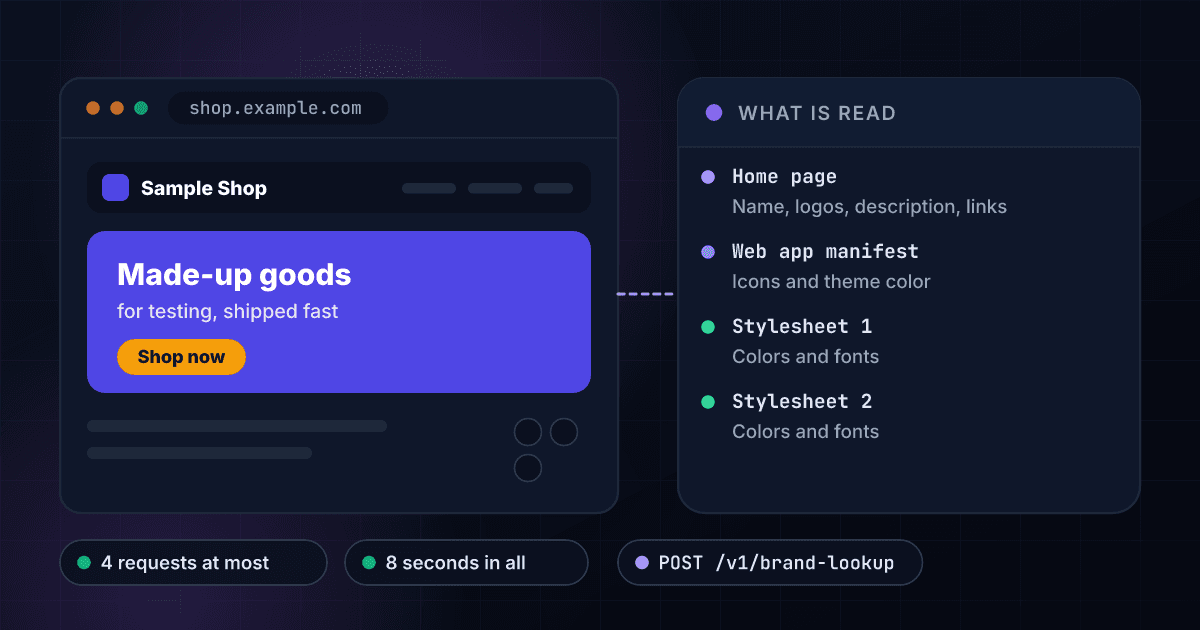
The home page and two stylesheets hold everything the brand kit is made from
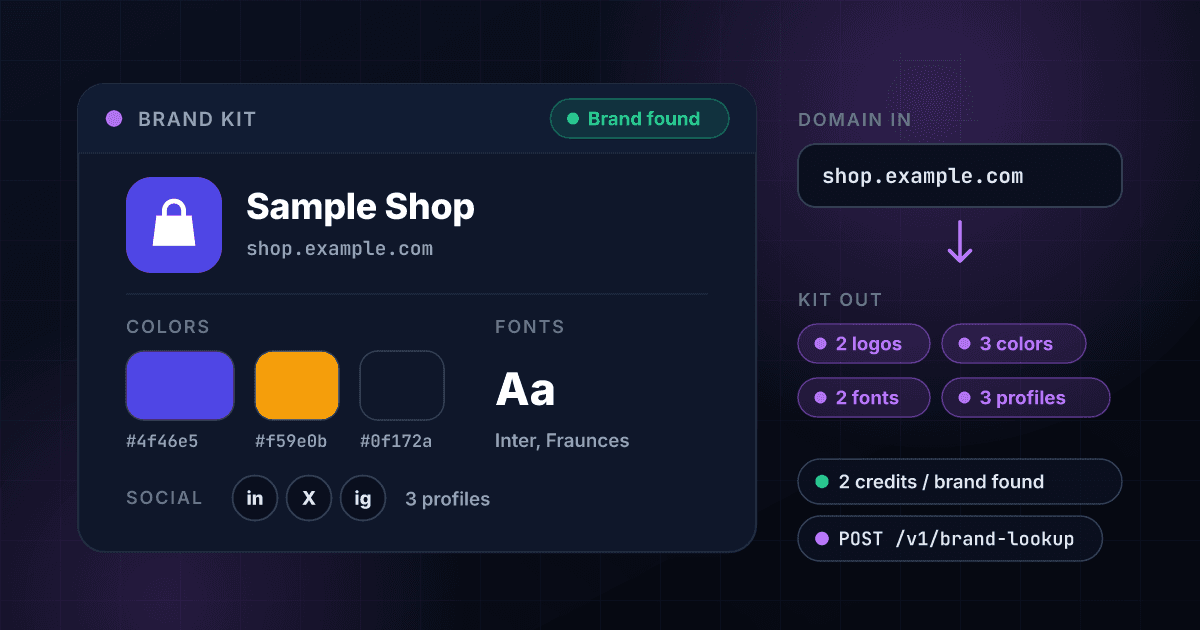
The name, the logos and the description come from the home page and the manifest, the colors from the stylesheets, and the social profiles from the links on the page. The company here is invented.
A brand kit comes back as a set of facts the site itself publishes, in one flat payload.
Every logo comes with its type and size
Logos are listed best first, each with its address, its purpose (logo for a wordmark or symbol, icon for a favicon-style square), its file type and its width and height when the site states them. The sharing image is returned separately.
- Best logo first
- SVG, PNG and other types named
- Width and height where stated
- The sharing image on its own
Colors arrive as hex values, most prominent first
Each color comes with where it was found, such as the site's declared theme color or its stylesheets, and how often a stylesheet uses it. The main color and the full list are also in the flat block.
- Hex values, ready to paste
- Most prominent first
- Where each color was found
- Use counts from the stylesheets
Fonts and social profiles are listed by name
The fonts the site loads come back by name with their source, and the social links it publishes come back as one address and handle per network: LinkedIn, X, Facebook, Instagram, YouTube, TikTok and GitHub.
- Font names with their source
- Seven networks, one address each
- The handle for each profile
- A count of profiles found
The site is read when you ask, not copied from an index
The kit is worked out from the home page, the manifest and the first two stylesheets as they are now. A result is remembered for 7 days, and bypass_cache: true reads the site again after a rebrand.
- Read from the company's own site
- The day it was read in checked_at
- Remembered for 7 days
- Bypass the memory on request
A site with nothing to read costs nothing
You are charged 2 credits only when a company name or a logo is found. A name that is not in DNS, a site with no home page or one that refuses the request, a page that names no company and a site that could not be reached cost 0, and that holds for bulk CSV jobs as well as the API.
- Zero credits when nothing is found
- Bulk CSV with a domain column
- The same credits as every other product
- One API key for all of it
A part the site does not publish is left empty
A color, font or profile the site does not publish comes back null or empty and is never guessed. A site that blocks automated requests answers access_refused, which is an answer and not an error.
- Null where nothing is published
- No guessed colors or profiles
- A reason for every empty answer
- Errors kept apart from answers
A domain goes in and a brand kit comes out
Send a domain
POST a domain, a web address or an email address. It is cut down to the site's host name. An IP address, a single word or a bare public suffix is refused with a clear error and costs nothing.
$ POST /api/v1/brand-lookup
"domain": "shop.example.com"
> a site, an address or an email
We read the site's own pages
1Lookup opens the home page, the web app manifest and the first two stylesheets, the same files a visitor's browser loads, with at most four requests and 8 seconds in all. A private or internal address is never connected to.
Home page read
Web app manifest read
First two stylesheets read
Name, logos, colors and fonts worked out
Get the kit, flat and structured
The name, the best logo, the colors, the fonts and the social profiles arrive in one JSON payload. A brand that is found bills 2 credits, and a site with no name or logo to read bills nothing.
nameSample Shop
logologo.svg
colors#4f46e5, #f59e0b, #0f172a
One endpoint reads a site and works like every other 1Lookup call.
Same authentication, same credit balance, and the same response envelope as every other 1Lookup product. If you have already integrated one endpoint, this one is a URL change.
curl -X POST https://app.1lookup.io/api/v1/brand-lookup \
  -H "Authorization: Bearer $API_KEY" \
  -H "Content-Type: application/json" \
-d '{ "domain": "shop.example.com" }'{
"classification": {
"found": true,
"domain": "shop.example.com",
"site_url": "https://shop.example.com/",
"redirected_to": null,
"company_name": "Sample Shop",
"description": "Sample Shop sells made-up goods for testing.",
"logo_url": "https://shop.example.com/assets/logo.svg",
"logo_format": "svg",
"primary_color": "#4f46e5",
"colors": "#4f46e5, #f59e0b, #0f172a",
"primary_font": "Inter",
"fonts": "Inter, Fraunces",
"linkedin_url": "https://www.linkedin.com/company/sample-shop",
"x_url": "https://x.com/sampleshop",
"facebook_url": null,
"instagram_url": "https://www.instagram.com/sampleshop",
"youtube_url": null,
"tiktok_url": null,
"github_url": null,
"social_count": 3,
"checked_at": "2026-10-25"
},
"insights": {
"brand_lookup_result": {
"name": "Sample Shop",
"alternate_names": ["Sample Shop Inc."],
"language": "en",
"logos": [
{ "url": "https://shop.example.com/assets/logo.svg", "source": "json_ld", "purpose": "logo", "format": "svg", "width": null, "height": null },
{ "url": "https://shop.example.com/apple-touch-icon.png", "source": "apple_touch_icon", "purpose": "icon", "format": "png", "width": 180, "height": 180 }
],
"social_image_url": "https://shop.example.com/og-card.png",
"colors": [
{ "hex": "#4f46e5", "source": "theme_color", "uses": null },
{ "hex": "#f59e0b", "source": "css", "uses": 18 },
{ "hex": "#0f172a", "source": "css", "uses": 9 }
],
"fonts": [
{ "name": "Inter", "source": "google_fonts" },
{ "name": "Fraunces", "source": "css" }
],
"social_profiles": [
{ "network": "linkedin", "url": "https://www.linkedin.com/company/sample-shop", "handle": "sample-shop" },
{ "network": "x", "url": "https://x.com/sampleshop", "handle": "sampleshop" },
{ "network": "instagram", "url": "https://www.instagram.com/sampleshop", "handle": "sampleshop" }
],
"data_source": "site_html"
}
},
"metadata": { "credits_used": 2, "cache_hit": false }
}A column of domains goes in and one row per domain comes out
Upload a CSV with a domain column and download a result file with each company's name, main color and fonts, with the best logo and its type in more columns. The three domains here are invented.
- 1domain
- 2shop.example.com
- 3studio.example.com
- 4parked.example.com
| domain | Found | Company Name | Primary Color | Fonts | Credits Used |
|---|---|---|---|---|---|
| shop.example.com | Yes | Sample Shop | #4f46e5 | Inter, Fraunces | 2 |
| studio.example.com | Yes | Sample Studio | #0f766e | Lora | 2 |
| parked.example.com | No | 0 |
More columns in the file, among them Logo URL, Logo Type, Colors, Description, one column for each social network, Website Address and Why Nothing Found.
One row in, one row out
Every domain becomes one row, so a list of 500 domains is a spreadsheet of 500 rows you can filter by whether a logo was found or sort by company name.
A site with nothing to read is a free row
A name that is not in DNS, a site with no home page or one that refuses the request comes back as a row with the reason in its own column and costs 0 credits.
A social profile the site does not link is left blank
Each network has its own column, so a spreadsheet shows at a glance which companies publish a LinkedIn page and which do not.
One call turns a domain into the brand kit its site publishes
One call turns a domain from a signup form, a CRM or a list into the pieces a design needs: the company name, the logo files, the colors ranked by use, the fonts and the social profiles, with the raw JSON your code receives beside it. The company, its logo and its colors here are invented.
- Domainshop.example.com
- CompanySample Shop
- Best logologo.svg (SVG)
- Iconapple-touch-icon.png, 180 by 180
- Main color#4f46e5
- All colors#4f46e5, #f59e0b, #0f172a
- FontsInter, Fraunces
- Social profiles3: LinkedIn, X, Instagram
- Sharing imageog-card.png
- DescriptionSample Shop sells made-up goods for testing.
{
  "classification": {
    "found": true,
    "domain": "shop.example.com",
    "company_name": "Sample Shop",
    "logo_url": "https://shop.example.com/assets/logo.svg",
    "logo_format": "svg",
    "primary_color": "#4f46e5",
    "primary_font": "Inter",
    "social_count": 3,
    "checked_at": "2026-10-25"
  },
  "insights": {
    "brand_lookup_result": {
      "name": "Sample Shop",
      "data_source": "site_html"
    }
  },
  "metadata": { "credits_used": 2 }
}
Every brand lookup returns the same fields at one flat price.
Every brand that is found returns the same fields and costs the same 2 credits, whatever the size of the company.
These fields name the company and describe it.
- found
- domain
- company_name
- alternate_names[]
- description
- language
- site_url
- redirected_to
These fields hold the logos.
- logo_url
- logo_format
- logos[]
- logos[].purpose
- logos[].width
- logos[].height
- social_image_url
These fields hold the colors and the fonts.
- primary_color
- colors
- colors[].hex
- colors[].uses
- primary_font
- fonts
- fonts[].name
These fields hold the social profiles.
- linkedin_url
- x_url
- facebook_url
- instagram_url
- youtube_url
- tiktok_url
- github_url
- social_count
- social_profiles[]
These fields say when the site was read and why nothing was found.
- checked_at
- reason
- data_source
- credits_used
- cache_hit
Product, sales and design teams use the brand kit to make every screen look like the customer.
Product teams personalizing onboarding
Take the domain from a new user's work email and greet them with their company's name, logo and brand color on the first screen, before they have filled in a single field.
CRM and sales teams with a list of accounts
Run a column of company domains through a bulk job and add the name, logo address and main color to every account, so a record shows the company instead of a bare domain.
Design and presentation tools
Pull a company's logo files, hex colors and fonts to pre-fill a deck, a proposal, an invoice or a template with the customer's own look.
Agencies preparing a pitch
Read a prospect's logo, colors, fonts and social profiles in one call, so the first mockup you send already looks like their brand.
Directories and marketplaces
Fill each listing with the company's name, description, logo and social links from its own site, and set aside the domains that return nothing at no cost.
Data teams cleaning a company list
Run a list of company websites and sort out the ones that do not exist, have no home page or refuse requests before anyone spends time on them.
A brand that is found is billed, and every other answer is free
A site that names its company or points to a logo returns the full kit. A site with nothing to read and a site that could not be reached cost nothing.
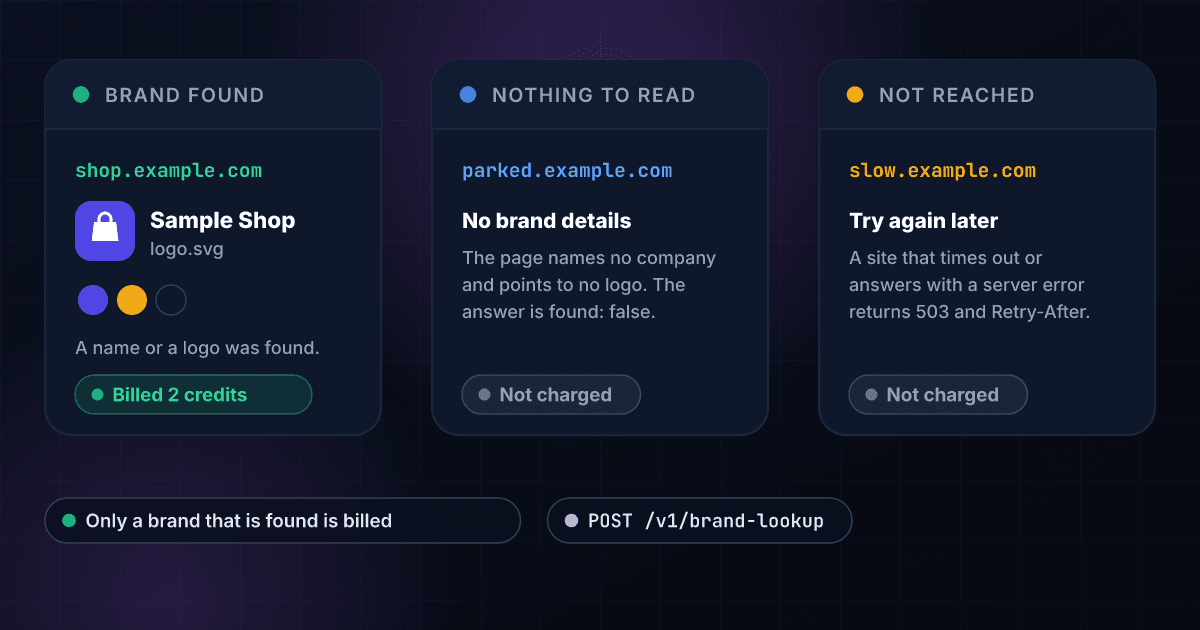
These are the questions people ask before they look up their first brand.
What does the Brand Lookup API return?
Send a domain and it returns the brand kit the company's own site publishes: the company name and any alternate names, every logo file listed best first with its purpose (logo or icon), file type and size, the sharing image, the brand colors as hex values with the most prominent first, the fonts, the social profiles it links to (LinkedIn, X, Facebook, Instagram, YouTube, TikTok and GitHub) and a short description. The flat classification block carries the name, the best logo, the main color, the main font and one link per network.
Where does the brand data come from?
From the company's own website, read when you ask. 1Lookup opens the home page, the web app manifest and the first two stylesheets, the same files a visitor's browser loads, and works out the kit from them. At most four requests are made, with 8 seconds for the whole lookup, and a private or internal address is never connected to. No third-party brand database sits behind it, so the answer is what the site itself publishes.
How much does a brand lookup cost?
2 credits per brand found, about $0.01 on the Starter plan. You are charged when a company name or a logo is found. A domain that does not exist, a site with no home page or one that refuses the request, a page that names no company and points to no logo, and a site that cannot be reached cost nothing.
When is a lookup free?
Six cases return found: false with a reason, at 200 OK and no charge: the name is not in DNS (no_such_host), it points to a private or internal address (blocked), the site has no home page (no_page), the site answered 401, 403 or 451 (access_refused), the address answered with something other than a web page (not_a_web_page), or the page names no company and points to no logo (no_brand_details). A site that times out, resets the connection or answers with a server error returns 503 with a Retry-After header, is not charged and is never reported as a company without a brand.
Which inputs does it accept?
A domain, a web address or an email address, cut down to the site's host name with a leading www. dropped. Any other subdomain is read as written, because shop.example.com can carry its own brand. An IP address, a single word or a bare public suffix is refused with a 400 error before anything is read and at no cost.
How are the logos listed?
Best first. Each logo carries its address, where it was found, its purpose (logo for a wordmark or symbol, icon for a favicon-style square), its file type and its width and height when the site states them. The sharing image used for link previews is returned separately and is not counted as a logo. The best logo's address and type are also in the flat block, so one field is enough when you only need a logo.
How are the colors picked?
The colors come back as hex values with the most prominent first, each with where it was found, such as the site's declared theme color or its stylesheets, and how many times it is used when it comes from a stylesheet. The flat block carries the main color and a comma-separated list, so a script can take the first value and a designer can read them all.
How fresh is the answer, and can I ask again?
The site is read when you ask, and every result shows the day it was read in checked_at. A result is remembered for 7 days. Send bypass_cache: true to read the site again, for example right after a company rebrands.
What does it not return?
Only what the site publishes can be returned. A site that blocks automated requests, or whose pages are drawn entirely by scripts, can come back with fewer parts or with access_refused. A part the site does not publish is null or empty, never guessed. It does not return headcount, revenue, funding or an industry, which is what Company Profile Lookup is for.
Can I look up a list of domains at once?
Yes. Upload a CSV with a domain column and you get a row per domain with the company name, the best logo address and type, the main color, all colors, the fonts, the description and one column per social network. A domain with nothing to read is a free row with the reason in its own column. The price stays at the same credits per brand found.
Does it watch a company and tell me when its brand changes?
No. It reads the site when you ask. To keep a record current, call it again for each domain on your own schedule with bypass_cache: true, and compare the name, the logo address and the colors with the last result.
To read the brand kit of a single site before you write any code, try the free brand kit finder.
The brand kit shows how a company looks, and these products tell you the rest.
Here is how reading a brand kit with 1Lookup compares with the other ways to get one.
Each page sets a rival's plans and prices beside ours and says where the rival does the job better. Every figure carries its source and the date it was checked.