Run a free IP fraud score check to see how risky an address is.
Enter an IP address to see its fraud risk level and the signals behind it. It is free, with no signup.
Free & rate-limited. No signup required to try.
An IP fraud score rates how risky an address looks, from 0 to 100, and groups it into a low, medium, high or critical risk level. 1Lookup's free checker shows the risk level and whether any IPv4 or IPv6 address is a VPN, proxy, Tor or datacenter address. A free account adds the exact score and the factors behind it.
- No signup to try
- IPv4 and IPv6
- VPN, proxy and Tor flags
- Exact 0 to 100 score with a free account
You can judge an IP address in four steps.
Enter the address.
Paste the IPv4 or IPv6 address from the signup, login or order you are checking.
Read the risk level.
Low is a score of 0 to 25, medium 26 to 50, high 51 to 75 and critical 76 to 100.
See which signal raised it.
A VPN or proxy flag, a datacenter host, a mobile network or a missing reverse DNS name each add to the score.
Choose how much friction to add.
The API suggests approving low risk, verifying medium, reviewing high and blocking critical.
Need this at scale? IP Lookup API
A fraud score, risk level and VPN, proxy and Tor flags for every signup, login and order.
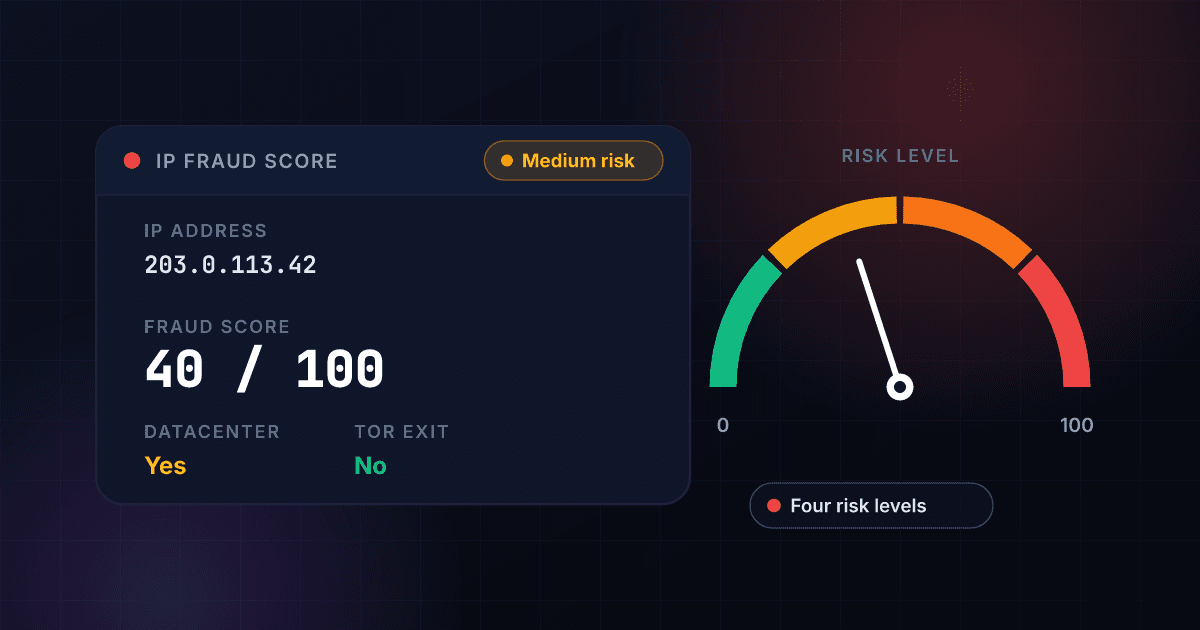
An IP fraud score rates how risky an address is, and the signals show why.
Every visit to your site, app or checkout arrives from an IP address, and addresses are not equal. A home broadband line is rarely a problem. An address that belongs to a hosting company, a VPN service, a proxy or the Tor network is far more likely to sit behind fake signups, payment testing and account takeover, because it hides who is behind the connection. An IP fraud score turns that difference into a rating you can act on.
1Lookup's check reads the address against its IP intelligence and returns a fraud score from 0 to 100, where higher is riskier, and a risk level of low, medium, high or critical. The score adds up signals: whether the address is flagged as a proxy or VPN, sits in a datacenter or on a mobile network, has no reverse DNS name, or belongs to an organization whose name says VPN, proxy, hosting or cloud. Tor exit status, read from the Tor Project's published exit list, is shown beside the score as its own flag. The free result shows the level and the flags, and the exact score comes with a free account.
Treat the level as one input next to device, behavior and identity data, because VPN endpoints change and many VPN users are ordinary people. Use this page when you have one address in front of you: a suspicious login, a signup that looks fake, an order from an unexpected country. When the check has to run on every signup, the IP lookup API returns the same fields as JSON.
The IP lookup API returns this fraud score on every request.
When the check has to run on every signup, login or order, the API returns the exact fraud score, the risk level and the flags as JSON for 1 credit a lookup. See the IP lookup API. To look at the anonymizer flags alone, use our free VPN and proxy detection. For the reputation view of the same address, use our free IP blacklist check. For the city, ISP and network behind an address, use our free IP address lookup. To check the phone number from the same signup, use our free VoIP checker.
An IP fraud check returns these fields, and each one answers a different question.
This is an invented result for 203.0.113.42, an address set aside for examples, laid out the way a check comes back. The first six fields are free on this page, and a free account opens the rest.
- Risk levelMedium risk
- VPN / proxy likelihoodMedium
- Tor exit nodeNo
- Datacenter / hostingYes
- Connection typeDatacenter
- Anonymity levelMedium
Opens with a free trial
- Exact fraud score40 / 100
- Risk factors2 factors
- Exact VPN exit probability0.1
- Suggested actionVERIFY
Risk level
The summary of the address, from low to critical. It is the first thing to read and the one to build a rule on.
VPN / proxy likelihood
How likely the address is a VPN or proxy exit, shown as low, medium or high. A hosting address reads medium even when no VPN is flagged.
Tor exit node
Whether the address is a relay where Tor traffic leaves the network, read from the Tor Project's published exit list.
Datacenter / hosting
Whether a hosting company or cloud operator owns the address. Real customers rarely connect from one.
Connection type
The kind of network the address sits on: residential, mobile, datacenter, CDN, public DNS or proxy.
Anonymity level
How well the address hides the visitor: none, medium or high.
Exact fraud score
The number behind the level, from 0 to 100. Higher is riskier, and 26 to 50 is the medium band.
Risk factors
The signals that added to the score, here DATACENTER_IP and NO_REVERSE_DNS, so you can see why the level is what it is.
Exact VPN exit probability
The chance that the address is a VPN or proxy exit, from 0 to 1, before it is rounded to low, medium or high.
Suggested action
What the API suggests for this level: approve, verify, review or block.
The check takes three steps and never contacts the owner of the address.
You enter an IP address.
Paste any public IPv4 or IPv6 address. Private addresses such as 192.168.0.1 are not visible from the internet, so they have no risk to rate.
We read the address against network data.
1Lookup finds who owns the address, whether it is flagged as a proxy or VPN, hosted or on a mobile network, and checks it against the Tor exit list and the ranges cloud operators publish.
You read the risk level and the flags.
See the level, the VPN and proxy likelihood, and the Tor and datacenter flags right away. A free account opens the exact score and the factors behind it.
An IP fraud check finds who owns the address before it rates the risk.
This is the path one check takes. The rating comes from the network the address sits on and what is known about it, not from anything the visitor sends.
- You enter the addressAn IPv4 or IPv6 address from a signup, login or order.
- The network owner is foundA home ISP, a mobile network, a hosting company or a cloud operator.
- The signals are checkedProxy and VPN flags, hosting and mobile networks, reverse DNS, the Tor exit list and the cloud ranges.
- The score and level are returnedA score from 0 to 100, a level from low to critical, and the flags that explain it.
Each risk level covers a band of the 0 to 100 score and comes with a suggested action.
The risk level is the headline field of every check. These are the four values the API returns in risk_assessment.risk_level, the score each one covers and the action the API suggests in recommendations.primary_action.
- 0-25Low risk
- 26-50Medium risk
- 51-75High risk
- 76-100Critical risk
| Risk level | API value | Score | Suggested action | What that means |
|---|---|---|---|---|
| Low risk | LOW | 0-25 | APPROVE | Let the visitor through |
| Medium risk | MEDIUM | 26-50 | VERIFY | Add a CAPTCHA and watch the session |
| High risk | HIGH | 51-75 | REVIEW | Hold for a manual review, with strict rate limits |
| Critical risk | CRITICAL | 76-100 | BLOCK | Deny access |
Six risk factors can appear in a response, and they tell you why the score is what it is.
The free result shows the level and the flags. With a free account, risk_assessment.risk_factors lists which of these applied to your address.
| Risk factor | Listed when |
|---|---|
| PROXY_DETECTED | The address is flagged as a proxy or VPN exit |
| DATACENTER_IP | The address belongs to a hosting company or cloud operator |
| MOBILE_CONNECTION | The address sits on a mobile network |
| NO_REVERSE_DNS | The address has no reverse DNS name |
| VPN_SERVICE | The organization name says VPN |
| HOSTING_PROVIDER | The organization name says hosting |
A fraud check reads these flags, and each one is a field in the API response.
These are the flags shown beside the score, with the field that carries each one. The free result shows the main flags, and the exact numbers come with a free account.
| Flag | API field | What it shows |
|---|---|---|
| VPN or proxy | vpn_exit_probability | How likely the address is a VPN or proxy exit, from 0 to 1 |
| Tor exit | tor_exit_node | Whether the address is a relay where Tor traffic leaves the network |
| Datacenter or hosting | datacenter_location | Whether a hosting company or cloud operator owns the address |
| Cloud operator | cloud_provider | The cloud and region, when the address is in a range the operator publishes |
| Anonymity level | anonymity_level | How well the address hides the visitor: NONE, MEDIUM or HIGH |
| Residential probability | residential_probability | How likely the address is an ordinary home connection, from 0 to 1 |
| Reserved address | is_bogon | Whether the address is reserved or unroutable and so cannot be a real visitor |
Source: Tor Project bulk exit list.
The connection type says what kind of network the address sits on.
The API returns one of seven values in classification.connection_type. It is often the quickest way to see why a level is what it is: a mobile address and a datacenter address call for different rules.
| API value | What it is | How to read it |
|---|---|---|
| RESIDENTIAL_ISP | A home or small-office broadband line | The ordinary case for a real customer |
| MOBILE_NETWORK | Mobile data from a phone carrier | Many people share one address, so it says little about one user |
| DATACENTER | A server in a hosting company or cloud | Rare for a real customer, common for bots and VPN exits |
| CDN_NETWORK | A content delivery network | Traffic relayed through a service and not the visitor's own line |
| PUBLIC_DNS | A public name server | Not a visitor at all |
| PROXY_SERVER | A proxy that relays traffic | The visitor is hiding behind another address |
| UNKNOWN | The network is none of the other six | Decide on the other signals |
Six IPv4 blocks are kept for private and special use, so none of them is a visitor's public address.
If a form shows you an address from one of these blocks, it is not the address websites see. The block sizes below follow from the prefix length: a /8 holds 16,777,216 addresses and each step down halves it. The list is from the IANA registry of special-purpose IPv4 addresses.
| Block | Reserved for | Addresses in the block | Defined in |
|---|---|---|---|
| 10.0.0.0/8 | Private networks | 16,777,216 | RFC 1918 |
| 172.16.0.0/12 | Private networks | 1,048,576 | RFC 1918 |
| 192.168.0.0/16 | Private networks | 65,536 | RFC 1918 |
| 100.64.0.0/10 | Shared address space for carrier-grade NAT | 4,194,304 | RFC 6598 |
| 127.0.0.0/8 | Loopback, the device itself | 16,777,216 | RFC 1122 |
| 169.254.0.0/16 | Link-local addresses | 65,536 | RFC 3927 |
An IP fraud check costs 1 credit, about $4.95 per 1,000 lookups on Starter and $2.00 on Enterprise.
These are the monthly plans on the pricing page. Every plan starts with a 7-day free trial, and the same credits pay for every other 1Lookup check.
| Plan | About per 1,000 lookups | Monthly price | IP checks included |
|---|---|---|---|
| Starter | $4.95 | $99 | 20,000 |
| Growth | $3.52 | $299 | 85,000 |
| Professional | $3.20 | $799 | 250,000 |
| Enterprise | $2.00 | $1,999 | 1,000,000 |
The IP lookup API returns the same fraud score as JSON from one request.
Send the address to the IP endpoint with your API key. Each request costs 1 credit, and every account can send up to 1,000 requests a minute. The score is in risk_assessment.fraud_score, the level in risk_assessment.risk_level, the factors in risk_assessment.risk_factors and the suggested action in recommendations.primary_action.
curl -X POST https://app.1lookup.io/api/v1/ip \
  -H "Authorization: Bearer YOUR_API_KEY" \
  -H "Content-Type: application/json" \
  -d '{"ip": "203.0.113.42"}'
import requests
response = requests.post(
"https://app.1lookup.io/api/v1/ip",
headers={"Authorization": "Bearer YOUR_API_KEY"},
json={"ip": "203.0.113.42"},
)
data = response.json()["data"]
print(data["risk_assessment"]["fraud_score"])const response = await fetch('https://app.1lookup.io/api/v1/ip', {
method: 'POST',
headers: {
'Authorization': 'Bearer YOUR_API_KEY',
'Content-Type': 'application/json'
},
body: JSON.stringify({ ip: '203.0.113.42' })
})
const { data } = await response.json()
console.log(data.risk_assessment.fraud_score)Response
{
  "success": true,
  "data": {
    "request": { "type": "ip", "input": "203.0.113.42" },
    "risk_assessment": {
      "fraud_score": 40,
      "risk_level": "MEDIUM",
      "risk_factors": ["DATACENTER_IP", "NO_REVERSE_DNS"]
    },
    "classification": {
      "connection_type": "DATACENTER",
      "anonymity_level": "MEDIUM",
      "residential_probability": 0
    },
    "insights": {
      "network": { "isp": "Example Networks", "asn": "AS64496" },
      "geographic": {
        "datacenter_location": true,
        "vpn_exit_probability": 0.1,
        "tor_exit_node": false
      },
      "network_intelligence": {
        "is_datacenter": true,
        "is_tor_exit": false,
        "coverage": "complete"
      }
    },
    "recommendations": { "primary_action": "VERIFY" },
    "metadata": { "credits_used": 1, "credits_remaining": 9998 }
  }
}
To run the same check on every signup, see our IP lookup API.
It rates the address from 0 to 100 and sorts it into four levels.
One level sums up every signal, so you can set a simple rule such as a CAPTCHA on medium and a review on high.
It flags VPN, proxy, Tor and datacenter addresses.
These are the addresses that hide where a visitor really is, and the flags say which kind of hiding raised the level.
It names the cloud behind a datacenter address.
When the address sits in a range that a cloud operator publishes, the result names the cloud and the region, so you can tell a cloud server from a home line.
A free account adds the exact score and the risk factors.
The 0 to 100 fraud score, the exact VPN exit probability and the list of risk factors come with the same lookup once you sign up.
Who uses this tool
Fraud teams use it to triage a suspicious order.
Check the address behind an order that looks off. A datacenter or proxy address on a consumer purchase is a reason to ask for more proof before you ship.
Product teams use it to screen signup abuse and bonus hunting.
Rate the address at registration and add a step for medium and high risk, so fake accounts cost more to create and real users are not slowed down.
Security teams use it to check the address behind a login.
A login from a Tor exit or a hosting address after years of normal use is a stronger signal than either fact alone.
Support teams use it to explain why a customer was challenged.
When a real customer is asked for a second factor, the flags show whether a VPN or a shared network caused it.
Frequently asked questions
What is an IP fraud score?
An IP fraud score rates how risky an address looks, from 0 to 100, where higher is riskier. 1Lookup adds up signals such as a proxy or VPN flag, datacenter hosting, a mobile network, a missing reverse DNS name and an organization name that says VPN, proxy, hosting or cloud, and groups the total into a risk level.
What do the IP risk levels mean?
Low is a score of 0 to 25, medium is 26 to 50, high is 51 to 75 and critical is 76 to 100. The API suggests approving a low-risk address, verifying a medium one, reviewing a high one and blocking a critical one.
What is a good IP fraud score?
Lower is better, and 25 or below is the low band, where the API suggests letting the visitor through. No single cutoff suits every business: a bank blocks sooner than a newsletter, so choose the level at which you add a step.
Which signals raise an IP fraud score?
A proxy or VPN flag weighs the most. Datacenter hosting, a missing reverse DNS name, a mobile network and an organization name that says VPN, proxy, hosting or cloud add smaller amounts. A free account shows the risk factors that applied to your address.
Does a VPN mean an IP address is fraudulent?
No. Many people use a VPN for privacy and nothing else. A VPN raises the risk level because fraud is far more common behind one, not because every VPN user is a fraudster, so use the flag to add a step and not to block by default.
Is a Tor exit node the same as a VPN?
No. Tor sends traffic through a chain of relays run by volunteers, and the exit node is the last relay, the address a website sees. 1Lookup reads the Tor Project's published exit list to flag it, and shows it as its own flag beside the score.
Can an IP fraud score be wrong?
Yes. VPN endpoints change, an address can change hands, and a flag reflects the network data available when the check runs. Expect an occasional false positive or miss, and use the score together with device, behavior and identity signals when the stakes are high.
What can the free IP fraud check not show?
The free tool stops at the risk level, the VPN and proxy likelihood, the Tor, datacenter and cloud flags, the connection type and the anonymity level. The exact 0 to 100 score, the risk factors, the exact VPN exit probability, the residential probability and the suggested action come with a free account, and bulk checks go through the API.
What is the difference between an IP fraud score and an IP blacklist check?
The IP blacklist check gives the reputation view of an address. The fraud score rates how risky the address looks from proxy, VPN, hosting, mobile and DNS signals, and gives you one level to act on at a signup, login or order.
What is the difference between an IP fraud score and VPN detection?
VPN detection shows the anonymizer flags alone: the VPN and proxy likelihood, Tor, datacenter and the anonymity level. A fraud score takes those and also the mobile network, reverse DNS and organization name signals into one number from 0 to 100.
Why does my own address show 192.168 or 10.0 and no score?
Addresses that start with 10, 172.16 to 172.31 or 192.168 are private addresses used inside homes and offices, and they cannot be reached from the internet. Your public address, the one websites see, is different. Search for what is my IP, then paste that address here.
Does the check work on IPv6 addresses?
Yes. The tool accepts IPv4 and IPv6 addresses, and the API returns the same fields for both.
Can an IP address show a person's name or home address?
No. An IP address maps to a network and an approximate area, usually the city, not to a person or a street. Any tool that claims to return a name or a house number from an IP address is guessing.
Is this IP fraud score checker really free?
Yes. The tool is free to use online and rate-limited for fair access. Every free check returns the risk level and the main flags. To open the exact score and the risk factors, or to check addresses at scale, sign up for a 7-day free trial, then use the API as you scale.
How much does an IP fraud check cost per lookup?
An IP fraud check costs 1 credit in the API. That is about $4.95 per 1,000 on the Starter plan, $3.52 on Growth, $3.20 on Professional and $2.00 on Enterprise. The free tool on this page checks one address at a time with no signup, and every plan starts with a 7-day free trial.
Is there an IP fraud score API?
Yes. The 1Lookup IP lookup API returns the fraud score, the risk level, the risk factors, the location and the VPN, proxy, Tor and datacenter flags in one call, for 1 credit a lookup. Use it at signup, login or checkout, starting with a 7-day free trial.
How often should I check the same IP address?
Check it again whenever a new event arrives from it. Addresses are reassigned between customers and VPN endpoints change, so yesterday's low risk is not a promise about today's visitor.