Free Fake Signup Checker
A fake signup checker looks at the email address a new account used. This free tool reads the real inbox behind Gmail dots and +tags, flags team names and throwaway inbox services, checks that the domain can receive mail and shows how many days ago the domain was registered. Only the domain is looked up.
- No signup needed
- Only the domain is looked up
- Reads the real inbox behind dots and tags
Free & rate-limited. No signup required to try.
Example resultSample result for mia+welcome@sample-shop-example.com. Run any lookup above and it is replaced with yours.
sample-shop-example.com was registered 12 days ago, which is very new for a signup address.
1 of 4 checks raised a flag.
Only the domain was looked up, in public DNS and the domain registry. The name before the @ was not sent anywhere. A repeat check on the same domain within ten minutes reuses the domain's answers.
The paid Signup Check adds the IP address, the phone number and the last hour of signups.
The free check reads the address and its domain only, not the IP address, the phone number, repeat signups or whether the mailbox exists. Signup Check adds the IP address, the phone number and repeat signups in one call for 5 credits, and returns allow, review or block with the reasons.
Source: RFC 5321: Simple Mail Transfer Protocol, published by IETF.
Need this at scale? Signup Check
One call per signup returns allow, review or block, a 0 to 100 risk score and the reasons, from the email, the IP address and the phone number, at 5 credits a check.
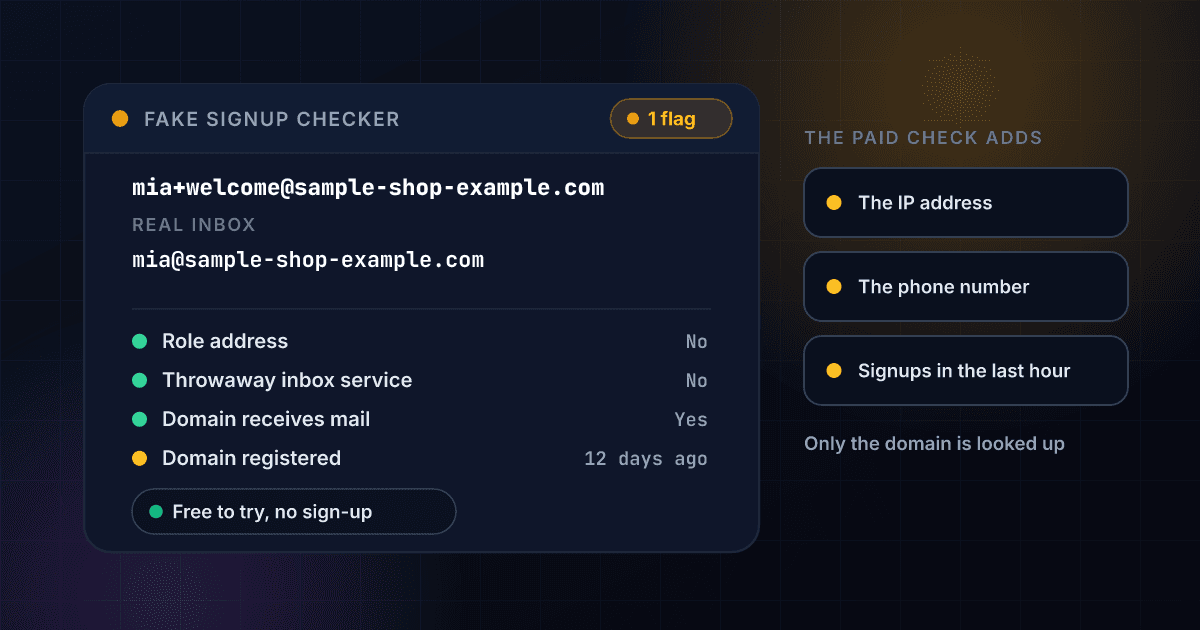
A signup's email address can show whether it is one real inbox or one of many spellings of the same one.
Free mailbox providers let one inbox be written in many ways. Gmail ignores the dots in a name and everything after a plus sign, so j.o.r.d.a.n@gmail.com, jordan+trial2@gmail.com and jordan@gmail.com all reach one inbox. A person who wants ten free trials can sign up ten times with one real inbox, and each signup looks like a new customer. This tool cuts the address back to the inbox behind it and shows how many spellings reach that inbox.
Four more checks can raise a flag. A team name such as info or support is a role address, a throwaway inbox service is one of 406 domains built to receive mail once and be dropped, a domain with no mail server cannot receive anything, and a domain registered in the last 30 or 90 days is very new. The real inbox is shown but never counts as a flag by itself, because plenty of real people use dots and tags.
Everything about the name before the @ is worked out on our server, and nothing derived from it is sent to a resolver or a registry. Only the domain is asked of public DNS and the domain registry. A check that someone ran on the same domain within ten minutes is shown again, and a check where DNS or the registry did not answer is never saved or reported as a finding. To keep the tool free for everyone, each visitor gets a small number of checks a day.
A signup check is one of several free checks on an email address and its domain.
To test whether a single mailbox exists, use the free email verifier. To read a domain's mail servers and their priorities, use the free MX record lookup. To see when a domain was registered, and with which registrar, use the free WHOIS lookup. To read the age of a domain on its own, use the free domain age checker. To see every record a domain publishes, use the free DNS lookup. To check an email address, a phone number and an IP address for fraud, try the free fraud checker.
A signup check returns these fields, and each one answers a different question.
This is an invented result for a made-up address on a made-up domain, laid out the way a real one comes back. Every field above the last four is free on this page. Signup Check adds the last four for 5 credits a signup.
- Real inboxmia@sample-shop-example.com
- Tag+welcome, dropped here because most business mail systems accept it
- Spellings that reach itUnlimited if the domain accepts +tags, which most business mail systems do
- Role addressNo
- Throwaway inbox serviceNot on our list of 406 throwaway domains
- Domain receives mailYes: 3 mail servers listed
- Mail providerGoogle Workspace
- Domain age12 days, registered 19 Oct 2026
- Registered in the last 30 or 90 daysYes, in the last 30 days
Opens with a free trial
- IP address riskProxy, VPN, Tor or hosting
- Phone number checkValid, line type, country
- Repeat signups in the last hourCounted for your API key
- Allow, review or block verdictA verdict and a 0 to 100 score
Real inbox
The inbox the address reaches once dots and tags are cut away. It is for counting, not an address to send to.
Tag
The part after a plus sign, which many providers ignore. People use tags to sort mail, and so do people opening many accounts.
Spellings that reach it
How many ways the name can be written and still reach the same inbox.
Role address
Whether the name belongs to a team or function, such as info or support, rather than one person.
Throwaway inbox service
Whether the domain is on the list of services that hand out inboxes to be used once.
Domain receives mail
Whether the domain publishes a mail server, accepts no mail, or does not exist.
Mail provider
Who handles the domain's mail, read from the mail server names.
Domain age
How long ago the registry says the domain was registered, counted to the moment of the check.
Registered in the last 30 or 90 days
A plain yes or no for the two windows, because a very new domain is the signal that matters.
IP address risk
Whether the signup came through a network that real customers rarely use.
Phone number check
Whether a phone number given at signup is a real line, and whether it fits the IP address.
Repeat signups in the last hour
How many other signups shared this IP address, inbox or email domain in the last 60 minutes.
Allow, review or block verdict
The one answer your signup code acts on, with every reason in plain words.
Checking a signup email takes three steps and no signup.
Paste one email address
Type the address a new account signed up with, like name@example.com. One address at a time, and nothing after the address is needed.
The address is read, and the domain is asked about
The real inbox, the team name and the throwaway list are worked out on our server. The domain's mail servers come from public DNS and its registration date from the domain registry, both asked together.
Read the flags and the real inbox
You see how many of the checks raised a flag, the real inbox and every field. Whole files of signups, with the IP address and phone number too, are in the free trial.
One check reads the address on our server and asks public sources only about its domain.
This is the path a single check takes. The name before the @ is dropped at the second step, so it never reaches a resolver or a registry.
- You paste an email addressOne address, written the usual way.
- The address is read on our serverThe real inbox, the team name and the throwaway list are worked out with no lookup at all.The name before the @ stops here and goes no further.
- Public DNS and the registry are asked about the domainIts mail servers and its registration date, in parallel, for the domain alone.
- You see the flags and the real inboxA source that did not answer is named, never shown as a clean result.
Providers treat dots and +tags differently, and the checker follows each one's rule.
The sub-address convention, a plus sign and a tag after the name, is described in RFC 5233. Where a provider documents it, the tag is dropped. Where it does not, the tag is dropped only on the assumption that most business mail systems accept it, and the result says so.
| Provider | Dots in the name | The +tag | Real inbox shown as |
|---|---|---|---|
| Gmail and Googlemail | Ignored | Ignored | The name with no dots and no tag, at gmail.com |
| Outlook, Hotmail, Live and MSN | Count | Ignored | The name with the tag cut off |
| iCloud, me.com and mac.com | Count | Ignored | The name with the tag cut off |
| Proton Mail | Count | Ignored | The name with the tag cut off |
| Fastmail | Count | Ignored | The name with the tag cut off |
| Zoho Mail | Count | Ignored | The name with the tag cut off |
| Yahoo and AOL | Count | Not collapsed: their tags use another syntax that cannot be told from a name | The address as typed |
| Any other domain | Count | Dropped, assuming the domain accepts it | The name with the tag cut off |
Source: RFC 5233: Sieve Email Filtering, Subaddress Extension.
A Gmail name with more letters can be written in far more ways with dots alone.
A name of N letters has N minus 1 gaps between them, and each gap holds a dot or does not, so it can be written 2 to the power of N minus 1 ways. The checker shows this count for a Gmail name and stops counting at one million. Adding a +tag makes the number of spellings unlimited.
| Letters in the name | Spellings with dots alone |
|---|---|
| 4 | 8 |
| 6 | 32 |
| 8 | 128 |
| 10 | 512 |
| 12 | 2,048 |
| 21 or more | More than 1,000,000 |
These are the four flags the checker can raise, and what each one does not mean.
A flag is a reason to look closer, not a verdict. A domain that accepts no mail is defined in RFC 7505, which gives a domain a way to say so with a single MX record that names no server.
| Flag | What the checker looks at | What it does not mean |
|---|---|---|
| Role address | The name before the @ is a team or function name such as info, admin, support or billing | Not fake. Companies use these every day, and a free account opened on one is only a small signal. |
| Throwaway inbox service | The domain, or a parent of it, is one of 406 throwaway inbox domains on our list | Not on the list does not mean clear. New services appear all the time, so a miss is a miss and not a clearance. |
| Domain cannot receive mail | The domain does not exist, publishes a null MX record, or has no mail server and no address record to fall back to | A domain with no mail server but an address record shows as maybe, because mail can fall back to that address. A resolver that did not answer is not a flag. |
| Domain registered recently | The registry's creation date: within 30 days is the stronger flag, 31 to 90 days the lighter one | Not always fake. A new domain can belong to a real new business. The age is not checked for long-running mailbox providers such as gmail.com. |
Source: RFC 7505: A Null MX No Service Resource Record for Domains That Accept No Mail.
A domain check ends in one of three ways, and each one means something different.
Telling these apart is the point of a checker, so the page never turns a failed query into a claim about the domain.
| What happened | What the tool shows | What it means |
|---|---|---|
| The domain answered | The mail servers and the registration date | The flags are worked out from them, and the result can be kept for ten minutes for the next visitor. |
| The domain is not there | The domain does not exist, or nobody holds it | DNS or the registry answered that there is no such domain, so no mail can reach this address. |
| A source did not answer in time | That part named as not answered | A timeout is not an answer. The half that did answer is shown, nothing is saved, and the page asks you to run the check again. |
Bulk signup checks read a whole file of signups with one CSV upload.
The free tool checks one address at a time and looks at the address and its domain only. With a 1Lookup account you upload a CSV file in the dashboard with one signup per row and download the same file back with a verdict, a risk score and the top reason on every row. These rows are invented.
signup
alex.sample@sample-shop-example.com | 203.0.113.24
pat+promo3@sample-store-example.net | 198.51.100.9
mia@sample-burner-example.org| signup | Verdict | Risk Score | Top Reason | Inbox Root | Is Alias | Disposable | Domain Age (days) | Credits Used |
|---|---|---|---|---|---|---|---|---|
| alex.sample@sample-shop-example.com | 203.0.113.24 | allow | 0 | alex.sample@sample-shop-example.com | No | No | 4210 | 5 | |
| pat+promo3@sample-store-example.net | 198.51.100.9 | review | 39 | The email domain was registered 11 days ago. | pat@sample-store-example.net | Yes | No | 11 | 5 |
| mia@sample-burner-example.org | block | 100 | The email is on a disposable inbox service. | mia@sample-burner-example.org | No | Yes | 2 | 5 |
- 5 credits for each signup checked, about $0.025 on Starter, and nothing for a row that cannot be read.
- Write the email in the signup column and, if you have them, the IP address and then the phone number after it, each separated by a vertical bar.
- The counts of other signups in the last hour are blank in a file, because a file is a record of past signups and not a live signup flow.
The Signup Check API returns a verdict, a risk score and the reasons as JSON from one request.
Send the email with your API key, and add the IP address and the phone number if you have them. A check costs 5 credits. The verdict, the score and the top reason are in classification, and the full list of reasons and the one-hour counts are in insights.signup_check_result.
curl -X POST https://app.1lookup.io/api/v1/signup-check \
  -H "Authorization: Bearer YOUR_API_KEY" \
  -H "Content-Type: application/json" \
  -d '{"email": "janedoe+promo6@example.com", "ip": "203.0.113.24"}'
import requests
response = requests.post(
"https://app.1lookup.io/api/v1/signup-check",
headers={"Authorization": "Bearer YOUR_API_KEY"},
json={"email": "janedoe+promo6@example.com", "ip": "203.0.113.24"},
)
data = response.json()["data"]
print(data["classification"]["verdict"])const response = await fetch('https://app.1lookup.io/api/v1/signup-check', {
method: 'POST',
headers: {
'Authorization': 'Bearer YOUR_API_KEY',
'Content-Type': 'application/json'
},
body: JSON.stringify({ email: 'janedoe+promo6@example.com', ip: '203.0.113.24' })
})
const { data } = await response.json()
console.log(data.classification.verdict)Response
{
  "success": true,
  "data": {
    "classification": {
      "verdict": "block",
      "risk_score": 92,
      "reason_count": 3,
      "top_reason": "6 other signups in the last hour used spellings of this same inbox.",
      "email_root": "janedoe@example.com",
      "email_is_alias": true,
      "signups_same_ip_1h": 14,
      "signups_same_inbox_1h": 6
    },
    "insights": {
      "signup_check_result": {
        "reasons": [
          { "text": "6 other signups in the last hour used spellings of this same inbox." },
          { "text": "The IP address belongs to a hosting or cloud provider, not a home or phone network." },
          { "text": "The email domain was registered 3 days ago." }
        ],
        "burst": {
          "window_seconds": 3600,
          "other_signups_same_ip": 14,
          "other_signups_same_inbox": 6,
          "other_signups_same_domain": 3
        }
      }
    },
    "metadata": { "credits_used": 5 }
  }
}
For one verdict on every signup, from the email, the IP address, the phone number and the last hour of signups, see our Signup Check API.
The real inbox is shown, with how many spellings reach it.
Gmail dots and +tags are cut away, tags on other providers are cut where they are documented or likely, and a count such as 128 spellings with dots alone shows how many signups one inbox could fill.
A throwaway inbox service is named from a list of domains.
The list holds 406 domains, subdomains of them included, and the result names the one that matched. A domain that is not on the list is reported as not on the list, never as clear.
A domain that cannot take mail is told apart from a domain that did not answer.
Missing, null-MX and no-mail-server domains are findings. A resolver or a registry that stayed silent is named as not answered, and the result is never saved.
The name before the @ is never sent to a resolver or a registry.
Only the domain is asked of public DNS and the domain registry. The saved answer is stored under the domain, so two addresses on one domain share it and neither address is in it.
Who uses this tool
Founders checking a burst of free-trial signups
Paste the addresses behind a spike and see which ones are one inbox under different spellings, which are throwaway services and which sit on a domain registered last week.
Support and trust teams reviewing a flagged account
Look at the address on an account that has used a promotion or a credit grant, and see in a few seconds whether the domain can even receive mail.
Marketers cleaning a list before a send
A domain with no mail server bounces every message sent to it. Spot those and the throwaway addresses before they reach your sender reputation.
Developers deciding which checks to build into a signup form
See what the address alone can tell you, and which questions need the IP address, the phone number or the last hour of signups instead.
Frequently asked questions
Is this fake signup checker free?
Yes, with no signup. Each visitor gets a small number of checks a day. A free trial adds the IP address, the phone number, the last hour of signups and the allow, review or block verdict, one signup at a time through the API or a whole file by CSV upload.
What does it check?
Five things about one email address: the real inbox behind dots and tags, whether the name is a team name, whether the domain is a throwaway inbox service, whether the domain can receive mail, and how long ago the domain was registered. The first three are worked out from the address itself. The last two come from public DNS and the domain registry.
Does Gmail ignore dots in an address?
Yes. Gmail treats j.o.r.d.a.n@gmail.com and jordan@gmail.com as the same inbox, and mail to jordan+anything@gmail.com also reaches jordan@gmail.com. The checker shows that inbox as the real inbox, with the tag and the number of spellings beside it.
Does a +tag or a dotted Gmail name mean the signup is fake?
No. Plenty of real people use tags to sort their mail and dots in their names. So an alias is shown as information and never raises a flag by itself. It matters when several signups turn out to be the same real inbox, which is what the paid Signup Check counts over the last hour.
What is a role address, and is it fake?
A role address is a team or function name such as info, admin, support or billing, rather than one person's name. It is not fake, and companies use them every day. It is a small signal because a free account opened on one is rarely one person's own.
How does it know an address is a throwaway inbox?
It compares the domain with a list of 406 throwaway inbox domains, subdomains included, and names the one that matched. An address that is not on the list is reported as not on the list. It is not reported as clear, because new throwaway services appear all the time.
Why does the age of a domain matter for a signup?
Registering a domain and setting up mail on it is cheap, so a signup from a domain registered last week is worth a second look. A new domain also belongs to many real new businesses, so it is a flag and not a verdict. The age is not checked for long-running mailbox providers such as gmail.com, where it says nothing about the person.
Does it check that the mailbox exists?
No. It checks whether the domain can receive mail, not whether this one mailbox is there. The free email verifier tests a single mailbox, and the paid Signup Check includes that test in its verdict.
Is the name before the @ sent anywhere?
Not to any resolver or registry. The name is read on our server to work out the real inbox, the team name and the throwaway match. Only the domain is asked of public DNS and the domain registry, and the saved answer is stored under the domain alone.
Why does a part of the result say it did not answer?
Public DNS or the domain registry did not reply in time. A silent source is never reported as a finding, so the half that did answer is shown, nothing is saved, and running the check again a moment later usually fills the rest.
Can I check a list of signups at once?
Yes, in a free trial. Upload a CSV with one signup per row, or call the Signup Check API. Each signup checked costs 5 credits, and a row that cannot be read costs nothing.